• Check out the results of the Techtree Contest #19!
  • Listen to a special audio message from Bill Roper to the Hive Workshop community (Bill is a former Vice President of Blizzard Entertainment, Producer, Designer, Musician, Voice Actor) 🔗Click here to hear his message!
  • Read Evilhog's interview with Gregory Alper, the original composer of the music for WarCraft: Orcs & Humans 🔗Click here to read the full interview.
  • Create a void inspired texture for Warcraft 3 and enter Hive's 34th Texturing Contest: Void! Click here to enter!
  • The Hive's 22nd Icon Contest: Creep Abilities is now concluded, time to vote for your favourite set of icons! Click here to vote!

Loading Screem

Status
Not open for further replies.

hdm

hdm

Level 9
Joined
Nov 19, 2011
Messages
384
HOw can i remove "press any key tocontinue" from the loading screen?there's always some noobs that don't press...or are away
 
You sure ?I saw alot of maps that have it removed ;X from custom loading screens
 
I have already tried to do it...Or it didn't work or I made the tiggers wrong.Can you give me the tigger ?
 
All wrong.
You have to replace an already existing loadingscreen via paths.
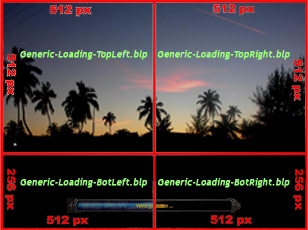
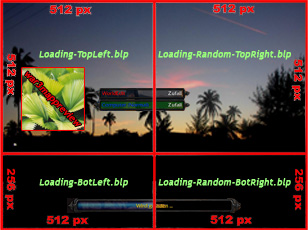
For that you have to splice them up in this order:
without loadingbars
bild1.jpg

with them
bild2.jpg


replace "war3imported\" with "UI\Glues\Loading\Multiplayer\"

And set the loadingscreen (in scenario options) to generic and you are done.

Remember that you always have to press a key in SinglePlayer and only in
MultiPlayer it gets removed.
 
Status
Not open for further replies.
Back
Top