• Check out the results of the Techtree Contest #19!
  • Listen to a special audio message from Bill Roper to the Hive Workshop community (Bill is a former Vice President of Blizzard Entertainment, Producer, Designer, Musician, Voice Actor) 🔗Click here to hear his message!
  • Read Evilhog's interview with Gregory Alper, the original composer of the music for WarCraft: Orcs & Humans 🔗Click here to read the full interview.
  • Create a void inspired texture for Warcraft 3 and enter Hive's 34th Texturing Contest: Void! Click here to enter!
  • The Hive's 22nd Icon Contest: Creep Abilities is now concluded, time to vote for your favourite set of icons! Click here to vote!

imported icon to a spell

Status
Not open for further replies.
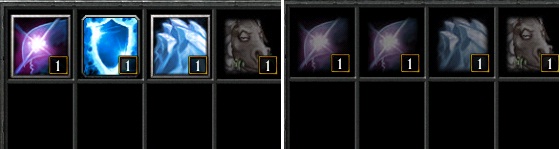
Hi guys, I have a little issue and I don't know where it comes from. I imported an image that i applied to a spell. I applied it to the spell's normal icon, the spell's research icon and to the spell's effect. The new image of the icon is displayed and work but the spell has 3 ranks and when i click and learn rank 1 and look the spell book again, the image is not displayed on the other 2 ranks - it is displayed as green space.
 
either upload the images as
ReplaceableTextures\CommandButtons\BTNYourImageName.blp

and

ReplaceableTextures\CommandButtonsDisabled\DISBTNYourImageName.blp

or just YourImageName.blp
 
This doesn't work too. The icon bug again in the spell book of the hero. this time it turns into frost nova (frost nova is next to the spell)

I believe for imported things to work properly you need to save your map, exit the world editor and restart it.

Not sure if this applies for icons as well.
 
Look the difference between the spells. Normal / F10 pressed or rank 1 learned
735372.jpg


I imported the icon as .blp file four times, each imported icon have a changed path to:

ReplaceableTextures\CommandButtonsDisabled\DISBTNFrostArmor.blp
ReplaceableTextures\CommandButtons\BTNFrostArmor.blp
ReplaceableTextures\CommandButtonsDisabled\DISPASBTNFrostArmor.blp
ReplaceableTextures\PassiveButtons\PASBTNFrostArmor.blp

Still,I can't firguire out how to fix this issue
 
Status
Not open for further replies.
Back
Top