• Check out the results of the Techtree Contest #19!
  • Listen to a special audio message from Bill Roper to the Hive Workshop community (Bill is a former Vice President of Blizzard Entertainment, Producer, Designer, Musician, Voice Actor) 🔗Click here to hear his message!
  • Read Evilhog's interview with Gregory Alper, the original composer of the music for WarCraft: Orcs & Humans 🔗Click here to read the full interview.
  • Create a void inspired texture for Warcraft 3 and enter Hive's 34th Texturing Contest: Void! Click here to enter!
  • The Hive's 22nd Icon Contest: Creep Abilities is now concluded, time to vote for your favourite set of icons! Click here to vote!

Epic RPG Tileset

Status
Not open for further replies.
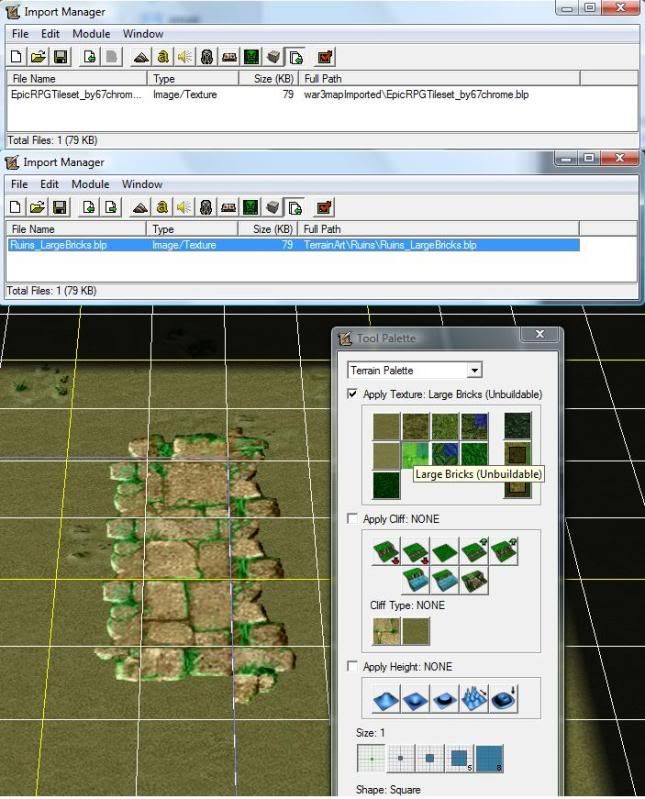
the replacement paths the author gave was TerrainArt\Icecrown\Ice_RuneBricks.blp or TerrainArt\Ruins\Ruins_LargeBricks.blp which makes sence. the tile set provided is EpicRPGTileset_by67chrome.blp. now when i change these and try to use those 2 tiles they are still Blizzard tiles. also the name of the imported file changes to whatever tile i am replacing.
tilesetchange.jpg
 
hmmm.... there's only two possible reasons I can think of.

First, have you tried restarting the WE? Tile set imports will only show next time the map is loaded.

Second, the path the creator supplied may be incorrect :)

If all else fails, try deleting, then re-importing the tile set again from scratch :D Sometimes works for me as I import stuff incorrectly all the time xD
 
Status
Not open for further replies.
Back
Top