
• Check out the results of the Techtree Contest #19!
  • Listen to a special audio message from Bill Roper to the Hive Workshop community (Bill is a former Vice President of Blizzard Entertainment, Producer, Designer, Musician, Voice Actor) 🔗Click here to hear his message!
  • Read Evilhog's interview with Gregory Alper, the original composer of the music for WarCraft: Orcs & Humans 🔗Click here to read the full interview.
  • Create a void inspired texture for Warcraft 3 and enter Hive's 34th Texturing Contest: Void! Click here to enter!
  • The Hive's 22nd Icon Contest: Creep Abilities is now concluded, time to vote for your favourite set of icons! Click here to vote!

All textures black in the Model Editor

Status
Not open for further replies.
Level 2
Joined
Nov 21, 2015
Messages
15
[Solved] All textures black in the Model Editor

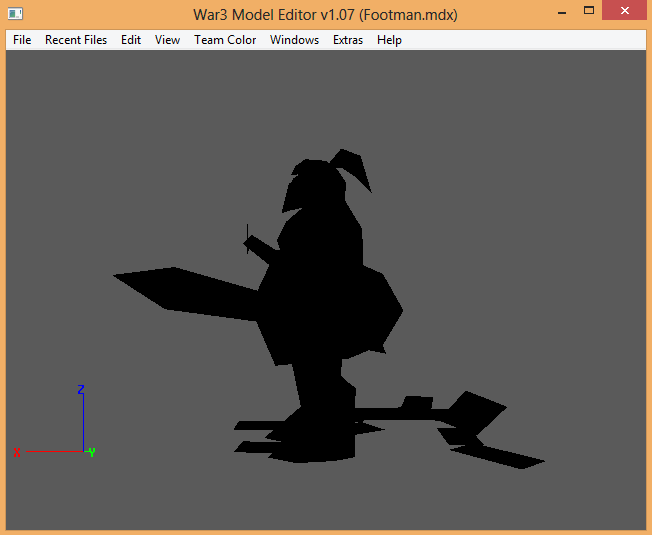
It was working fine before, but now for some reason every model is just completely black. I looked for a fix but found nothing. I checked this with both downloaded models and models extracted with Warcraft 3 Viewer and it's the same. I also redownloaded the editor but it did nothing.

50uMm34.png
 
Last edited:
It was working fine before, but now for some reason every model is just completely black. I looked for a fix but found nothing. I checked this with both downloaded models and models extracted with Warcraft 3 Viewer and it's the same. I also redownloaded the editor but it did nothing.

Did you rename anything inside the warcraft 3 folder or the folder itself? Cuz this also happen to me when I rename wc3 folder, and all the models of Warcraft3 ModelEditor shows in black then I fix it to the original! This might be the reason...
 
Status
Not open for further replies.
Back
Top