• Listen to a special audio message from Bill Roper to the Hive Workshop community (Bill is a former Vice President of Blizzard Entertainment, Producer, Designer, Musician, Voice Actor) 🔗Click here to hear his message!
  • Read Evilhog's interview with Gregory Alper, the original composer of the music for WarCraft: Orcs & Humans 🔗Click here to read the full interview.
  • The Hive's 22nd Icon Contest: Creep Abilities is now concluded, time to vote for your favourite set of icons! Click here to vote!
  • ✅ The POLL for Hive's Texturing Contest #34 is OPEN! Vote for the TOP 3 SKINS! 🔗Click here to cast your vote!
  • ✅ The POLL for Hive's Techtree Contest #20 is OPEN! Vote for the TOP 3 FACTIONS! 🔗Click here to cast your vote!

WoW-Converter: export all WoW models to Warcraft 3

This bundle is marked as pending. It has not been reviewed by a staff member yet.
Do you want to add some famous World of Warcraft characters into your map but cannot find their model anywhere?
Are you a model ripper but tired with manual steps when extracting models like assigning textures to geosets, renaming animations, etc..., and just want to get straight to the fun parts?

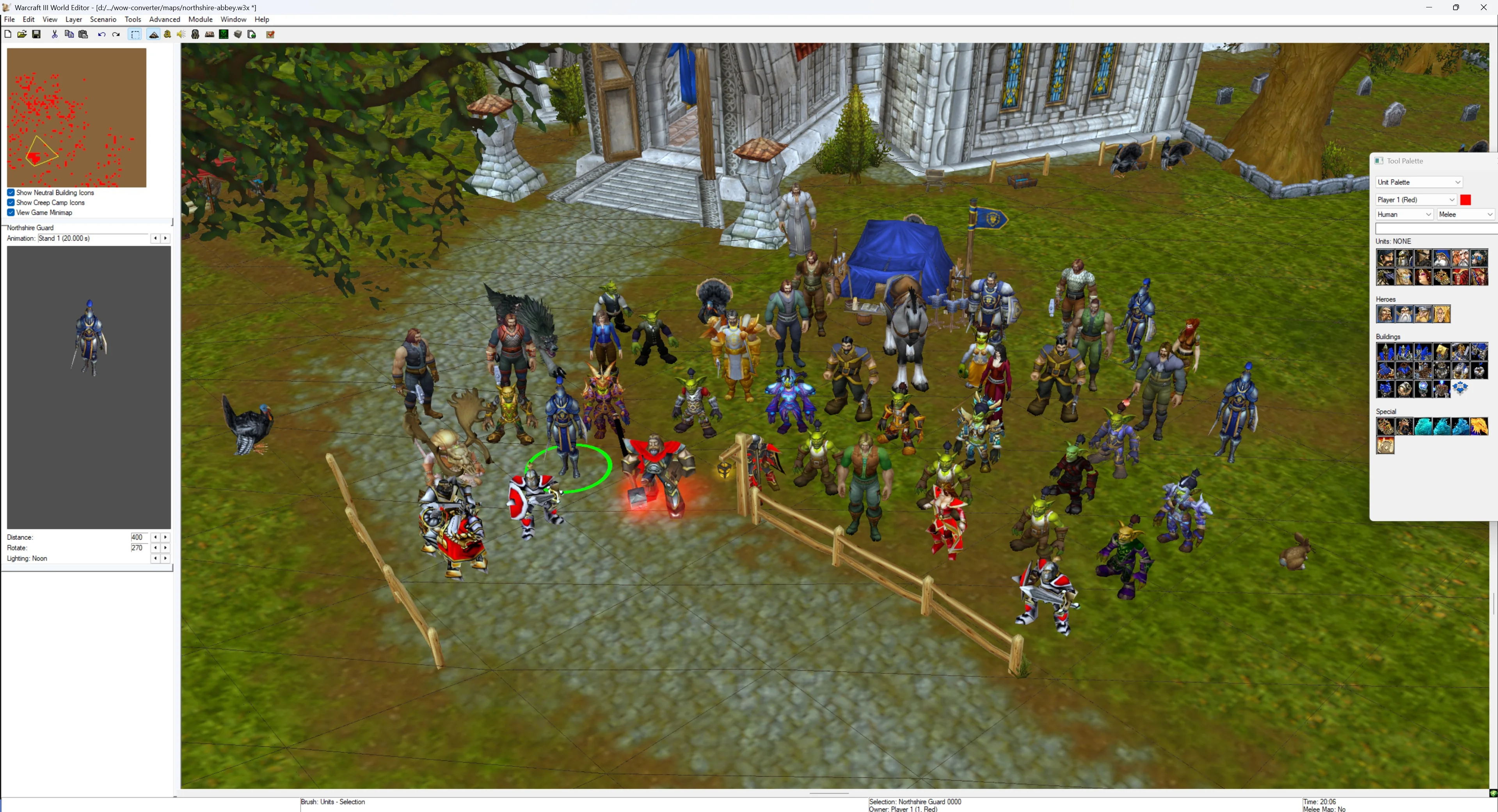
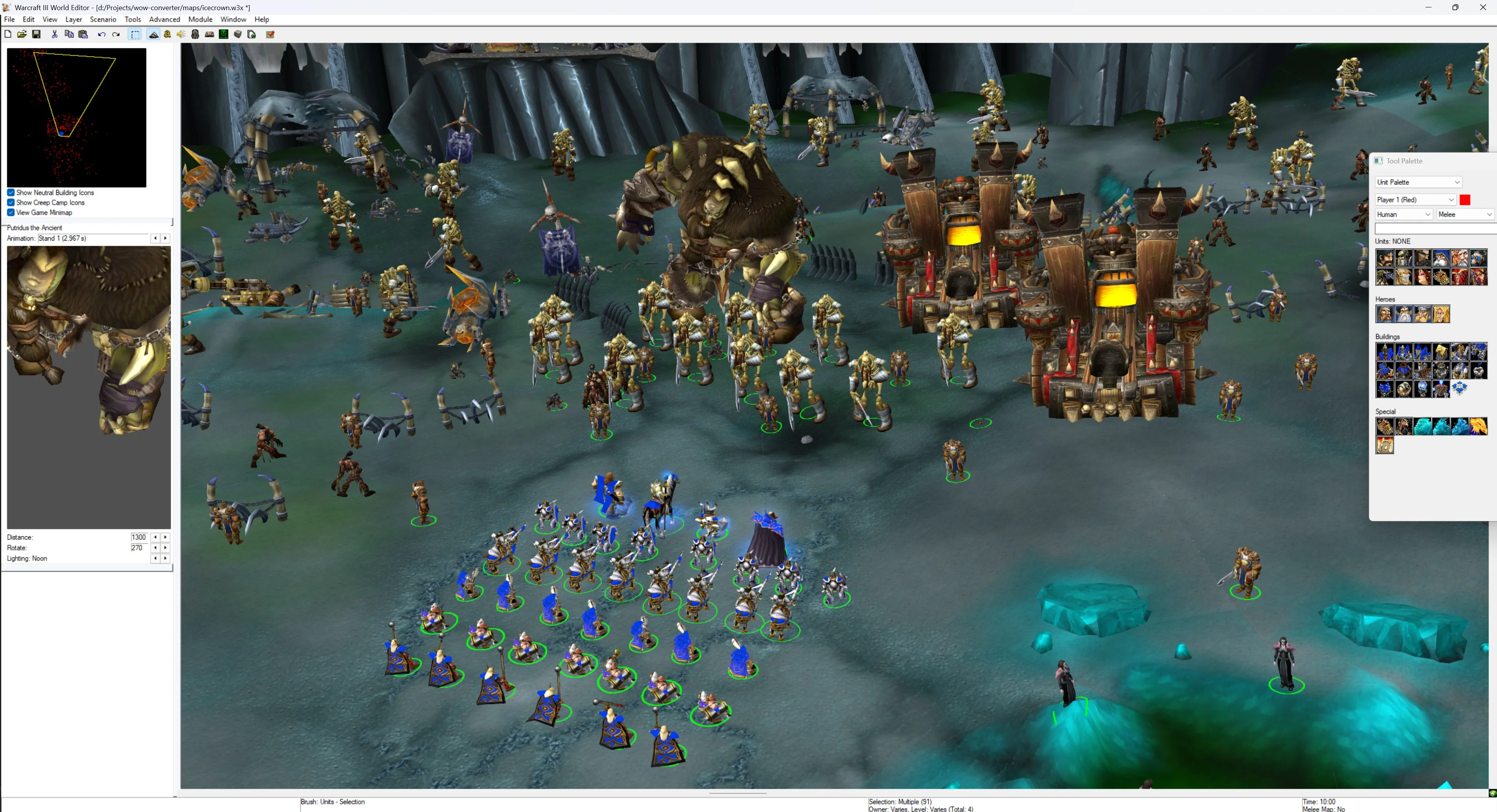
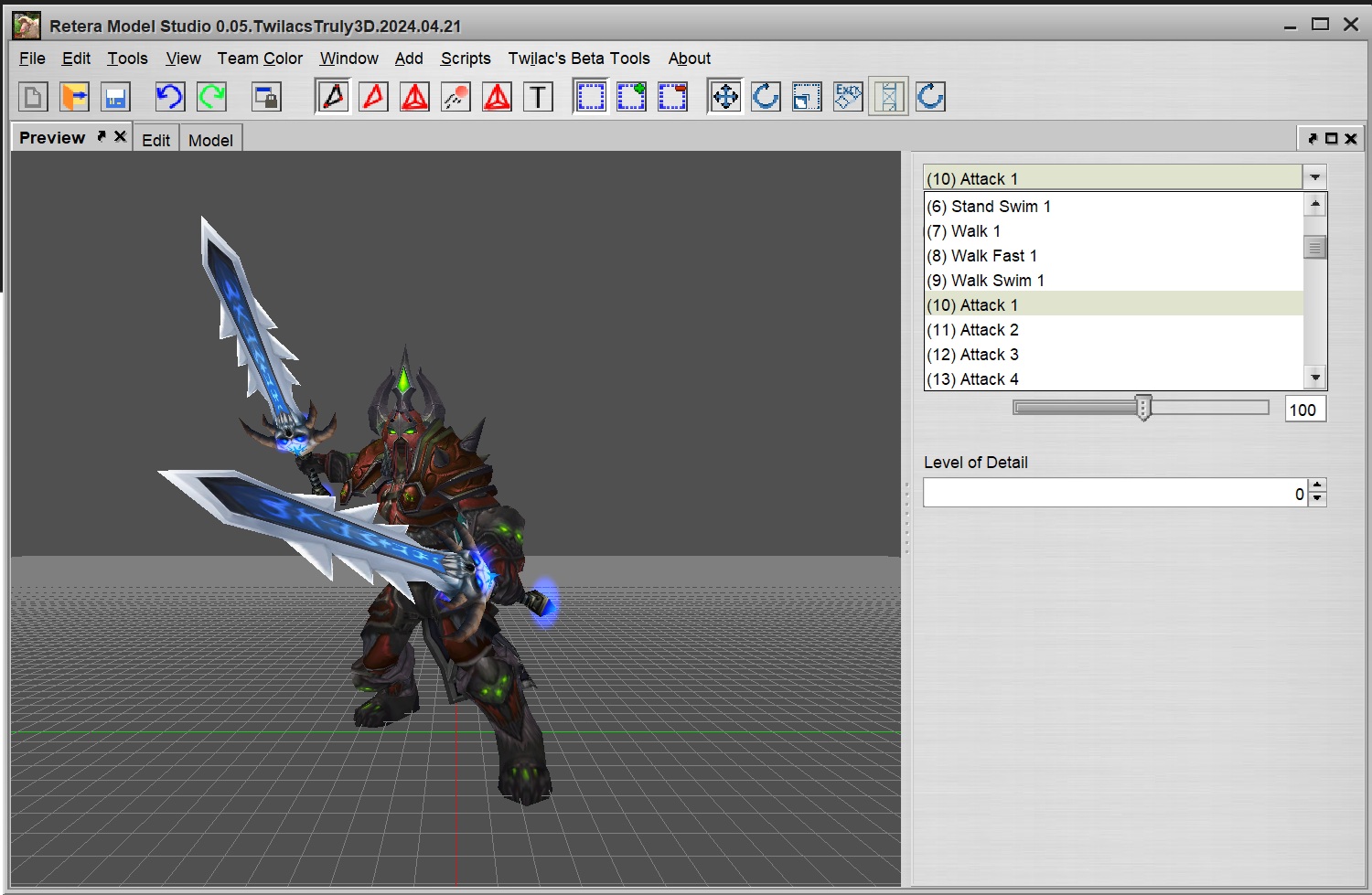
Then this innovative tool is for you. Full list of features below. Here are some screenshots demonstrating its capability:


341563-99881967bd87de700f6e4e0d1327c111.webp

341564-32c79c49c9fa0238df9c8fc8da4ffbfb.webp

1757876883775-png.549229
1757876921846-png.549230

1757877046320-png.549231
1757877190851-png.549232

1757878420830-png.549234
1757878600627-png.549235

1757878683811-png.549236
1757878819665-png.549237

341702-e6794ee2b04efbd1c120315c915c354d.jpg
342428-3e8723a844103d0fbe7a9c53478391e9.jpg


347575-55b84bab2e58571dce7bbd01e11f6b4f.jpg

341565-a08a67bead79e1ec54a64e5fb286d044.jpg


Amazing, right? This power is available to everyone now.

Visit wow.quangdel.com and give it a try!

This is a hosted web version so no installation required. Alternatively you can download and run the tool locally. Full instructions and open-source code: GitHub - pqhuy98/wow-converter.

Features
  • Browse and export any WoW models (e.g. creatures, doodads, ability effects...) to Warcraft 3's MDX/MDL.
  • Export character models based on Wowhead URL (NPCs, dressing room, items, objects...).
  • Customize your character: attach items (e.g. weapons) and mount to the model's body.
  • The tool automatically does all required steps:
    • Filter relevant WoW animations, and renames them to Warcraft 3's standards.
    • Assign textures, materials, texture anims, , collision boxes...
    • Set material filter mode and flags like "TwoSided", "Unfogged", "NoDepthTest", "NoDepthSet" (except for WMO models).
    • Approximately down-port WoW's particle emitters, ribbon emitters, lights to meet Warcraft 3's limitations.
  • Various optimizations: remove used nodes/vertices/keyframes, resize texture images...
  • Preserves fidelity when export highly complex WoW models to WC3's SD 800 legacy format.
  • Browse and export WoW icons into WC3 active/passive/autocast... icons with optional AI upscaling.

If you encounter any bugs, please report and I will try to fix them. Some missing features to be added or fixed later:
  • Cannot fully export certain characters, e.g. dracthyrs...

Installation

1. Get the tools

Download from this Hive post or from Releases · pqhuy98/wow-converter and extract it. You will see the two main files among many other files:

2. Start wow.export.exe

This is my fork of Kruithne's GitHub - Kruithne/wow.export: 📦 wow.export is the number one export toolkit for World of Warcraft. with the required enhanced capabilities. You will need to keep it open.
  • Open wow.export.exe. Select "Open Local Installation" and your local WoW installation, or "Use Blizzard CDN" if you don't have one. Wait for it to load.
341573-495a0cb8038ed94c90342386a46a76de.jpg


3. Start wow-converter
  • Run wow-converter.exe. A command line window will open displaying all app messages.
  • Wait for the message:
341574-03dd0c346ca5acf42d1ec8e6e90fd0e9.jpg


4. Export your model
  • Open in your browser. It is exactly the same app hosted on Huy's wow-converter
  • Exported assets appear in the exported-assets directory inside the folder where you extracted the app. This is more convenient than the hosted version because the exported files are in your computer, no need to download and extract ZIPs.

Change logs

2025 December 21
  • Add texture mipmap.
  • SD 800 models no longer have all materials auto-marked as Unshaded.
  • Fix the auto-generated camera in WMO models causing issue in Reteras Model Studio.

2025 December 7
  • Fix the wowhead dressing room texture issues that @WanSaweR and @nyghtfury reported above.
  • Now the tool is able to export all animations that were previously missing.
  • The tool now automatically recomputes geoset normals. In practice, this fixes some weird shading issues of cloaks.

2025 November 10
  • Add new UI page to browse wow textures. If the texture is a wow icon then the tool can export it to WC3-ready icon BLP files. Example:
    • Deathknight frost icons: Huy's wow-converter with WC3 BTN/PAS/... frame overlays.
    • This allows exporting multiple icons at once, you can select which frame variants (BTN/PAS/ATC...) and border styles (Reforged vs Classics). This works similar to Reforgerator v1.2.0 - Icon Tool. Thank you @Makkad for your open source project GitHub - makkad0/Reforgerator: Batch image processor for War3 icons with GUI & CLI. that I used as code reference for applying WC3 border overlays.
    • Automatically includes the icon's disabled version DISBTN/DISPAS/DISATC... All icon files are saved to the correct WC3 path, e.g. exported-assets\ReplaceableTextures\CommandButtons\BTNdeathwing.blp
    • Optionally the tool can upscale small icons into higher resolution (128px/256px) with a local AI upscaler (Upscayl - AI Image Upscaler) to hopefully fit with Classic 2.0 icons (128px) or Reforged (256px).
    • You can customize output name of each icon file before exporting.
    • Overall this feature makes adding WoW icons into your map incredibly easy, clean, and fast.
  • Browse pages (model and texture) can now be shared by copy-paste the URL e.g. Baby fox model, Deathknight icon, search results for "illidan" models...

2025 November 8
  • Fix a bug with Material's Layer in SD models having unexpected HD flag "Unlit".
  • Now automatically add "Death" animation if original model misses it. During "Death" animation, the model is hidden by resizing to 0.
  • Better animation naming for visual effect models, many of them now have correct "Birth", "Stand", "Death" animations that was previously named "Cinematic Hold/Decay".

2025 October 31
  • Use orc upright model if wowhead URL says so.
  • WMO's filter modes and textures are now fully converted correctly.
  • Fix bug with SD 800 models having incorrect texture animations keyframes.

2025 October 6
  • Fix an issue with SD800 models don't have animation sequences ordered by increasingly intervals. This causes Hive's model checker reports severe warnings on those SD 800 models.
  • wow.export now has updates and improvements from the official Kruithne's wow.export latest's 0.2.2 release.
  • Now models' portrait cameras uses true WoW's portrait camera instead of previously just guesses works. This makes portrait of many models significantly better.
  • Added a new tab to browse WoW maps. I intend this tab to later on allows exporting WoW map tiles into WC3 map with all terrains and doodads. E.g like this template map: WoW's Scarlet Enclave - Template
  • Some wow-converter's web UI improvements.

2025 September 14
  • Allow exporting character with customizable Mount model. Currently the model plays only attack and death animations of the mount. In a future update I will programmatically combine character attack animations with mount's animations.
  • Now support collection-based character customization, i.e. Demon Hunter's horns, Earthen's body gems, Mechagnome's gadgets...
  • Dressing room conversion can now export weapon's visual effects on a best-effort basis. Example: Executioner weapon effect - result: Huy's wow-converter
  • Add "Browse Models" tab to easily search and browse all WoW model assets (e.g. creatures, doodads, spell effects...). Visit wow.quangdel.com/browse or the same URL path locally.
  • Several bug fixes related to particles that allow exporting a greater amount of spell effects. Note: particle conversion is not always perfect but best effort, due to WC3 doesn't support as many graphic shaders as WoW.
  • Other bug fixes and UI improvements:
    • Fix missing geosets in some character races like Undead' arm/face or Dwarf's beard.
    • Add attack options Bow, Gun, Thrown
    • Now the tool can automatically detect suitable attack options based on given weapons.
    • No longer needs to change file input type (wowhead/local/displayID), the tool now can auto-detect input type based on pasted text.
    • Texture PNG->BLP conversion is now significantly faster by utilizing all CPU cores.
    • Correct in-game Portrait by cloning Stand anims into "Portrait" anims.
    • Improved keyframe optimization to give smaller model size and fix a very rare bug.
    • Add a UI button to clean up everything inside export-assets folder.
    • Various improvements to web model viewer and "export in progress" loader.

2025 September 2
  • Add dressing room feature, 1st version. You can use wowhead URLs containing "/dressing-room#..." from either creating your own character from Dressing Room - World of Warcraft or visit any Wowhead Outfits and open its Dressing Room.
  • This is the 1st dressing room version, so there are some limitations:
    • These are not yet supported: dressing room mount, additional selectable weapon visual effects, individual shoulder transmog, Orc upright models...
    • Rarely there will be incorrect texture applied to the base body.
    • Dracthyr characters will not convert correctly.
    • If you get the error "Input file contains unsupported image format", it means there is an issue with the dressing room URL or conflict with your wow installation.
      • Make sure the dressing room URL is correct and "final" by open it in a completely new browser tab, then copy the URL again from the browser's URL bar. Some old-format dressing room URL will turn into new format supported by the tool after you do so.
      • Or you might be using URL of an older expansion e.g. /mop-classic/dressing-room#... while having wow.export pointing to Retail WoW.
      • The last resort is to re-draft the character from another working dressing room URL.
    • Some models will have visual effects but not moving, this is due to WoW's UV2 map is not portable to WC3's single UV map.
  • HD->SD conversion algorithm is no longer experimental, now it is very powerful being able to almost perfectly convert high complexity HD WoW models into SD. It is better than all open source HD->SD conversion implementations I have seen, e.g the ones in RMS/TRMS.
  • The tool can now export mounts and game objects, for example:
  • Significantly more powerful particle emitters conversion.
  • Significantly more accurate geosets selection, e.g. human female no longer always has the extra hair geoset.
  • Added an optimization option to automatically resize output textures to smaller than 1024/512/256px.
  • Some UI/UX improvements and bug fixes.


2025 August 25
  • Fix all bugs related to attachments. E.g. blood elf models can now equip weapons. Weapons equipped on attachment points like "Sheath Main Hand" or "Sheath Offhand" now works correctly.
  • Fix a vast amount of bugs related to particle emitters, geoset anims, WoW replaceable textures missing.
  • When providing a classic wowhead URL, the tool will try to export the classic model if it still exists in WoW retail game files. By changing wow.export's wow installation to Classic (MOP) or Classic Era, it will always be able to find classic models.
  • Add ear geosets that were previously missing to all models.
  • Add support for collection-based equipment. Example Rokhan above: Huy's wow-converter


2025 August 21
  • Fix bug that materials with multiple layers didn't show 2nd glow textures correctly.
  • Fix bug that texture anims are incorrect.
  • Fix UI bug that WMO models couldn't be exported easily.

FAQ

"I cannot run the tool locally. After pressing the Export button, nothing happens."
  • Some European people during the alpha test reported such issue. The root cause was Blizzard CDN blocking their IP address, prevents wow.export tool retrieving necessary Blizzard data. If Blizzard CDN blocks your IP address, you will need to use VPN to a different country.
"How does it work internally?"
  • For exporting NPC models, wow-converter.exe reads your Wowhead URLs to understand what the NPC consists of (race, gender, customizations like beards..., equipped items). Then it calls wow.export.exe to pull data from your WoW local installation and transform them to OBJ/PNG/JSON files. Then wow-converter.exe reads those exported files, and combine them into the final MDX model file with textures.
  • As you have noticed, the tool is capable to exporting a whole WoW map with terrains and doodads and preplaced units. However I haven't build a user-friendly UI for this yet.
"I have an idea for a great feature!"

Credits
Contents

WoW-Converter: export WoW NPCs to Warcraft 3 (Binary)

This tool is very practical, powerful, and easy to use. However, it is limited to formats compiled for Warcraft 3.
We can use model sets that we didn't even know existed and create interesting combinations.

@Warcraft Sandbox Could you expand it to export to formats supported by Blender and/or other engines?
Unity supports 3D models in FBX format.

I want to play "Sandbox" using the assets from WoW and Warcraft 3. I just want to use the assets for my own enjoyment and learning.
 
Back
Top