• Listen to a special audio message from Bill Roper to the Hive Workshop community (Bill is a former Vice President of Blizzard Entertainment, Producer, Designer, Musician, Voice Actor) 🔗Click here to hear his message!
  • Read Evilhog's interview with Gregory Alper, the original composer of the music for WarCraft: Orcs & Humans 🔗Click here to read the full interview.
  • The Hive's 22nd Icon Contest: Creep Abilities is now concluded, time to vote for your favourite set of icons! Click here to vote!
  • ✅ The POLL for Hive's Texturing Contest #34 is OPEN! Vote for the TOP 3 SKINS! 🔗Click here to cast your vote!
  • ✅ The POLL for Hive's Techtree Contest #20 is OPEN! Vote for the TOP 3 FACTIONS! 🔗Click here to cast your vote!

Transparent TGAs not displaying correctly

Status
Not open for further replies.
Level 6
Joined
May 7, 2009
Messages
228
I thought that I could remove the awful edge artifacts in my loadscreen and reduce the map size by splitting it into two seperate textures: one for the sky, and a transparent one for the foreground.
However, it won't show up correctly. No matter what I try, it always has a weird border at the edges. I tried flattening it, but that didn't help either.

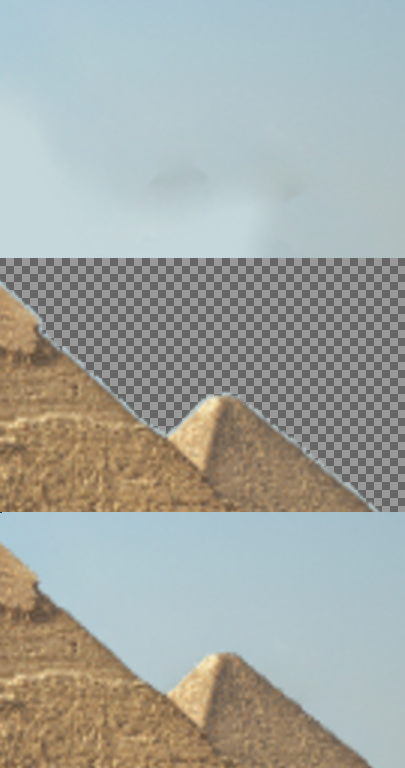
Anyway, here are the background and foreground images I am using (zoomed in), and how it is supposed to look.
Images1.png


And here is how it actually looks
Images2.png


What am I doing wrong? How can I fix it?
 
There are no gray edges on the pyramid. The edges are light blue.

The first time, I tried it with no edges, but I thought that semi transparency might be the problem, so I semiflattened it to a single bit alpha channel. But that didn't work either.

Anyway, the pictures I posted were of the flattened version. I can post the first set of pictures too if you think it would help.
 
Umm,Dan van Ohlus is right, on the second picture u can see a small small gray line between the blue and the transparent.

So, if u just erase a little more of the blue a to get a little bit closer to the pyramid u will probably erase the gray line between.
 
What are you talking about?

I didn't use eraser tool or the lasso tool, or for that matter, transparent colors.

Then try use the lasso tool
use it because transperent colors with the brush tool does leave semi-transparent colors aswell as the eraser does too
The lasso tool cuts it of right where it's supposed to
Eraser/Brush/Brush with transparent color
====--..
Lasso Tool
====
 
Status
Not open for further replies.
Back
Top