
Community
Projects
Maps
Tutorials
Gallery
Support Us
Install the app
How to install the app on iOS
Follow along with the video below to see how to install our site as a web app on your home screen.
Note: This feature may not be available in some browsers.
-
Listen to a special audio message from Bill Roper to the Hive Workshop community (Bill is a former Vice President of Blizzard Entertainment, Producer, Designer, Musician, Voice Actor) 🔗Click here to hear his message!
-
Read Evilhog's interview with Gregory Alper, the original composer of the music for WarCraft: Orcs & Humans 🔗Click here to read the full interview.
-
The Hive's 22nd Icon Contest: Creep Abilities is now concluded, time to vote for your favourite set of icons! Click here to vote!
-
✅ The POLL for Hive's Texturing Contest #34 is OPEN! Vote for the TOP 3 SKINS! 🔗Click here to cast your vote!

You are using an out of date browser. It may not display this or other websites correctly.
You should upgrade or use an alternative browser.
You should upgrade or use an alternative browser.
Name Color
- Status
- Not open for further replies.


- Joined
- Jun 27, 2010
- Messages
- 3,303
your name is colored automatically depending on the slot. What do you want to do exactly?
- Joined
- Jun 27, 2010
- Messages
- 3,303
Does this do it?
-
 Player - Change color of Player 1 (Red) to Red, Changing color of existing units

- Joined
- Nov 5, 2013
- Messages
- 132
Yes! It is possible, just find the option "change player name" in the player section in GUI, use a editor of color to create the effect and put all the edited name in the GUI.

- Joined
- May 27, 2012
- Messages
- 115
This should do the trick:
Just replace the Your Name with your name ^^
and then you enter the name you wish to be called can be any thing add color codes to make it special i writed Your Name with colors by using the JNPG world editor. If you dont have it go get it.
Just replace the Your Name with your name ^^
and then you enter the name you wish to be called can be any thing add color codes to make it special i writed Your Name with colors by using the JNPG world editor. If you dont have it go get it.
-
 Name Change
-

 Events
-


 Map initialization
-
-

 Conditions
-

 Actions
-

 Player Group - Pick every player in (All players) and do (Actions)
-
Loop - Actions
-
 If (All Conditions are True) then do (Then Actions) else do (Else Actions)
-
If - Conditions
-
(Name of (Picked player)) Equal to Your Name
-
-
Then - Actions
-
Player - Set name of (Picked player) to New Name (you can add color codes here)
-
-
Else - Actions
-
-
-
-
-

- Joined
- Jun 23, 2007
- Messages
- 4,065


You use color codes but you will hit the player name or string limit before you get to gradient the whole name.
|
- Joined
- Jun 23, 2007
- Messages
- 4,065
I know the change the player name thing. But how to make that the map check my nickname. I dont see such thing like Player Name is equal to... in the world editor. So how to make this?
|

- Joined
- Nov 5, 2013
- Messages
- 132
Set some variable of string type with the name of the player.
- Joined
- May 27, 2012
- Messages
- 115
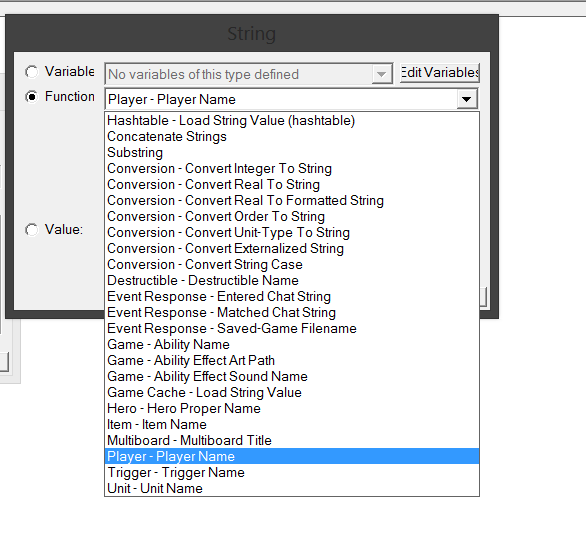
aaa its easy
convert player name to string ^^
convert player name to string ^^
- Joined
- May 27, 2012
- Messages
- 115
- Joined
- May 27, 2012
- Messages
- 115
Then help is needed it comes ^^
- Status
- Not open for further replies.


