Deleting weapons

Status
Not open for further replies.
Level 2
Joined
Oct 27, 2010
Messages
14
Umm, hi there xD I'm an absolute noob at modelling, so i need your help.
Can your majesties give me a detailed tut on how to delete weapons from a CUSTOM model, not the classical Blizzard's model... I usually have the problem with extracting MDX.. Custom models just dont get MDX out =( 8n 4 yo h3lp!

D0 33t @nd g3t moar 1337 l@nGu@g3 \m/>_<\m/
 
=P couldn't hold :D (the haters will hate >_<)
anyways, can you just say it and be on with it? :D Please?
 
1. Download Magos Model Editor.
2. Open up your mdx/l file with Magos.
3. Once your model is opened, click Windows->Model Editor.
4. A screen will pop up showing all the vertices. Select the appropriate vertices of the weapon you want deleted.
5. Once they are selected, go into the Model Editor screen, select Transformations->Scaling.
6. In the Scaling window, set all the X/Y/Z values to 0 and press ok.
7. Done!
 
1. Download Magos Model Editor.
2. Open up your mdx/l file with Magos.
3. Once your model is opened, click Windows->Model Editor.
4. A screen will pop up showing all the vertices. Select the appropriate vertices of the weapon you want deleted.
5. Once they are selected, go into the Model Editor screen, select Transformations->Scaling.
6. In the Scaling window, set all the X/Y/Z values to 0 and press ok.
7. Done!

He beat me to it :thumbs_up:
 
1. Download Magos Model Editor.
2. Open up your mdx/l file with Magos.
3. Once your model is opened, click Windows->Model Editor.
4. A screen will pop up showing all the vertices. Select the appropriate vertices of the weapon you want deleted.
5. Once they are selected, go into the Model Editor screen, select Transformations->Scaling.
6. In the Scaling window, set all the X/Y/Z values to 0 and press ok.
7. Done!

or if the weapon is in a material that is not related to any other parts of the model, you can just open the Material manager on Magos, ctrl click the weapon, then it will highlight the correspoding material in the manager then right click the material, choose remove.
 
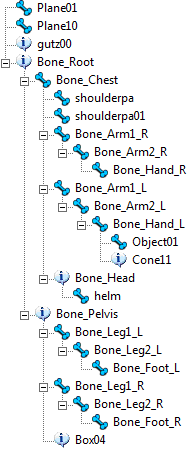
Nice of u ^_^ It worked for one of the models... but wich one will it be here?
b2c696ebce85.png

*edit*
pass... just created mah own attachment point :DD
 
Last edited:
Status
Not open for further replies.
Back
Top