• Check out the results of the Techtree Contest #19!
  • Listen to a special audio message from Bill Roper to the Hive Workshop community (Bill is a former Vice President of Blizzard Entertainment, Producer, Designer, Musician, Voice Actor) 🔗Click here to hear his message!
  • Read Evilhog's interview with Gregory Alper, the original composer of the music for WarCraft: Orcs & Humans 🔗Click here to read the full interview.
  • Create a void inspired texture for Warcraft 3 and enter Hive's 34th Texturing Contest: Void! Click here to enter!
  • The Hive's 22nd Icon Contest: Creep Abilities is now concluded, time to vote for your favourite set of icons! Click here to vote!

CW_Death_Knight.BLP

This bundle is marked as director's cut. It exceeds all expectations and excels in every regard.
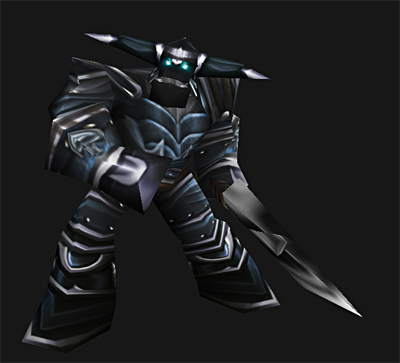
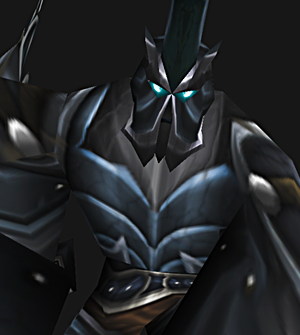
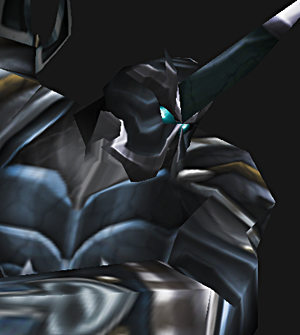
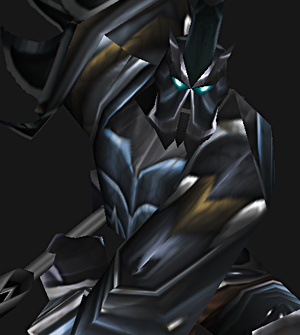
dk2_02.png
dk2_01.png
dk2_03.png


Oh noes! Not another Death Knight skin! :O

Based it on some of the WoW Death Knight armour :)

This is a first version and I plan to update / improve it after I get some feedback :)

Keywords:
Death, Knight, deathknight, felguard, blue, frozen, lich king, undead, death, ice, shard, evil, dark, darkness
Contents

Death Knight (Texture)

Reviews
13:13, 9th Dec 2009 THE_END: Top notch skin right here sir, though please put a shot of the weapon in the post where the other three pics are..k thanks
13:13, 9th Dec 2009
THE_END: Top notch skin right here sir, though please put a shot of the weapon in the post where the other three pics are..k thanks
 
Now i saw the weapon, you really have to improve it and i don't think you will get a modeler^^

Aye :/ Its a shame the wrap and the shape of the FelGuards weapon is so weird xD

It would looks ok if it was'nt for the massive poking out bit :P

I might just ask around to see if anyone would be interested in making me a fel-guard minor model-edit or something :P
 
Everybody hear me out : If this skin doesn't get the Director's Cut, I'll sell myself on E-bay!
- Rating 6/5
- Voting for Approval
*no advertising intended and I'm exaggerating on the -DC- bit, but this skin does rock*
 
lulz or not, this skin is cool, but it needs more subtle runes.

I thought about it too, but decided not to :) I based the armour on this pic which has no runes! :O http://static.mmo-champion.com/mmoc/images/news/2009/march/season6_deathknight_female_hd.jpg

I might re-do the shoulders though to make them more shiny :)

Not bad, doesn't need to be 512x512 however.

I tried it as 256x256, but I felt it lost a lot of the quality in-game :P Theres a lot of fine detail on this skin which just wouldn't show up :D I could link to a 256x256 low-res copy if you like :)
 
While I'm disinclined to agree with that, it's a matter of personal preference. I understand that sometimes when you create cinematic skins, 256 can be a bit too limiting. But I think you are wrong to assume you can't get adequate crispness out of the smaller wrap. I really see no details that would be seriously hurt by a reduction, but once again it is a matter of preference.
 
May I ask why you obviously avoid showing us the weapon? Based on the other coments, I have no doubt that this is an amazing skin, but I will judge for myself if this is worth using.

Its because the wrap for the sword is horrible right now :)

I'm working on it though :P Soon as I update the skin I'll include the sword in the screenshots :)
 
Dont make it so big.

You just dowload the skin, then you open Import Manager in World Editor. Use the Import button to import the skin. Then when its imported open it in World Editor.
You will see the path and the "Use Custom Path" thingy. Press on it and the path will be unlocked. Then put the path( in this case Units\Demon\Felgaurd\FelGuard.blp) on its place, press Ok and close World Editor. Dont forget to save! Then open it again and if you did everythng correctly the skins will be working.
 
Dont make it so big.

You just dowload the skin, then you open Import Manager in World Editor. Use the Import button to import the skin. Then when its imported open it in World Editor.
You will see the path and the "Use Custom Path" thingy. Press on it and the path will be unlocked. Then put the path( in this case Units\Demon\Felgaurd\FelGuard.blp) on its place, press Ok and close World Editor. Dont forget to save! Then open it again and if you did everythng correctly the skins will be working.

...and don't forget to extract the BLP file from the downloaded ZIP file before you import it.

(Just wanted to fill up the respond to decrease the risk of newbie mappers confusion)
 
I don't understand, how can i import a blue felguard if there isn't any instructions to import a blue felguard, CloudWolf?
 
I don't understand, how can i import a blue felguard if there isn't any instructions to import a blue felguard, CloudWolf?

Basically, the red and blue Felguard have the same texture layout so are compatible with each-other :P To replace the red fel-guard skin, simply change the path of the skin once its imported to "Units\Demon\Felgaurd\FelGuard.blp".

If you wanted tor eplace the blue fel-guard skin, you simply need to change it to the correct path for that skin, which in this case is:

"Units\Demon\Felgaurd\FelGuardBlue.blp"

Essentially, that path represents where the original skin is stored in the MPQ, which is Warcraft III's database of all the models and skins the game uses :)

Hope this helps!
 
Basically, the red and blue Felguard have the same texture layout so are compatible with each-other :P To replace the red fel-guard skin, simply change the path of the skin once its imported to "Units\Demon\Felgaurd\FelGuard.blp".

If you wanted tor eplace the blue fel-guard skin, you simply need to change it to the correct path for that skin, which in this case is:

"Units\Demon\Felgaurd\FelGuardBlue.blp"

Essentially, that path represents where the original skin is stored in the MPQ, which is Warcraft III's database of all the models and skins the game uses :)

Hope this helps!


Thank you, i just found it and i got it, CloudWolf. :)

No helps needed.
 
Awesome texture! I've slightly changed it to fit the Grunt model, is it nice?
 
Back
Top