• Check out the results of the Techtree Contest #19!
  • Listen to a special audio message from Bill Roper to the Hive Workshop community (Bill is a former Vice President of Blizzard Entertainment, Producer, Designer, Musician, Voice Actor) 🔗Click here to hear his message!
  • Read Evilhog's interview with Gregory Alper, the original composer of the music for WarCraft: Orcs & Humans 🔗Click here to read the full interview.
  • Create a void inspired texture for Warcraft 3 and enter Hive's 34th Texturing Contest: Void! Click here to enter!
  • The Hive's 22nd Icon Contest: Creep Abilities is now concluded, time to vote for your favourite set of icons! Click here to vote!

Custom Tiles edge problem

Status
Not open for further replies.
Level 3
Joined
May 24, 2014
Messages
22
sdlc18Y.png


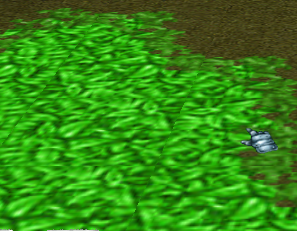
I made a new tiles and put in the Gradation to Photoshop, but still can see the edge between the tiles.
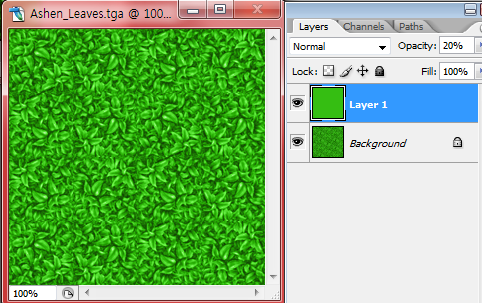
IvNStsh.png


Somebody said to me:
"The edge problem is simple. Just put it in the Gradation from alpha. (Photoshop)then you solve that problem."

The method I used is:
1. Create the New Layer in Photoshop
2. Choose the color with Eyedropper Tool (Spoide Tool)
3. Fill up the Layer before I choose that color with Gradation Tool
4. Control the Opacity

Was something wrong or missed I before?
 
I think you're referring to terrain overgo, which causes the terrain to appear look weird when blending with other tiles, the solution would be to re-order the tiles as shown in the tutorial link.
 
It may look bad close up. But if you look at any tiles whether custom or otherwise close up you can see the seams on all of them. I'm assuming you are talking about the seams between each tile where you can see a difference between them right?
 
Status
Not open for further replies.
Back
Top