• Check out the results of the Techtree Contest #19!
  • Listen to a special audio message from Bill Roper to the Hive Workshop community (Bill is a former Vice President of Blizzard Entertainment, Producer, Designer, Musician, Voice Actor) 🔗Click here to hear his message!
  • Read Evilhog's interview with Gregory Alper, the original composer of the music for WarCraft: Orcs & Humans 🔗Click here to read the full interview.
  • Create a void inspired texture for Warcraft 3 and enter Hive's 34th Texturing Contest: Void! Click here to enter!
  • The Hive's 22nd Icon Contest: Creep Abilities is now concluded, time to vote for your favourite set of icons! Click here to vote!

Custom armor and attack types

Status
Not open for further replies.
Level 5
Joined
Nov 7, 2007
Messages
134
Hi, I've seen in Gem TD that they are using custom armor and attack types. I was just wondering, how do you add these?
 
Hello there, this will be my first post after some hours of research and practice on my first map.

As i am trying to make something a little original, i would like to know if someone know the url of a tutorial or a thread where someone explain a little more how works this customization of "game interface" and "game constant" ?

I thank you in advance :)
 
Hello there, this will be my first post after some hours of research and practice on my first map.

As i am trying to make something a little original, i would like to know if someone know the url of a tutorial or a thread where someone explain a little more how works this customization of "game interface" and "game constant" ?

I thank you in advance :)

Well it is actualy very simpel.... You just open them in advanced, and check custom values. Then it says what it does, so you just change to fit your needs, no tutorial realy needed.... if you can read english.

BTW, Introduce yourself to the hive: Introduction Tread
 
Well it is actualy very simpel.... You just open them in advanced, and check custom values. Then it says what it does, so you just change to fit your needs, no tutorial realy needed.... if you can read english.
that's not as easy as you say if he doesn't have the english WE
i don't know for the other language, but for the french translation, sometime that's really really incomprehensible

samples :
the "ward" classification
in the game, "ward" is translated by "balise", which mean "beacon"
but in the WE, this is what they have done..
"ward" looks like "warden" so the translator has translated "warden"
"warden" doesn't have a direct french translation, so the translator use the closer word "garde"
("garde" direct english translation is "guard")
so in the french WE, the "ward" classification is called "guard" instead of "beacon"... that really doesn't help...

@Jayce :
Game interface : https://www.hiveworkshop.com/forums/showthread.php?t=39401
 
So i have done my introduction, in the appropriate forum :)

Thanks for the response, and in fact yes i have the french version of WE, and translations are dumb :/
Is there any way to install the english version of WE ? or if you have the french version of the game your are condamned to use the french version of WE ?
 
So i have done my introduction, in the appropriate forum :)

Thanks for the response, and in fact yes i have the french version of WE, and translations are dumb :/
Is there any way to install the english version of WE ? or if you have the french version of the game your are condamned to use the french version of WE ?

well you could always use the WEU... I think it only exsist in english.. correct me if mistaken, as I never tried it with french version..
 
Ok i have tested the "game interface" to replace the standards icons with imported ones, and it is ok and easy as you said.

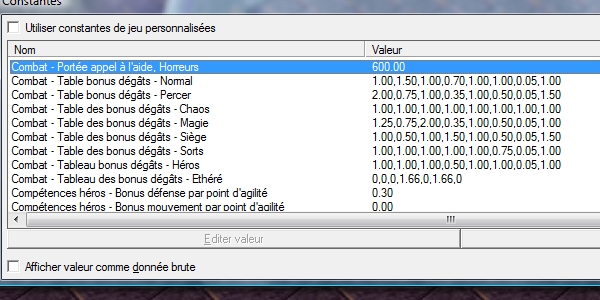
But it seems that the "game constant" screen will not be that way easy. Here is a screenshot of the damages modifiers of the constants screen :

Constants.jpg


Any of you know the exact match between those numbers and related armor types ? For exemple :

Chaos Damage - 1.00,1.00,1.00,1.00,1.00,1.00,1.00,1.00

I know this means Chaos attacks makes 100% damages to all armor, but what is the order ? Anyone know ?

Thanks in advance for the one who knows :)
 
Ok ok, after some existing map editing, i think i will be able to create some sort of tutorial explaining entirely the attack/defense/tooltips customization.

Hopping this will help, later on. Before the submission of this tutorial if someone is looking forward for some infos, just send me a PM, i will do my best to help.
 
Ok ok, after some existing map editing, i think i will be able to create some sort of tutorial explaining entirely the attack/defense/tooltips customization.

Hopping this will help, later on. Before the submission of this tutorial if someone is looking forward for some infos, just send me a PM, i will do my best to help.

Tell if you need help to check if it is correct....
 
Status
Not open for further replies.
Back
Top