
Lunarus
L
Lunarus
Edit: It seems I was able to fix it by saving to the desktop..
I apologize in advance if this is not the right place to post this.
Now my issue is that the skins that I have converted to .blps (using war 3 viewer) and have tested in the world editor are not appearing in the folder that I have saved them too. What's weird though is that previous skins I have made (really scribbly, cruddy tests, just started "skinning" yesterday) appear. Does it have something to do with the file size? I mean all of them are under 100kb, and even the one cruddy one that's over 100kb is appearing.. Any ideas? And I do realize I shouldn't be trying to upload considering I'm new at skinning but just for future reference.
And here's a pic of my first ever skin! First time using GIMP haven't looked at any tutorials yet
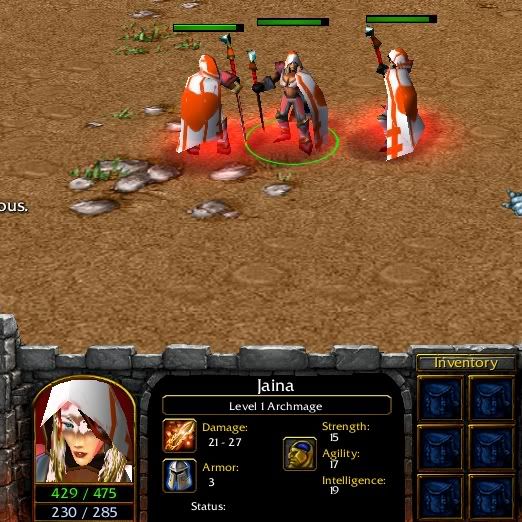
Jaina as a Nurse or Medic. Criticsim is wanted and accepted.
I apologize in advance if this is not the right place to post this.
Now my issue is that the skins that I have converted to .blps (using war 3 viewer) and have tested in the world editor are not appearing in the folder that I have saved them too. What's weird though is that previous skins I have made (really scribbly, cruddy tests, just started "skinning" yesterday) appear. Does it have something to do with the file size? I mean all of them are under 100kb, and even the one cruddy one that's over 100kb is appearing.. Any ideas?
And I do realize I shouldn't be trying to upload considering I'm new at skinning but just for future reference.And here's a pic of my first ever skin! First time using GIMP haven't looked at any tutorials yet
Jaina as a Nurse or Medic. Criticsim is wanted and accepted.
Last edited by a moderator:


