• Listen to a special audio message from Bill Roper to the Hive Workshop community (Bill is a former Vice President of Blizzard Entertainment, Producer, Designer, Musician, Voice Actor) 🔗Click here to hear his message!
  • Read Evilhog's interview with Gregory Alper, the original composer of the music for WarCraft: Orcs & Humans 🔗Click here to read the full interview.
  • The Hive's 22nd Icon Contest: Creep Abilities is now concluded, time to vote for your favourite set of icons! Click here to vote!
  • ✅ The POLL for Hive's Texturing Contest #34 is OPEN! Vote for the TOP 3 SKINS! 🔗Click here to cast your vote!
  • ✅ The POLL for Hive's Techtree Contest #20 is OPEN! Vote for the TOP 3 FACTIONS! 🔗Click here to cast your vote!

CW_LOTR_Gondor_Infantry.blp

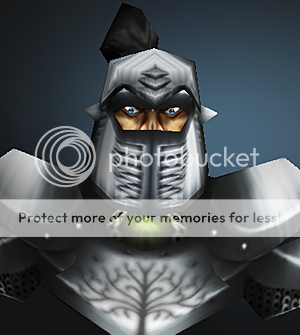
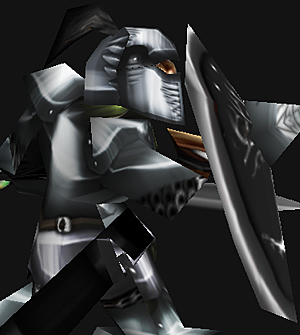
Another simple footman edit to make him look more like a soldier of gondor :) I figured this would also be quite usefull to many LOTR style maps :)
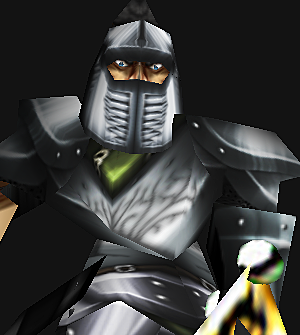
gondor_03.png
gondor_01.png
gondor_02.png


All comments and criticism are welcome :)

Keywords:
Footman, Silver, Gondor, Lotr, Lord, of, the, rings, Solider, infrantry, armour, armor, armoured, armored, plate, plated, metal, warrior
Contents

Lord of the Rings :: Gondor Infantry (Texture)

Reviews
19:56, 24th Jan 2010 67chrome: Terrific handling of the footman wrap, everything looks awesome. Your handling of the metal and shiny buts reminds me a lot of Black Stan. Anyways, fantastic work :)
for models, import your desired model (if you downloaded and extracted it), choose a unit, double-click model file and choose model. for skins, download, extract, and import, then set the skin to the right path and boom ur done. any more questions?
 
Okay so im new and all, i usually get the blp thing Example: Units\Human\TheCaptain\TheCaptain.blp and paste but this one doesn't have? Can someone be kind enough to tell me how to use this: Import the skin to the following path:
textures\footman.blp

The skin will replace the following unit/doodad/texture/interface:
footman.blp
 
Back
Top