• Listen to a special audio message from Bill Roper to the Hive Workshop community (Bill is a former Vice President of Blizzard Entertainment, Producer, Designer, Musician, Voice Actor) 🔗Click here to hear his message!
  • Read Evilhog's interview with Gregory Alper, the original composer of the music for WarCraft: Orcs & Humans 🔗Click here to read the full interview.
  • The Hive's 22nd Icon Contest: Creep Abilities is now concluded, time to vote for your favourite set of icons! Click here to vote!
  • ✅ The POLL for Hive's Texturing Contest #34 is OPEN! Vote for the TOP 3 SKINS! 🔗Click here to cast your vote!
  • ✅ The POLL for Hive's Techtree Contest #20 is OPEN! Vote for the TOP 3 FACTIONS! 🔗Click here to cast your vote!

Custom Icons {they become green when I click the menu}

Status
Not open for further replies.
Level 2
Joined
Apr 14, 2009
Messages
29
Hi.

I downloaded a custom icon/model pack from your model pack section. The pack was approved. I imported the icons into my wc3 world editor and used them to replace an icon on a custom spell I made. Everything looked great until I paused the game. The icon became green, like when it cannot find an icon, but as soon as I start the game it comes back to normal. I noticed that other spells become slightly gray when the game is paused and I did extract an icon like that into the editor but I cannot find a place to put it. Is the icon I am using, missing a file that makes it gray when the game pauses or haven't I edited the spell correctly? (The spell I am using is metamorphosis and I am using it to shape shift my hero into a custom model).

Also, is there a special trigger used to make the spells fit in order when you make a custom unit? When I edit the hero spells and test the map the spells get all mixed up randomly.

EDIT: Okey it works now. All I needed to do was to import the BTN and DISBTN files like bananaHunt showed me. You don't need to put the DISBTN file anywhere just make sure you import it like bananaHUNT said.
 
Last edited:
an icon has normally always 2 files. 1 btn and disbtn. you need both because the disbtn makes that grayed icon when you pause.


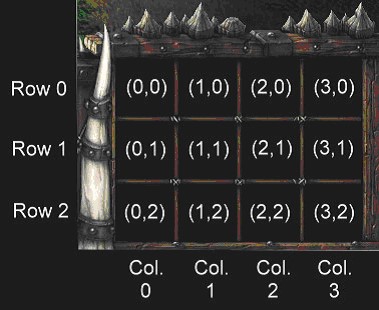
when you create a spell there are two options in the editor. button position x and position y. 0/0 is the first place in the top row. but normally you would use 0/2 for the first spell and 1/2 for the 2nd and so on.
 
This can help you:
uniteditor1.jpg


Also on your first question, it has nothing to do with the ability or model.
When your icon turns green it means the icon cannot be found. Usually you have entered an incorrect path.
Like EBTM said, every icon has a normal version (BTN for regular border, ATCBTN for autocast or PASBTN for passive) and a disabled version (DISBTN). The game uses the disable version for example when you pause the game. It is a darker version of the icon. For almost every icon the paths are (using YourIcon as name):

ReplaceableTextures\CommandButtons\BTNYourIcon.tga (or .blp) - for normal and atc icons
ReplaceableTextures\PassiveButtons\PASBTNYourIcon.tga (or .blp) - for passive
ReplaceableTextures\CommandButtonsDisabled\DISBTNYourIcon.tga (or .blp) - for disabled
ReplaceableTextures\CommandButtonsDisabled\DISPASBTNYourIcon.tga (or .blp) - for disabled passive

you can change them by going to the import manager (f12) > double click your file > select use custom *something* > change the path from wc3imported\blabla to the above
 
Ah. I thought that there was a special place in the object editor where I should put the passive button. Thanks for the help I will try it out.

Thanks for the tip with the spells it works perfectly :)
 
If you have a question, sure, use the search function to see if someone answered it before. But do not necro post a 7 year old thread.

The spell name has no basis on the icon.
I assume you're using a custom icon, you need to make sure you have downloaded the Disabled Button Icon as well and correctly set its path.
 
If you have a question, sure, use the search function to see if someone answered it before. But do not necro post a 7 year old thread.

The spell name has no basis on the icon.
I assume you're using a custom icon, you need to make sure you have downloaded the Disabled Button Icon as well and correctly set its path.

Sorry, but yes it is a custom icon, i don't know how to set the path or anything for it
 
You can place your normal icon in any folder anywhere, the location doesnt matter, only the name does.
Because the DISBTN is placed in one folder (which can be customized), which is "ReplaceableTextures\CommandButtonsDisabled\" by default, followed by a "DIS" prefix, and finally the name of the icon in the end.
So: <DISBTN_PATH> + "DIS" + <ICON_NAME>

If your icon is called "BTNSoulSteal.BLP", then you should have your DISBTN icon at "ReplaceableTextures\CommandButtonsDisabled\DISBTNSoulSteal.BLP"

You can set the filepath in the import manager.
By default, everything is at wc3imported\<name>
 
Status
Not open for further replies.
Back
Top