

- Joined
- Jan 12, 2011
- Messages
- 110
GUI Equipment Manager
by Donach
Difficulty - Easy/Medium
What does it basically do?
This EM replaces usual way of items giving you bonuses. It's optimized for 1 unit only at a time for each player.
- I could also make it working for more number of units, if there will be enough interest for it. But experienced users can remake it on their own.
The thing is, that the items does not have any bonus to give it to you hero.
It works like this:
You gain some item. Whenever you click on it (it has to be useable - so all items will have ability to be clicked), it "puts the item on you" which gives you certain bonus. Then to unequip it, you just simply click on certain icon for the item used at your inventory, which gives you the item back to you inventory.
What does it really do is, that it moves the item you use on predefined place, then gives "full slot" ability to dummy unit and the ability to your unit. The unequipping is just opposite process.
What are we going to need?
Dummy unit
Create custom unit, set its Art - Scaling, Selection values to 0. - (you may have to hold SHIFT and left-click some of it, because it normally won't allow you to set it lower than 0.1)
Also set its Art - Model file: "none.mdl". (without "")
Then Stats - Sight Radius (both) values to 0.
Now give the unit Abilities - Normal: Inventory (Hero), Invulnerable(Neutral).
Spells and abilities
1) You’ll need custom spell for each item-type. I use 11 types: Amulet, Armor, Boots, Gloves, Helmet, Legs, Main-hand, Shield(Offhand), Ring, Shoulder, Special
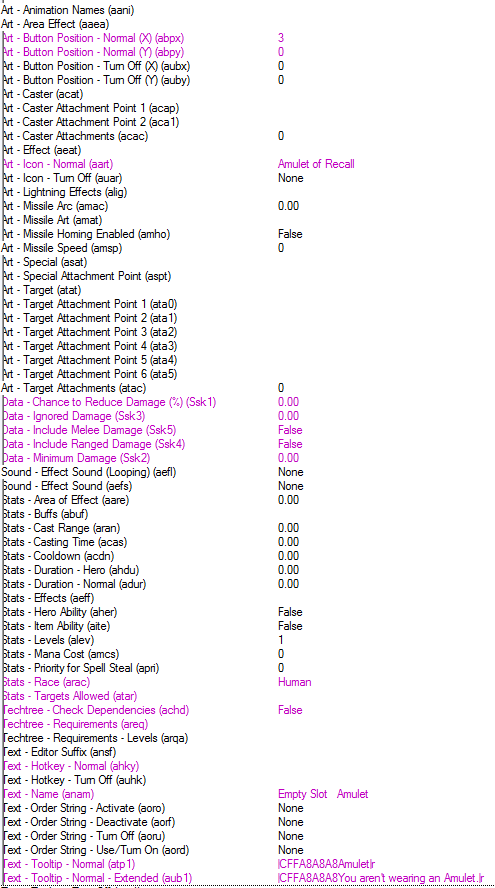
- just Empty slot for Amulet example
2) You'll need ability for every item you want to use. So 100 items = 100 abilities for them (And another 100 as hero abilities ).
).
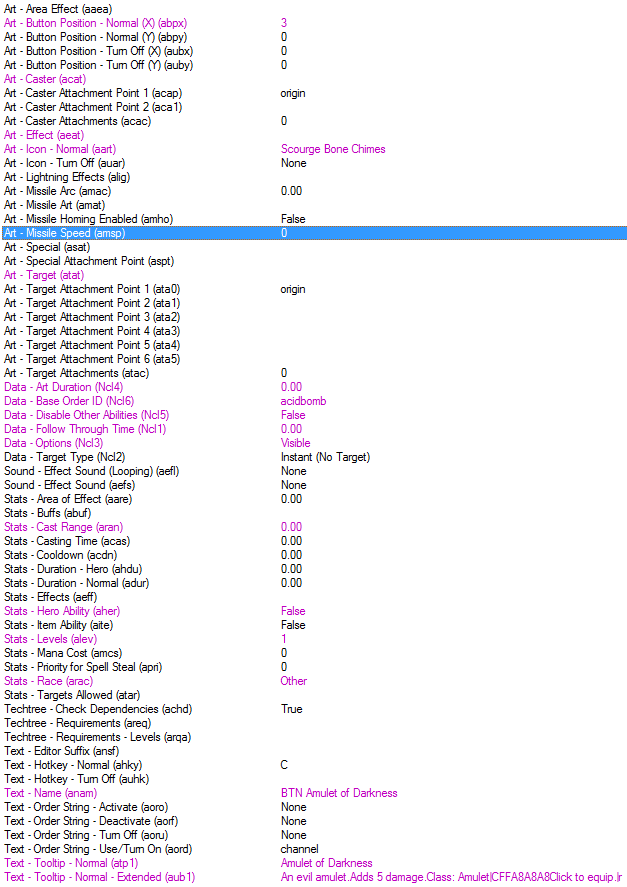
- Set all your Dummy abilities like this, just change name to: "BTN 'YourItemName'"
3) Next thing you'll need are abilities, that gives that certain bonus that item should actually provide. It goes the same as with Dummy ability, 100 items = 100 hero abilities.
For demonstration I'll use "Item Damage Bonus" ability called: ABI "Item name".
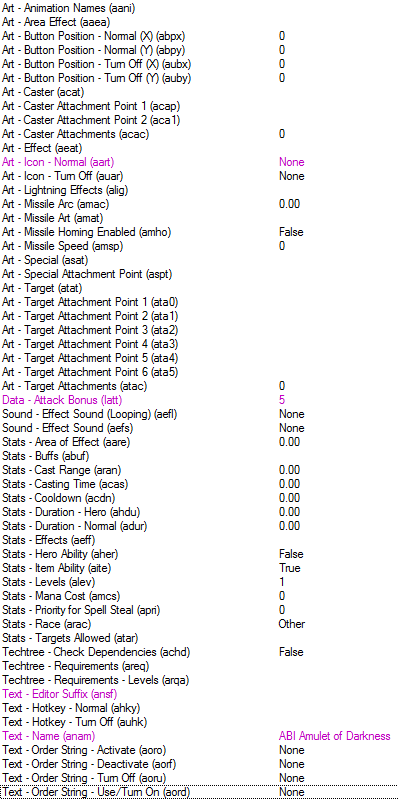
- it should be sth like this one
4) Ability called "[clickable item]" - base for this is "Item Temporary Speed Bonus".
Just set:
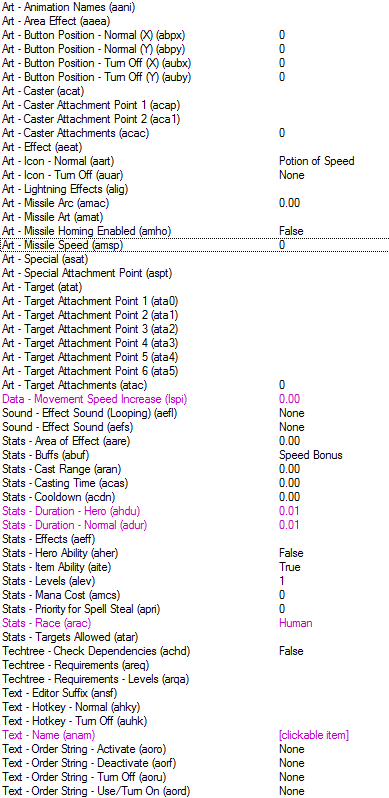
And give this ability to all your items.
5) Spells Equipment - to select Dummy unit; Exit - to select back hero
- based on spell "Channel" too
- almost same as the BTN abilities for dummy, just change names, icons etc.
6) The Items it self
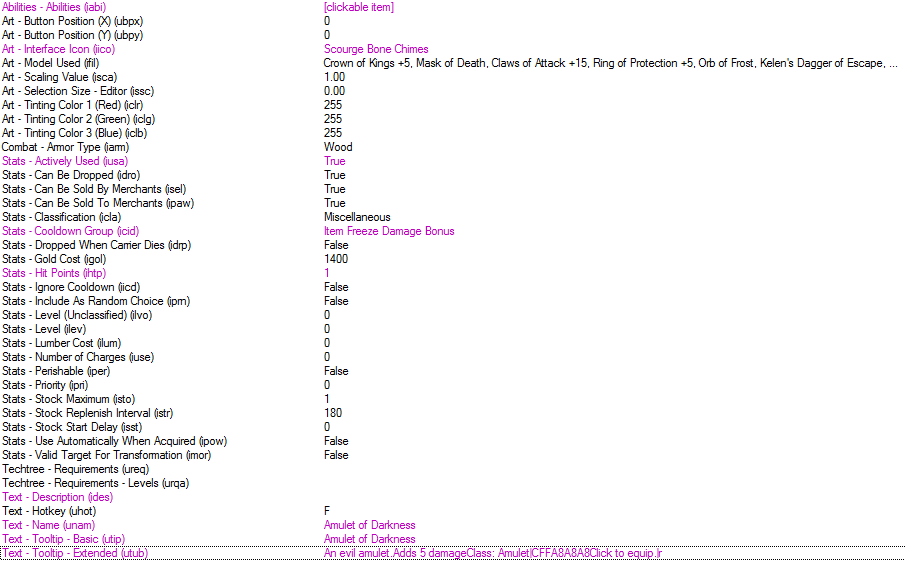
- the item stats look like this - you can do this for all your items, just change Icon, Name and Tooltips
- notice, that the item actually does NOTHING, its used only as “tracker” for ability added, when you use the item
Variables
- I'll demonstrate only on Amulet type of item.
InventoryDummy - Unit Array (1)
CurrentHero - Unit Array (1)
ItemAmulet - Item-Type Array (1)
ItemAmuletAbility - Ability Array (1)
ItemAmuletHeroAbility - Ability Array (1)
ItemAmuletInteger - Integer
ItemAmuletIsUsed - Boolean Array (1)
ItemAmuletLifeInteger - Integer Array (1)
ItemAmuletUsed - Item-Type Array (1) - if destroying
or
ItemAmuletUsed - Item Array (1) - if moving
ItemAmuletUsed2 - Item
- This depends, if you destroy or just move item from unit using it
- I’ve noticed, that when I move the item, it’s a lot faster when I’m giving it back to hero, because when you have to create new item, it takes more time than moving an existing one
Point_DummyCreation – Point
Point_ItemEquipRemove - Point
Regions
1 - Region, where Dummy unit will be created
- variable Point_DummyCreation will be set to center of this region
2 - Region, where items will be moved (not need if you're destroying them)
- variable Point_ItemEquipRemove will be set to center of this region
Initialization
Create dummy
- creates dummy at dummy region if player 1-4 is user - 4 players to make it shorter (I’ve got players 1 – 10 as user, so it creates 10 dummies every time it starts a map)
- sets variable to track the dummy
- and finnaly adds all required abilities to all dummies for each player using loop
Add Equipment spell to hero
- pretty simple. In the If/then/else conditions I use only Unit-types that are players able to have.
- also sets variable CurrentHero to hero, that was just Created/Loaded.
- at setting the variable it HAS to be Owner of(Triggering unit) - you can't exchange it just for (Triggering player)
Dummy/Hero Selection
- Whenever player uses Equipment spell, it selects the Dummy for him
- Whenever player uses Exit spell, it selects Hero for him
- added condition for checking, if player even have his hero alive - it would pan the camera to center of map, if the condition wasn't there
- the ownership change is due to changing ownership to any player via command - this is more explained at end of this tutorial
Define variables
- do this for all your items
- do this also for all your Dummy abilities
- and do this again for all your Hero Abilities
- NEVER forget that the numbers in arrays at this init is MAX LIFE of target item - you have to set it for every item and it cannot be same for 2 items
How does my Equipment Manager work?
Let's see the magic:
Easy to see it, but I'll explain it:
- the newer version is better by my opinion - you don't have to manually unequip amulet if you have one equipped, but insted if you use another amulet it drops the currently equpped and gives it back to you while equipping the item used
- PS: Notice, that in conditions I also use condition for InventoryDummy - It's due to my Save/Load system, since I save those abilities as Items giving them to dummy and using them right away after load.
Pretty easy, huh?
So, what about putting the item back to hero?
This is simply just opposite process than putting the item "on" hero.
1) If ability being cast is equal to Variable(ItemAmuletAbility[Life integer of Amulet that is currently active{Player number}]) AND Variable (ItemAmuletIsUsed[PlayerNumber]) boolean = true, returns actions:
- this one is maybe a bit confusing - This took me the most time to set it correct
- 1) ItemAmuletAbility - this is ability, that is declared at Initialization (look it up)
- 2) Life integer of amulet = Variable(ItemAmuletLifeInteger) - which is declared, when we are putting the Amulet on and is equal to life, the Amulet has
Now the actions:
-comment
1.Removes certain ability to Dummy
2.Removes certain ability to Hero
3.Adds Empty slot Amulet from Dummy
-comment-
4. Shows text: You have unequipped "item name".
-comment-
-comment-
5. Now this is new and it should be here since beggining - what this If/then/else does is, that it checks if here has some space in his inventory - in older version, if hero had full inventory, the item wouldn't show up and you would lose it.
5.1 - if items hero has is 5 or less, it normally gives him the item he has dropped from equipment
5.2 - if hero has 6 items, this creates point which is position of our hero, moves the item at the position and then removes the point
-comment-
6.Sets Variable(ItemAmuletUsed2) to No item
7.Sets Variable(ItemAmuletLifeInteger) to 0
8.Sets Variable(ItemAmuletIsUsed) to boolean = false
Here it is. If you want to add more types of items, just continue in Else and add another If/then/else and put the conditions to check, if the Ability being cast is one of that certain type.
Features
Viewing another player's inventory
As the title says: this will allow you to see what other players have on them equipped (but still, you cannot drop their items or do anything with their equip).
Here is how it goes: You type "-inv 1" for example, it checks if the player (1 stands for Red) isn't using his inventory right now, and then it selects it for you and making you the owner of the inventory. This allows you to see all items the player has equipped.
Let's see what will we need:
Variables
IntegerSelect - Integer (Base 0)
Player - Player Array (1)
Initialization
During map initialization (or short after) you have to attach Player[] variable to certain players like this:
The selection
This is the selection itself. Although I normally use it for 10 players, here is shorter version for 4 players.
OK, so how does it work?
Event:
Player types "-inv" with and addition of number or name of color for target players inventory he wants to see.
Conditions:
1. Checks if "-inv " is entered correctly.
2. Checks if the message player wrote is longer than "-inv " which is 5 letters (notice that space " " is also a letter!).
Actions:
1. We set variable IntegerSelect to 0 - this will be used as player number as the trigger will go on
2. Right after we set the variable IntegerSelect to itself + 1 - as 1 stands for red player
Multiple Actions:
Conditions:
1. checks, if target inventory isn't used by origin player of that inventory (you may add another condition which won't allow select the inventory even if someone else than the original owner has the inventory selected)
2. and 3. - check of the written substring behing "-inv " is either "red" or "1"
Then Actions:
1. changes ownership of target inventory for player writing the message
2. selects the inventory
Else Actions
- checks for same conditions as before but at the 1st condition, it checks if the player HAS the inventory selected
- returns message, which says that certain player is just right now using his inventory
Pretty simple and works well (atleast as far as I'm able to test on my 2 computers)
I hope there are no leaks in this selecting. If I'm wrong, please, tell me where are the bugs and I'll repair them.
Item property restriction
This is very simple trigger - no variables etc. needed.
It works like this: You pick up an item, if you're picking it up for the first time, it sets the item property to you.
If you're picking it for more times, it does practically nothing.
But then, if somebody wants to pick up your item, it will post message to him, that the item isn't his and drops it from him.
So just simply:
1. it checks if the item is owned by triggering player or by noone (in WC3 it is player 16 by default)
2. if so, it changes owner to the triggering player
3. if not, it checks if the triggering player isn't owner, and if so, returns actions
3.1. drops the item manipulated from triggering unit
3.2. posts message to triggering player, that the item he picked up isn't his
AceHart's Save/Load System
Ok, I wouldn't expect anyone to ever reply, but it happened, so I decided to post even the last "feature", which is implementation of this EM into a Save/Load system - originally by AceHart and edited by me for my purposes.
How does it work: After map is loaded, initialization runs, saving general units, items and abilities. Then you can anytime write "-save" and 2 codes will appear - one for your hero, second for your dummy (with abilities/items from this EM).
When you want to load, you just write the -load/-load2 followed by your code and that's it.
So, how do the triggers look like?
First of all, there is some JASS coding, which I understand only a little, just enough to change it a little bit (text coloring and such), so don't worry to change it if you understand it, otherwise DON'T TOUCH THIS PART!!!:
- copy this JASS code into the map-specific area - When you're at Trigger Editor, click on the mapname at the top (with the blue parchment icon), and enter this into the Custom Script Code area.
Triggers, that operate with the JASS code above:
Previous trigger explanation:
List of Heroes - here you need to specify every hero that will use Save/Load system
Number of Heroes - obvious, total number of heroes specified before
- the same goes for abilities and items (yes, you have to list all items and abilities too, if you want to save them)
Alphabet - usable characters, you may add chars like =, +, -, etc, but I wouldn't recommend to do so
CaseSensitive - whether the code is case sensitive or not - if not, the code will be longer
UsePlayername - whether yes or not to implement player's name into the code, which will result in specific code for every player
- don't touch any other stuff in this trigger, like said in comments
Just a plain explanation how it works (advanced users will know what happens thanks to comments), so:
After typing the "-save" string, triggers start to work. The saving is divided into "phases" and you MUST follow the same phases in the same order when loading, or strange stuff could happen.
So, at first trigger - you're saving gold, hero (his experience, position, items, abilities) and then turn all values into Code - here comes the JASS Encoder
Similar thing goes for dummy - you're saving dummy, its abilities and then turning the values into code
When loading, you gain all the stuff in same "steps" you saved them - first you gain gold, than hero, who is given Experience, position, items and abilities).
So just to be clear - if you want to edit this system, remember, that you MUST have the same steps in right order in both mirrored triggers (Save Hero/Load Hero; Save Dummy/Load Dummy).
Next, variables. Here is the list of all of them you'll need: (one variable may be used in more triggers, but here is shown always only once)
INITIALIZATION:
Code - String
Save - Integer with Array
SaveCount - Integer
SaveLoad_Abilities - Ability
SaveLoad_Abilities_LastIndex - Integer
Save_Alphabet - String
SaveLoad_CaseSensitive - Boolean
SaveLoad_Compress - Integer with Array
SaveLoad_Heroes - Unit-type with Array
SaveLoad_Heroes_LastIndex - Integer
SaveLoad_Initialized - Boolean
SaveLoad_Items - Item-Type with Array
SaveLoad_Items_LastIndex - Integer
SaveLoad_Uncompress - Integer with Array
SaveLoad_UsePlayername - Boolean
Validate - Boolean
SAVELOAD SAVE HERO:
SaveUnit - Unit
TempItem - Item
UnitGroup - Unit Group
SAVELOAD SAVE DUMMY:
InventoryDummy - Unit with Array
InventoryDummyUnittype - Unit-Type with Array
ItemAmuletIsUsed - Boolean with Array
ItemAmuletUsed - Item with Array
SAVELOAD LOAD HERO:
TempInteger - Integer
TempItemType - Item-Type
TempUnitType - Unit-Type
SAVELOAD LOAD DUMMY:
ItemAmuletHeroAbility - Ability with Array
ItemAmuletLifeInteger - Integer with Array
Point_DummyCreation - Point
Don't forget to alter it for more item types - at "SaveLoad Save Dummy" and "SaveLoad Load Dummy" triggers just copy the actions with different variables for certain item types.
I hope that everything is clear in this part, if not, contact me by posting here or just PM me.
I'm also updating the DEMO map with the saving implemented, so check it out and test it yourself!
PS: I have NOT implemented a trigger with condition that you can't load more than once.
Somebody wants it to be limited, somebody does not. Just upgrade it yourself to suit your needs - I personally recommend atleast DISALLOWING to load2 (items) before using load, because players could abuse this and copy items this way.
Final Disposition
I checked the spelling, everything should be OK now.
If there are still leaks, I'm very sorry and I'll check it again.
There is also test map included, so you can test it on your own - sorry for the size (which is not much in these days anyway :-D), it's mostly due to the pictures I've used that are included.
Enjoy!
- there is now new map uploaded with the upgraded and hopefully leak-less version
- also, if you've used the equipment before, I recommend you to remove it and use this updated one - it should be leak-less and it has better essential functionality than the older one
- if there are still any bugs, I'll repair them
PS:
If you want to use this in Save/Load map, then I recommend saving Items instead of abilities and then to give them to dummy, that will use them right when he gets the item, which will result in the same action, as if the Hero used the item.
- if there will be interest, I'll show how I changed AceHarts Save/Load system to fit this Equipment System.
I hope that you'll enjoy this as much as I do.
If you use this in your map, give credits, please, but not only to me, but also to The_Witcher, as he is mine inspiration for creating this system, based on his.
Credits:
The_Witcher's Advanced Equipment System - I based my Equipment on his (and I also took some ideas like 11 item types). Thanks to his work, I made this completely JASS-free Equipment for people (like me), who aren't familiar with JASS.
Adiktuz - Pointing out for 1 bug, that would occur if the item would be damaged - it's now prevented by setting items life to max right after it's used.
EDIT:
(old)New version of demo map added - it should now contain everything posted here;
(old)Added action into both equipping triggers, that will prevent glitch if you'd attack the item, and it's life would be different from its max life;
(old)Added new feature in the tutorial (which was already implemented in demo map V2), which changes property of items being picked up - this is also implemented in equipping items, so it doesn't have to be there. The reason I'm adding this here is, that, for example I, don't want players to switch items between them - to prevent making shitloads of money, etc... It just your choice which one of there property changing system to keep, or just delete both;
(new)Added new feature - Save/Load system altered for use with my EM, check new DEMO map V4.
by Donach
Difficulty - Easy/Medium
What does it basically do?
This EM replaces usual way of items giving you bonuses. It's optimized for 1 unit only at a time for each player.
- I could also make it working for more number of units, if there will be enough interest for it. But experienced users can remake it on their own.
The thing is, that the items does not have any bonus to give it to you hero.
It works like this:
You gain some item. Whenever you click on it (it has to be useable - so all items will have ability to be clicked), it "puts the item on you" which gives you certain bonus. Then to unequip it, you just simply click on certain icon for the item used at your inventory, which gives you the item back to you inventory.
What does it really do is, that it moves the item you use on predefined place, then gives "full slot" ability to dummy unit and the ability to your unit. The unequipping is just opposite process.
What are we going to need?
Dummy unit
Create custom unit, set its Art - Scaling, Selection values to 0. - (you may have to hold SHIFT and left-click some of it, because it normally won't allow you to set it lower than 0.1)
Also set its Art - Model file: "none.mdl". (without "")
Then Stats - Sight Radius (both) values to 0.
Now give the unit Abilities - Normal: Inventory (Hero), Invulnerable(Neutral).
Spells and abilities
1) You’ll need custom spell for each item-type. I use 11 types: Amulet, Armor, Boots, Gloves, Helmet, Legs, Main-hand, Shield(Offhand), Ring, Shoulder, Special
- just Empty slot for Amulet example
2) You'll need ability for every item you want to use. So 100 items = 100 abilities for them (And another 100 as hero abilities
).- Set all your Dummy abilities like this, just change name to: "BTN 'YourItemName'"
3) Next thing you'll need are abilities, that gives that certain bonus that item should actually provide. It goes the same as with Dummy ability, 100 items = 100 hero abilities.
For demonstration I'll use "Item Damage Bonus" ability called: ABI "Item name".
- it should be sth like this one
4) Ability called "[clickable item]" - base for this is "Item Temporary Speed Bonus".
Just set:
And give this ability to all your items.
5) Spells Equipment - to select Dummy unit; Exit - to select back hero
- based on spell "Channel" too
- almost same as the BTN abilities for dummy, just change names, icons etc.
6) The Items it self
- the item stats look like this - you can do this for all your items, just change Icon, Name and Tooltips
- notice, that the item actually does NOTHING, its used only as “tracker” for ability added, when you use the item
Variables
- I'll demonstrate only on Amulet type of item.
InventoryDummy - Unit Array (1)
CurrentHero - Unit Array (1)
ItemAmulet - Item-Type Array (1)
ItemAmuletAbility - Ability Array (1)
ItemAmuletHeroAbility - Ability Array (1)
ItemAmuletInteger - Integer
ItemAmuletIsUsed - Boolean Array (1)
ItemAmuletLifeInteger - Integer Array (1)
ItemAmuletUsed - Item-Type Array (1) - if destroying
or
ItemAmuletUsed - Item Array (1) - if moving
ItemAmuletUsed2 - Item
- This depends, if you destroy or just move item from unit using it
- I’ve noticed, that when I move the item, it’s a lot faster when I’m giving it back to hero, because when you have to create new item, it takes more time than moving an existing one
Point_DummyCreation – Point
Point_ItemEquipRemove - Point
Regions
1 - Region, where Dummy unit will be created
- variable Point_DummyCreation will be set to center of this region
2 - Region, where items will be moved (not need if you're destroying them)
- variable Point_ItemEquipRemove will be set to center of this region
Initialization
Create dummy
-
 Dummy Create
-

 Events
-


 Time - Elapsed game time is 0.20 seconds
-
-

 Conditions
-

 Actions
-

 Set Point_DummyCreation = (Center of Equipment Dummy Region <gen>)
-
 Multiple FunctionsIf (All Conditions are True) then do (Then Actions) else do (Else Actions)
-
If - Conditions
-
(Player 1 (Red) controller) Equal to (==) User
-
-
Then - Actions
-
 Unit - Create 1 Inventory - |cffff0000Red|r for Player 1 (Red) at Point_DummyCreation facing Default building facing (270.0) degrees
-
Set InventoryDummy[(Player number of (Owner of (Last created unit)))] = (Last created unit)
-
Set InventoryDummyUnittype[(Player number of (Owner of (Last created unit)))] = (Unit-type of (Last created unit))
-
-
Else - Actions
-
-
Multiple FunctionsIf (All Conditions are True) then do (Then Actions) else do (Else Actions)
-
If - Conditions
-
(Player 2 (Blue) controller) Equal to (==) User
-
-
Then - Actions
-
Unit - Create 1 Inventory - |cff0000ffBlue|r for Player 2 (Blue) at Point_DummyCreation facing Default building facing (270.0) degrees
-
Set InventoryDummy[(Player number of (Owner of (Last created unit)))] = (Last created unit)
-
Set InventoryDummyUnittype[(Player number of (Owner of (Last created unit)))] = (Unit-type of (Last created unit))
-
-
Else - Actions
-
-
Multiple FunctionsIf (All Conditions are True) then do (Then Actions) else do (Else Actions)
-
If - Conditions
-
(Player 3 (Teal) controller) Equal to (==) User
-
-
Then - Actions
-
Unit - Create 1 Inventory - |cff008080Teal|r for Player 3 (Teal) at Point_DummyCreation facing Default building facing (270.0) degrees
-
Set InventoryDummy[(Player number of (Owner of (Last created unit)))] = (Last created unit)
-
Set InventoryDummyUnittype[(Player number of (Owner of (Last created unit)))] = (Unit-type of (Last created unit))
-
-
Else - Actions
-
-
Multiple FunctionsIf (All Conditions are True) then do (Then Actions) else do (Else Actions)
-
If - Conditions
-
(Player 4 (Purple) controller) Equal to (==) User
-
-
Then - Actions
-
Unit - Create 1 Inventory - |cff800080Purple|r for Player 4 (Purple) at Point_DummyCreation facing Default building facing (270.0) degrees
-
Set InventoryDummy[(Player number of (Owner of (Last created unit)))] = (Last created unit)
-
Set InventoryDummyUnittype[(Player number of (Owner of (Last created unit)))] = (Unit-type of (Last created unit))
-
-
Else - Actions
-
-
 Do Multiple ActionsFor each (Integer A) from 1 to 4, do (Actions)
-
Loop - Actions
-
Unit - Add Empty Slot Amulet to InventoryDummy[(Integer A)]
-
Unit - Add Empty Slot Armor to InventoryDummy[(Integer A)]
-
Unit - Add Empty Slot Boots to InventoryDummy[(Integer A)]
-
Unit - Add Empty Slot Gloves to InventoryDummy[(Integer A)]
-
Unit - Add Empty Slot Helmet to InventoryDummy[(Integer A)]
-
Unit - Add Empty Slot Legs to InventoryDummy[(Integer A)]
-
Unit - Add Empty Slot Mainhand to InventoryDummy[(Integer A)]
-
Unit - Add Empty Slot Shield to InventoryDummy[(Integer A)]
-
Unit - Add Empty Slot Ring to InventoryDummy[(Integer A)]
-
Unit - Add Empty Slot Shoulder to InventoryDummy[(Integer A)]
-
Unit - Add Empty Slot Special to InventoryDummy[(Integer A)]
-
Unit - Add Exit to InventoryDummy[(Integer A)]
-
-
-
-
Custom script: call RemoveLocation(udg_Point_DummyCreation)
-
-
- sets variable to track the dummy
- and finnaly adds all required abilities to all dummies for each player using loop
Add Equipment spell to hero
-
Equipment Spell Add
-
Events
-
Unit - A unit enters (Playable map area)
-
-
Conditions
-
((Entering unit) is A Hero) Equal to (==) True
-
-
Actions
-
Multiple FunctionsIf (All Conditions are True) then do (Then Actions) else do (Else Actions)
-
If - Conditions
-
Multiple ConditionsOr - Any (Conditions) are true
-
Conditions
-
(Unit-type of (Entering unit)) Equal to (==) Female
-
(Unit-type of (Triggering unit)) Equal to (==) Male
-
-
-
-
Then - Actions
-
Unit - Add Equipment to (Triggering unit)
-
Set CurrentHero[(Player number of (Owner of (Triggering unit)))] = (Triggering unit)
-
Set CurrentHeroType[(Player number of (Owner of (Triggering unit)))] = (Unit-type of (Triggering unit))
-
-
Else - Actions
-
-
-
- also sets variable CurrentHero to hero, that was just Created/Loaded.
- at setting the variable it HAS to be Owner of(Triggering unit) - you can't exchange it just for (Triggering player)
Dummy/Hero Selection
-
Select Inventory
-
Events
-
Unit - A unit Begins casting an ability
-
-
Conditions
-
Actions
-
Multiple FunctionsIf (All Conditions are True) then do (Then Actions) else do (Else Actions)
-
If - Conditions
-
(Ability being cast) Equal to (==) Equipment
-
-
Then - Actions
-
Unit - Change ownership of InventoryDummy[(Player number of (Triggering player))] to (Triggering player) and Change color
-
 Selection - Select InventoryDummy[(Player number of (Triggering player))] for (Triggering player)
-
-
Else - Actions
-
-
Multiple FunctionsIf (All Conditions are True) then do (Then Actions) else do (Else Actions)
-
If - Conditions
-
(Ability being cast) Equal to (==) Exit
-
(CurrentHero[(Player number of (Triggering player))] is alive) Equal to (==) True
-
-
Then - Actions
-
 Camera - Pan camera for (Triggering player) to (Position of CurrentHero[(Player number of (Triggering player))]) over 0.00 seconds
-
Selection - Select CurrentHero[(Player number of (Triggering player))] for (Triggering player)
-
-
Else - Actions
-
-
-
- Whenever player uses Exit spell, it selects Hero for him
- added condition for checking, if player even have his hero alive - it would pan the camera to center of map, if the condition wasn't there
- the ownership change is due to changing ownership to any player via command - this is more explained at end of this tutorial
Define variables
-
Item 1 Initialization
-
Item 1 Initialization
-
Events
-
Time - Elapsed game time is 0.20 seconds
-
-
Conditions
-
Actions
-
 -------- Amulets --------
-
Set ItemAmulet[1] = Amulet of Darkness
-
Set ItemAmulet[2] = Amulet of Brightness
-
-
-
ItemAbillity 2 Initialization
-
ItemAbillity 2 Initialization
-
Events
-
Time - Elapsed game time is 0.20 seconds
-
-
Conditions
-
Actions
-
-------- Amulets Abilities --------
-
Set ItemAmuletAbility[1] = BTN Amulet of Darkness
-
Set ItemAmuletAbility[2] = BTN Amulet of Brightness
-
-
-
ItemHeroAbillity 3 Initialization
-
ItemHeroAbillity 3 Initialization
-
Events
-
Time - Elapsed game time is 0.20 seconds
-
-
Conditions
-
Actions
-
-------- Amulets Hero Abilities --------
-
Set ItemAmuletHeroAbility[1] = ABI Amulet of Darkness
-
Set ItemAmuletHeroAbility[2] = ABI Amulet of Brightness
-
-
- NEVER forget that the numbers in arrays at this init is MAX LIFE of target item - you have to set it for every item and it cannot be same for 2 items
How does my Equipment Manager work?
Let's see the magic:
-
HeroAmulet Equip Item
-
HeroAmulet Equip Item
-
Events
-
Unit - A unit Uses an item
-
-
Conditions
-
Actions
-
 Item - Set life of (Item being manipulated) to 1000000.00
-
-------- 1st - check, if there isn't another amulet used at the moment. --------
-
Multiple FunctionsIf (All Conditions are True) then do (Then Actions) else do (Else Actions)
-
If - Conditions
-
Multiple ConditionsOr - Any (Conditions) are true
-
Conditions
-
((Triggering unit) is A Hero) Equal to (==) True
-
(Unit-type of (Triggering unit)) Equal to (==) InventoryDummyUnittype[(Player number of (Triggering player))]
-
-
-
ItemAmuletIsUsed[(Player number of (Triggering player))] Equal to (==) False
-
Multiple ConditionsOr - Any (Conditions) are true
-
Conditions
-
(Current life of (Item being manipulated)) Less than or equal to (<=) 100.00
-
-
-
-
-
Then - Actions
-
Set Point_ItemEquipRemove = (Center of Item Remove Region <gen>)
-
-------- 1st - Adds amulet abillity to DUMMY; 2nd - Adds amulet bonus to HERO; 3rd - Removes Empty Slot Amulet from DUMMY --------
-
Unit - Add ItemAmuletAbility[(Integer((Current life of (Item being manipulated))))] to InventoryDummy[(Player number of (Triggering player))]
-
Unit - Add ItemAmuletHeroAbility[(Integer((Current life of (Item being manipulated))))] to CurrentHero[(Player number of (Triggering player))]
-
Unit - Remove Empty Slot Amulet from InventoryDummy[(Player number of (Triggering player))]
-
-------- 1st - Sets variable, to track back the item; 2nd - sets boolean, that amulet is now used; 3rd - sets current amulet item is now used --------
-
Set ItemAmuletLifeInteger[(Player number of (Triggering player))] = (Integer((Current life of (Item being manipulated))))
-
Set ItemAmuletIsUsed[(Player number of (Triggering player))] = True
-
Set ItemAmuletUsed[(Player number of (Triggering player))] = (Item being manipulated)
-
-------- Drops and moves the item to Region for item moving --------
-
 Hero - Drop ItemAmuletUsed[(Player number of (Triggering player))] from (Triggering unit)
-
Item - Move (Last dropped item) to Point_ItemEquipRemove
-
Custom script: call RemoveLocation(udg_Point_ItemEquipRemove)
-
-
Else - Actions
-
-------- ELSE: Checks if amulet is used (It is), and return message --------
-
Multiple FunctionsIf (All Conditions are True) then do (Then Actions) else do (Else Actions)
-
If - Conditions
-
ItemAmuletIsUsed[(Player number of (Triggering player))] Equal to (==) True
-
Multiple ConditionsOr - Any (Conditions) are true
-
Conditions
-
(Current life of (Item being manipulated)) Less than or equal to (<=) 100.00
-
-
-
-
-
Then - Actions
-
 Game - Display to (Player group((Triggering player))) the text: |CFFFF0000You alrea...
-
-
Else - Actions
-
-
-
-
-
-
-
-
-
HeroAmulet Equip Item v2
-
HeroAmulet Equip Item v2
-
Events
-
Unit - A unit Uses an item
-
-
Conditions
-
Actions
-
Item - Set life of (Item being manipulated) to 1000000.00
-
-------- 1st - check, if there isn't another amulet used at the moment. --------
-
Multiple FunctionsIf (All Conditions are True) then do (Then Actions) else do (Else Actions)
-
If - Conditions
-
ItemAmuletIsUsed[(Player number of (Triggering player))] Equal to (==) False
-
Multiple ConditionsOr - Any (Conditions) are true
-
Conditions
-
(Current life of (Item being manipulated)) Less than or equal to (<=) 100.00
-
-
-
Multiple ConditionsOr - Any (Conditions) are true
-
Conditions
-
((Triggering unit) is A Hero) Equal to (==) True
-
(Unit-type of (Triggering unit)) Equal to (==) InventoryDummyUnittype[(Player number of (Triggering player))]
-
-
-
-
-
Then - Actions
-
-------- Changes owner of the item equipped so played can't give the item to anyone else (It's your choice if you're willing to have this in your map) --------
-
Item - Change ownership of (Item being manipulated) to (Triggering player) and Retain color
-
-------- Sets point for later item remove. --------
-
Set Point_ItemEquipRemove = (Center of Item Remove Region <gen>)
-
-------- 1st - Adds amulet abillity to DUMMY; 2nd - Adds amulet bonus to HERO; 3rd - Removes Empty Slot Amulet from DUMMY --------
-
Unit - Add ItemAmuletAbility[(Integer((Current life of (Item being manipulated))))] to InventoryDummy[(Player number of (Triggering player))]
-
Unit - Add ItemAmuletHeroAbility[(Integer((Current life of (Item being manipulated))))] to CurrentHero[(Player number of (Triggering player))]
-
Unit - Remove Empty Slot Amulet from InventoryDummy[(Player number of (Triggering player))]
-
-------- 1st - Sets variable, to track back the item; 2nd - sets boolean, that amulet is now used; 3rd - sets current amulet item is now used --------
-
Set ItemAmuletLifeInteger[(Player number of (Triggering player))] = (Integer((Current life of (Item being manipulated))))
-
Set ItemAmuletIsUsed[(Player number of (Triggering player))] = True
-
Set ItemAmuletUsed[(Player number of (Triggering player))] = (Item being manipulated)
-
-------- Drops and moves the item to Region for item moving --------
-
Hero - Drop ItemAmuletUsed[(Player number of (Triggering player))] from (Triggering unit)
-
Item - Move (Last dropped item) to Point_ItemEquipRemove
-
Custom script: call RemoveLocation(udg_Point_ItemEquipRemove)
-
-------- This is just essential - it displays: You have equipped "Item name" - the color of item name will be based on its rarity. --------
-
Game - Display to (Player group((Triggering player))) the text: (|CFFFFCC00You have + (|r|CFF00FF00equipped|r |CFF9400D3 + (Name of ItemAmuletUsed[(Player number of (Triggering player))])))
-
-
Else - Actions
-
-------- ELSE: Checks if amulet is used (It is), and return message --------
-
Multiple FunctionsIf (All Conditions are True) then do (Then Actions) else do (Else Actions)
-
If - Conditions
-
ItemAmuletIsUsed[(Player number of (Triggering player))] Equal to (==) True
-
Multiple ConditionsOr - Any (Conditions) are true
-
Conditions
-
(Current life of (Item being manipulated)) Less than or equal to (<=) 100.00
-
-
-
Multiple ConditionsOr - Any (Conditions) are true
-
Conditions
-
((Triggering unit) is A Hero) Equal to (==) True
-
(Unit-type of (Triggering unit)) Equal to (==) InventoryDummyUnittype[(Player number of (Triggering player))]
-
-
-
-
-
Then - Actions
-
-------- These actions will actually exchange item used for the one we have equipped. --------
-
-------- Changes owner of the item equipped so played can't give the item to anyone else (It's your choice if you're willing to have this in your map) --------
-
Item - Change ownership of (Item being manipulated) to (Triggering player) and Retain color
-
-------- Sets point for later item remove. --------
-
Set Point_ItemEquipRemove = (Center of Item Remove Region <gen>)
-
-------- Remove item ability + hero ability --------
-
Unit - Remove ItemAmuletAbility[ItemAmuletLifeInteger[(Player number of (Triggering player))]] from InventoryDummy[(Player number of (Triggering player))]
-
Unit - Remove ItemAmuletHeroAbility[ItemAmuletLifeInteger[(Player number of (Triggering player))]] from CurrentHero[(Player number of (Triggering player))]
-
-------- Adds item ability and hero ability --------
-
Unit - Add ItemAmuletAbility[(Integer((Current life of (Item being manipulated))))] to InventoryDummy[(Player number of (Triggering player))]
-
Unit - Add ItemAmuletHeroAbility[(Integer((Current life of (Item being manipulated))))] to CurrentHero[(Player number of (Triggering player))]
-
-------- This is item we have had equipped. It has to be saved into another variable just for use in this trigger. --------
-
Set ItemAmuletUsed2 = ItemAmuletUsed[(Player number of (Triggering player))]
-
-------- Sets variables --------
-
Set ItemAmuletLifeInteger[(Player number of (Triggering player))] = (Integer((Current life of (Item being manipulated))))
-
Set ItemAmuletIsUsed[(Player number of (Triggering player))] = True
-
Set ItemAmuletUsed[(Player number of (Triggering player))] = (Item being manipulated)
-
-------- Drops and moves the item to Region for item moving --------
-
Hero - Drop ItemAmuletUsed[(Player number of (Triggering player))] from (Triggering unit)
-
Item - Move (Last dropped item) to Point_ItemEquipRemove
-
-------- After we have our item we clicked equipped, this adds to your hero inventory the item dropped (which was equipped before). --------
-
Hero - Give ItemAmuletUsed2 to CurrentHero[(Player number of (Triggering player))]
-
Custom script: call RemoveLocation(udg_Point_ItemEquipRemove)
-
Set ItemAmuletUsed2 = No item
-
-------- Displays which item have you equipped and which unequipped. Color of item names will again be based on their rarity. --------
-
Game - Display to (Player group((Triggering player))) the text: (|CFFFFCC00You have + (|r|CFF00FF00equipped|r |CFF9400D3 + (Name of ItemAmuletUsed[(Player number of (Triggering player))])))
-
Game - Display to (Player group((Triggering player))) the text: (|CFFFFCC00You have + (|r|CFFFF0000unequipped|r |CFF9400D3 + (Name of ItemAmuletUsed2)))
-
-
Else - Actions
-
-
-
-
-
-
-
-
Easy to see it, but I'll explain it:
Old version:
First of all: sets items life to its maximum - this can be really high number, since items have their maximum set. - This is to prevent damaging items with let's say +1k HP, so you would equip another insted of the one you got
1) If unit uses item, that has life =< 100 (100 is Amulet life cap, 101+ is Armor life) AND If Amulet is NOT used, then here comes the actions:
1. sets point for item remove in item region
-comment-
2. Adds certain ability to Dummy
3. Adds certain ability to Hero
4. Removes Empty slot Amulet from Dummy
-comment-
5. Sets Variable(ItemAmuletLifeInteger) to hold the number = life of item being manipulated
5. Sets Variable (ItemAmuletIsUsed) to see if amulet is now used (which is)
6. Sets Variable (ItemAmuletUsed) to the item, that is manipulated with
-comment-
7. Drops the item being manipulated from Triggering unit
8. And finally moving it to region prepared for it (using point variable)
2) If the conditions fail, here comes check, If Variable (ItemAmuletIsUsed) boolean = true AND if the life of the Item being manipulated is >= 100 (to check, if its Amulet), then
1.Displays to player message: You're already using an amulet!
- here are the conditions due to more items, that are to be added in this trigger (or can be in another trigger, its your call)
First of all: sets items life to its maximum - this can be really high number, since items have their maximum set. - This is to prevent damaging items with let's say +1k HP, so you would equip another insted of the one you got
1) If unit uses item, that has life =< 100 (100 is Amulet life cap, 101+ is Armor life) AND If Amulet is NOT used, then here comes the actions:
1. sets point for item remove in item region
-comment-
2. Adds certain ability to Dummy
3. Adds certain ability to Hero
4. Removes Empty slot Amulet from Dummy
-comment-
5. Sets Variable(ItemAmuletLifeInteger) to hold the number = life of item being manipulated
5. Sets Variable (ItemAmuletIsUsed) to see if amulet is now used (which is)
6. Sets Variable (ItemAmuletUsed) to the item, that is manipulated with
-comment-
7. Drops the item being manipulated from Triggering unit
8. And finally moving it to region prepared for it (using point variable)
2) If the conditions fail, here comes check, If Variable (ItemAmuletIsUsed) boolean = true AND if the life of the Item being manipulated is >= 100 (to check, if its Amulet), then
1.Displays to player message: You're already using an amulet!
- here are the conditions due to more items, that are to be added in this trigger (or can be in another trigger, its your call)
Newer version:
1) part is the same, let's see the second (longer) one
Since there are comments everywhere (I've added them for purpose of use in this tutorial) it's easier to understand than before but let's see it closely:
2)
1. changes owner of the item used (I use this in map map, so players won't be able to wear super good items and then give it to another ones
-comment-
2. sets point for item remove
-comment-
3. removes certain ability from DUMMY
4. removes certain ability from HERO
-comment-
5. adds new ability of item used to DUMMY
6. adds new ability of item used to HERO
-comment-
7. sets the old item into variable to be able to give it hero after we remove the clicked one
- notice, that there is new variable - ItemAmuletUsed2 WITHOUT array - this variable serves only in this new equip trigger and isn't used anywhere else
-comment-
8. Sets Variable(ItemAmuletLifeInteger) to hold the number = life of item being manipulated
9. Sets Variable (ItemAmuletIsUsed) to see if amulet is now used (which is)
10. Sets Variable (ItemAmuletUsed) to the item, that is manipulated with
-comment-
11. Drops the item being manipulated from Triggering unit
12. And finally moving it to region prepared for it (using point variable)
-comment-
13. now this gives the old item we have had equipped back to hero inventory
14. point remove to prevent leaks
15. sets the variable (ItemAmuletUsed2) to no item, since we're not using this variable in any other trigger
-comment-
16. displays message with text: You have equipped "item name".
17. displays message with text: You have unequipped "item name".
1) part is the same, let's see the second (longer) one
Since there are comments everywhere (I've added them for purpose of use in this tutorial) it's easier to understand than before but let's see it closely:
2)
1. changes owner of the item used (I use this in map map, so players won't be able to wear super good items and then give it to another ones
-comment-
2. sets point for item remove
-comment-
3. removes certain ability from DUMMY
4. removes certain ability from HERO
-comment-
5. adds new ability of item used to DUMMY
6. adds new ability of item used to HERO
-comment-
7. sets the old item into variable to be able to give it hero after we remove the clicked one
- notice, that there is new variable - ItemAmuletUsed2 WITHOUT array - this variable serves only in this new equip trigger and isn't used anywhere else
-comment-
8. Sets Variable(ItemAmuletLifeInteger) to hold the number = life of item being manipulated
9. Sets Variable (ItemAmuletIsUsed) to see if amulet is now used (which is)
10. Sets Variable (ItemAmuletUsed) to the item, that is manipulated with
-comment-
11. Drops the item being manipulated from Triggering unit
12. And finally moving it to region prepared for it (using point variable)
-comment-
13. now this gives the old item we have had equipped back to hero inventory
14. point remove to prevent leaks
15. sets the variable (ItemAmuletUsed2) to no item, since we're not using this variable in any other trigger
-comment-
16. displays message with text: You have equipped "item name".
17. displays message with text: You have unequipped "item name".
- the newer version is better by my opinion - you don't have to manually unequip amulet if you have one equipped, but insted if you use another amulet it drops the currently equpped and gives it back to you while equipping the item used
- PS: Notice, that in conditions I also use condition for InventoryDummy - It's due to my Save/Load system, since I save those abilities as Items giving them to dummy and using them right away after load.
Pretty easy, huh?
So, what about putting the item back to hero?
-
HeroUnEquip Item
-
Events
-
Unit - A unit Begins casting an ability
-
-
Conditions
-
Actions
-
-------- 1st condition - Checks if the ability being cast is equal to Amulet type; then 2nd condition: check, if it is still used and if yes, it continues to actions --------
-
Multiple FunctionsIf (All Conditions are True) then do (Then Actions) else do (Else Actions)
-
If - Conditions
-
(Ability being cast) Equal to (==) ItemAmuletAbility[ItemAmuletLifeInteger[(Player number of (Triggering player))]]
-
ItemAmuletIsUsed[(Player number of (Triggering player))] Equal to (==) True
-
-
Then - Actions
-
-------- 1. Remove ability of current Amulet from Dummy; 2. Remove ability provided by item from Hero; 3. Add Empty Amulet slot to Dummy --------
-
Unit - Remove ItemAmuletAbility[ItemAmuletLifeInteger[(Player number of (Triggering player))]] from InventoryDummy[(Player number of (Triggering player))]
-
Unit - Remove ItemAmuletHeroAbility[ItemAmuletLifeInteger[(Player number of (Triggering player))]] from CurrentHero[(Player number of (Triggering player))]
-
Unit - Add Empty Slot Amulet to InventoryDummy[(Player number of (Triggering player))]
-
-------- Shows text: You have unequipped "item name" - the item name's color will be based on its rarity. --------
-
Game - Display to (Player group((Triggering player))) the text: (|CFFFFCC00You have + (|r|CFFFF0000unequipped|r |CFF9400D3 + (Name of ItemAmuletUsed[(Player number of (Triggering player))])))
-
-------- This is new action, making this unequipping working, even if you have full inventory. --------
-
-------- 1. checks if hero has 5 or less items. If so, it gives him the item immediately. --------
-
Multiple FunctionsIf (All Conditions are True) then do (Then Actions) else do (Else Actions)
-
If - Conditions
-
(Number of items carried by CurrentHero[(Player number of (Triggering player))]) Less than or equal to (<=) 5
-
-
Then - Actions
-
Hero - Give ItemAmuletUsed[(Player number of (Triggering player))] to CurrentHero[(Player number of (Triggering player))]
-
-
Else - Actions
-
-------- But, if the hero has 6 items, it can't give him the item, he would lose it. So instead, it will move to position of your hero. --------
-
Multiple FunctionsIf (All Conditions are True) then do (Then Actions) else do (Else Actions)
-
If - Conditions
-
(Number of items carried by CurrentHero[(Player number of (Triggering player))]) Equal to (==) 6
-
-
Then - Actions
-
Set Point_CurrentHero = (Position of CurrentHero[(Player number of (Triggering player))])
-
Item - Move ItemAmuletUsed[(Player number of (Triggering player))] to Point_CurrentHero
-
Custom script: call RemoveLocation(udg_Point_CurrentHero)
-
-
Else - Actions
-
-
-
-
-
-
-------- Sets variables to null/0 etc. --------
-
Set ItemAmuletUsed[(Player number of (Triggering player))] = No item
-
Set ItemAmuletLifeInteger[(Player number of (Triggering player))] = 0
-
Set ItemAmuletIsUsed[(Player number of (Triggering player))] = False
-
-
Else - Actions
-
-
-
-
1) If ability being cast is equal to Variable(ItemAmuletAbility[Life integer of Amulet that is currently active{Player number}]) AND Variable (ItemAmuletIsUsed[PlayerNumber]) boolean = true, returns actions:
- this one is maybe a bit confusing - This took me the most time to set it correct
- 1) ItemAmuletAbility - this is ability, that is declared at Initialization (look it up)
- 2) Life integer of amulet = Variable(ItemAmuletLifeInteger) - which is declared, when we are putting the Amulet on and is equal to life, the Amulet has
Now the actions:
-comment
1.Removes certain ability to Dummy
2.Removes certain ability to Hero
3.Adds Empty slot Amulet from Dummy
-comment-
4. Shows text: You have unequipped "item name".
-comment-
-comment-
5. Now this is new and it should be here since beggining - what this If/then/else does is, that it checks if here has some space in his inventory - in older version, if hero had full inventory, the item wouldn't show up and you would lose it.
5.1 - if items hero has is 5 or less, it normally gives him the item he has dropped from equipment
5.2 - if hero has 6 items, this creates point which is position of our hero, moves the item at the position and then removes the point
-comment-
6.Sets Variable(ItemAmuletUsed2) to No item
7.Sets Variable(ItemAmuletLifeInteger) to 0
8.Sets Variable(ItemAmuletIsUsed) to boolean = false
Here it is. If you want to add more types of items, just continue in Else and add another If/then/else and put the conditions to check, if the Ability being cast is one of that certain type.
Features
Viewing another player's inventory
As the title says: this will allow you to see what other players have on them equipped (but still, you cannot drop their items or do anything with their equip).
Here is how it goes: You type "-inv 1" for example, it checks if the player (1 stands for Red) isn't using his inventory right now, and then it selects it for you and making you the owner of the inventory. This allows you to see all items the player has equipped.
Let's see what will we need:
Variables
IntegerSelect - Integer (Base 0)
Player - Player Array (1)
Initialization
During map initialization (or short after) you have to attach Player[] variable to certain players like this:
-
MapInitialization
-
Events
-
Time - Elapsed game time is 0.50 seconds
-
-
Conditions
-
Actions
-
 Player Group - Pick every player in (All players) and do (Actions)
-
Loop - Actions
-
Set Player[(Player number of (Picked player))] = (Picked player)
-
-
-
-
This is the selection itself. Although I normally use it for 10 players, here is shorter version for 4 players.
-
Select Friends Inventory
-
Events
-
 Player - Player 1 (Red) types a chat message containing -inv as A substring
-
Player - Player 2 (Blue) types a chat message containing -inv as A substring
-
Player - Player 3 (Teal) types a chat message containing -inv as A substring
-
Player - Player 4 (Purple) types a chat message containing -inv as A substring
-
-
Conditions
-
(Substring((Entered chat string), 1, 5)) Equal to (==) (Matched chat string)
-
(Length of (Entered chat string)) Greater than (>) 5
-
-
Actions
-
Set IntegerSelect = 0
-
-------- PLAYER 1 - RED --------
-
Set IntegerSelect = (IntegerSelect + 1)
-
Multiple FunctionsIf (All Conditions are True) then do (Then Actions) else do (Else Actions)
-
If - Conditions
-
(InventoryDummy[IntegerSelect] is selected by Player[IntegerSelect]) Equal to (==) False
-
Multiple ConditionsOr - Any (Conditions) are true
-
Conditions
-
(Substring((Entered chat string), 6, (Length of (Entered chat string)))) Equal to (==) red
-
(Substring((Entered chat string), 6, (Length of (Entered chat string)))) Equal to (==) 1
-
-
-
-
-
Then - Actions
-
Unit - Change ownership of InventoryDummy[IntegerSelect] to (Triggering player) and Retain color
-
Selection - Select InventoryDummy[IntegerSelect] for (Triggering player)
-
-
Else - Actions
-
Multiple FunctionsIf (All Conditions are True) then do (Then Actions) else do (Else Actions)
-
If - Conditions
-
(InventoryDummy[IntegerSelect] is selected by Player[IntegerSelect]) Equal to (==) True
-
Multiple ConditionsOr - Any (Conditions) are true
-
Conditions
-
(Substring((Entered chat string), 6, (Length of (Entered chat string)))) Equal to (==) red
-
(Substring((Entered chat string), 6, (Length of (Entered chat string)))) Equal to (==) 1
-
-
-
-
-
Then - Actions
-
Game - Display to (Player group((Triggering player))) the text: (|CFFFFCC00 + ((Name of Player[IntegerSelect]) + |r is using his inventory right now.))
-
-
Else - Actions
-
-
-
-
-
-------- PLAYER 2 - BLUE --------
-
Set IntegerSelect = (IntegerSelect + 1)
-
Multiple FunctionsIf (All Conditions are True) then do (Then Actions) else do (Else Actions)
-
If - Conditions
-
(InventoryDummy[IntegerSelect] is selected by Player[IntegerSelect]) Equal to (==) False
-
Multiple ConditionsOr - Any (Conditions) are true
-
Conditions
-
(Substring((Entered chat string), 6, (Length of (Entered chat string)))) Equal to (==) blue
-
(Substring((Entered chat string), 6, (Length of (Entered chat string)))) Equal to (==) 2
-
-
-
-
-
Then - Actions
-
Unit - Change ownership of InventoryDummy[IntegerSelect] to (Triggering player) and Retain color
-
Selection - Select InventoryDummy[IntegerSelect] for (Triggering player)
-
-
Else - Actions
-
Multiple FunctionsIf (All Conditions are True) then do (Then Actions) else do (Else Actions)
-
If - Conditions
-
(InventoryDummy[IntegerSelect] is selected by Player[IntegerSelect]) Equal to (==) True
-
Multiple ConditionsOr - Any (Conditions) are true
-
Conditions
-
(Substring((Entered chat string), 6, (Length of (Entered chat string)))) Equal to (==) blue
-
(Substring((Entered chat string), 6, (Length of (Entered chat string)))) Equal to (==) 2
-
-
-
-
-
Then - Actions
-
Game - Display to (Player group((Triggering player))) the text: (|CFFFFCC00 + ((Name of Player[IntegerSelect]) + |r is using his inventory right now.))
-
-
Else - Actions
-
-
-
-
-
-------- PLAYER 3 - TEAL --------
-
Set IntegerSelect = (IntegerSelect + 1)
-
Multiple FunctionsIf (All Conditions are True) then do (Then Actions) else do (Else Actions)
-
If - Conditions
-
(InventoryDummy[IntegerSelect] is selected by Player[IntegerSelect]) Equal to (==) False
-
Multiple ConditionsOr - Any (Conditions) are true
-
Conditions
-
(Substring((Entered chat string), 6, (Length of (Entered chat string)))) Equal to (==) teal
-
(Substring((Entered chat string), 6, (Length of (Entered chat string)))) Equal to (==) 3
-
-
-
-
-
Then - Actions
-
Unit - Change ownership of InventoryDummy[IntegerSelect] to (Triggering player) and Retain color
-
Selection - Select InventoryDummy[IntegerSelect] for (Triggering player)
-
-
Else - Actions
-
Multiple FunctionsIf (All Conditions are True) then do (Then Actions) else do (Else Actions)
-
If - Conditions
-
(InventoryDummy[IntegerSelect] is selected by Player[IntegerSelect]) Equal to (==) True
-
Multiple ConditionsOr - Any (Conditions) are true
-
Conditions
-
(Substring((Entered chat string), 6, (Length of (Entered chat string)))) Equal to (==) teal
-
(Substring((Entered chat string), 6, (Length of (Entered chat string)))) Equal to (==) 3
-
-
-
-
-
Then - Actions
-
Game - Display to (Player group((Triggering player))) the text: (|CFFFFCC00 + ((Name of Player[IntegerSelect]) + |r is using his inventory right now.))
-
-
Else - Actions
-
-
-
-
-
-------- PLAYER 4 - PURPLE --------
-
Set IntegerSelect = (IntegerSelect + 1)
-
Multiple FunctionsIf (All Conditions are True) then do (Then Actions) else do (Else Actions)
-
If - Conditions
-
(InventoryDummy[IntegerSelect] is selected by Player[IntegerSelect]) Equal to (==) False
-
Multiple ConditionsOr - Any (Conditions) are true
-
Conditions
-
(Substring((Entered chat string), 6, (Length of (Entered chat string)))) Equal to (==) purple
-
(Substring((Entered chat string), 6, (Length of (Entered chat string)))) Equal to (==) 4
-
-
-
-
-
Then - Actions
-
Unit - Change ownership of InventoryDummy[IntegerSelect] to (Triggering player) and Retain color
-
Selection - Select InventoryDummy[IntegerSelect] for (Triggering player)
-
-
Else - Actions
-
Multiple FunctionsIf (All Conditions are True) then do (Then Actions) else do (Else Actions)
-
If - Conditions
-
(InventoryDummy[IntegerSelect] is selected by Player[IntegerSelect]) Equal to (==) True
-
Multiple ConditionsOr - Any (Conditions) are true
-
Conditions
-
(Substring((Entered chat string), 6, (Length of (Entered chat string)))) Equal to (==) purple
-
(Substring((Entered chat string), 6, (Length of (Entered chat string)))) Equal to (==) 4
-
-
-
-
-
Then - Actions
-
Game - Display to (Player group((Triggering player))) the text: (|CFFFFCC00 + ((Name of Player[IntegerSelect]) + |r is using his inventory right now.))
-
-
Else - Actions
-
-
-
-
-
-
Event:
Player types "-inv" with and addition of number or name of color for target players inventory he wants to see.
Conditions:
1. Checks if "-inv " is entered correctly.
2. Checks if the message player wrote is longer than "-inv " which is 5 letters (notice that space " " is also a letter!).
Actions:
1. We set variable IntegerSelect to 0 - this will be used as player number as the trigger will go on
2. Right after we set the variable IntegerSelect to itself + 1 - as 1 stands for red player
Multiple Actions:
Conditions:
1. checks, if target inventory isn't used by origin player of that inventory (you may add another condition which won't allow select the inventory even if someone else than the original owner has the inventory selected)
2. and 3. - check of the written substring behing "-inv " is either "red" or "1"
Then Actions:
1. changes ownership of target inventory for player writing the message
2. selects the inventory
Else Actions
- checks for same conditions as before but at the 1st condition, it checks if the player HAS the inventory selected
- returns message, which says that certain player is just right now using his inventory
Pretty simple and works well (atleast as far as I'm able to test on my 2 computers
)I hope there are no leaks in this selecting. If I'm wrong, please, tell me where are the bugs and I'll repair them.
Item property restriction
This is very simple trigger - no variables etc. needed.
It works like this: You pick up an item, if you're picking it up for the first time, it sets the item property to you.
If you're picking it for more times, it does practically nothing.
But then, if somebody wants to pick up your item, it will post message to him, that the item isn't his and drops it from him.
-
Item Pickup Owner
-
Events
-
Unit - A unit Acquires an item
-
-
Conditions
-
Actions
-
Multiple FunctionsIf (All Conditions are True) then do (Then Actions) else do (Else Actions)
-
If - Conditions
-
Multiple ConditionsOr - Any (Conditions) are true
-
Conditions
-
(Owner of (Item being manipulated)) Equal to (==) (Player(16))
-
(Owner of (Item being manipulated)) Equal to (==) (Triggering player)
-
-
-
-
Then - Actions
-
Item - Change ownership of (Item being manipulated) to (Triggering player) and Retain color
-
-
Else - Actions
-
Multiple FunctionsIf (All Conditions are True) then do (Then Actions) else do (Else Actions)
-
If - Conditions
-
(Owner of (Item being manipulated)) Not equal to (!=) (Triggering player)
-
-
Then - Actions
-
Hero - Drop (Item being manipulated) from (Triggering unit)
-
Game - Display to (Player group((Triggering player))) the text: (This item belongs to + (|CFFFFCC00 + ((Name of (Owner of (Item being manipulated))) + |r.)))
-
-
Else - Actions
-
-
-
-
-
1. it checks if the item is owned by triggering player or by noone (in WC3 it is player 16 by default)
2. if so, it changes owner to the triggering player
3. if not, it checks if the triggering player isn't owner, and if so, returns actions
3.1. drops the item manipulated from triggering unit
3.2. posts message to triggering player, that the item he picked up isn't his
AceHart's Save/Load System
Ok, I wouldn't expect anyone to ever reply, but it happened, so I decided to post even the last "feature", which is implementation of this EM into a Save/Load system - originally by AceHart and edited by me for my purposes.
How does it work: After map is loaded, initialization runs, saving general units, items and abilities. Then you can anytime write "-save" and 2 codes will appear - one for your hero, second for your dummy (with abilities/items from this EM).
When you want to load, you just write the -load/-load2 followed by your code and that's it.
So, how do the triggers look like?
First of all, there is some JASS coding, which I understand only a little, just enough to change it a little bit (text coloring and such), so don't worry to change it if you understand it, otherwise DON'T TOUCH THIS PART!!!:
JASS:
function SaveLoad_InitialSetup takes nothing returns nothing
    local integer i = 0
    local integer j = 0

    loop
        set udg_SaveLoad_Compress[i + 48] = j
        set udg_SaveLoad_Uncompress[i] = i + 48
        set j = j + 1
        set i = i + 1
        exitwhen i >= 10
    endloop
    set i = 0
    loop
        set udg_SaveLoad_Compress[i + 97] = j
        set udg_SaveLoad_Compress[i + 65] = j + 26
        set udg_SaveLoad_Uncompress[i + 10] = i + 97
        set udg_SaveLoad_Uncompress[i + 26 + 10] = i + 65
        set j = j + 1
        set i = i + 1
        exitwhen i >= 26
    endloop
endfunction

function SaveLoad_Id2CId takes integer n returns integer
    local integer i = n / (256 * 256 * 256)
    local integer r
    set n = n - i * (256 * 256 * 256)
    set r = udg_SaveLoad_Compress[i]
    set i = n / (256 * 256)
    set n = n - i * (256 * 256)
    set r = r * 64 + udg_SaveLoad_Compress[i]
    set i = n / 256
    set r = r * 64 + udg_SaveLoad_Compress[i]
    return r * 64 + udg_SaveLoad_Compress[n - i * 256]
endfunction

function SaveLoad_CId2Id takes integer n returns integer
    local integer i = n / (64 * 64 * 64)
    local integer r
    set n = n - i * (64 * 64 * 64)
    set r = udg_SaveLoad_Uncompress[i]
    set i = n / (64 * 64)
    set n = n - i * (64 * 64)
    set r = r * 256 + udg_SaveLoad_Uncompress[i]
    set i = n / 64
    set r = r * 256 + udg_SaveLoad_Uncompress[i]
    return r * 256 + udg_SaveLoad_Uncompress[n - i * 64]
endfunction


function SaveLoad_Unit2Integer takes unit u returns integer
    local integer i = 0
    local integer n = GetUnitTypeId(u)
    if udg_SaveLoad_Initialized == false then
        set udg_SaveLoad_Initialized = true
        call SaveLoad_InitialSetup()
    endif
    loop
        set i = i + 1
        exitwhen i > udg_SaveLoad_Heroes_LastIndex
        if udg_SaveLoad_Heroes[i] == n then
            return i
        endif
    endloop
    return SaveLoad_Id2CId(n)
endfunction
function SaveLoad_Integer2Unit takes integer i returns integer
    if udg_SaveLoad_Initialized == false then
        set udg_SaveLoad_Initialized = true
        call SaveLoad_InitialSetup()
    endif
    if i <= udg_SaveLoad_Heroes_LastIndex then
        return udg_SaveLoad_Heroes[i]
    endif
    return SaveLoad_CId2Id(i)
endfunction

function SaveLoad_Item2Integer takes item t returns integer
    local integer i = 0
    local integer n = GetItemTypeId(t)
    if udg_SaveLoad_Initialized == false then
        set udg_SaveLoad_Initialized = true
        call SaveLoad_InitialSetup()
    endif
    loop
        set i = i + 1
        exitwhen i > udg_SaveLoad_Items_LastIndex
        if udg_SaveLoad_Items[i] == n then
            return i
        endif
    endloop
    return SaveLoad_Id2CId(n)
endfunction
function SaveLoad_Integer2Item takes integer i returns integer
    if udg_SaveLoad_Initialized == false then
        set udg_SaveLoad_Initialized = true
        call SaveLoad_InitialSetup()
    endif
    if i <= udg_SaveLoad_Items_LastIndex then
        return udg_SaveLoad_Items[i]
    endif
    return SaveLoad_CId2Id(i)
endfunction

function SaveLoad_Ability2Integer takes integer a returns integer
    local integer i = 0
    if udg_SaveLoad_Initialized == false then
        set udg_SaveLoad_Initialized = true
        call SaveLoad_InitialSetup()
    endif
    loop
        set i = i + 1
        exitwhen i > udg_SaveLoad_Abilities_LastIndex
        if udg_SaveLoad_Abilities[i] == a then
            return i
        endif
    endloop
    return SaveLoad_Id2CId(a)
endfunction
function SaveLoad_Integer2Ability takes integer i returns integer
    if udg_SaveLoad_Initialized == false then
        set udg_SaveLoad_Initialized = true
        call SaveLoad_InitialSetup()
    endif
    if i <= udg_SaveLoad_Abilities_LastIndex then
        return udg_SaveLoad_Abilities[i]
    endif
    return SaveLoad_CId2Id(i)
endfunction

function SaveLoad_Color takes string s returns string
    local integer i = StringLength(s)
    local string c
    local string r = ""

    loop
        set i = i - 1
        set c = SubString(s,i,i + 1)
        if c == "0" or c == "1" or c == "2" or c == "3" or c == "4" or c == "5" or c == "6" or c == "7" or c == "8" or c == "9" then
            set r = "|cffffcc00" + c + "|r" + r
        elseif c == "-" then
            set r = "|cffdddddd-|r" + r
        elseif c == "a" or c == "b" or c == "c" or c == "d" or c == "e" or c == "f" or c == "g" or c == "h" or c == "i" or c == "j" or c == "k" or c == "l" or c == "m" or c == "n" or c == "o" or c == "p" or c == "q" or c == "r" or c == "s" or c == "t" or c == "u" or c == "v" or c == "w" or c == "x" or c == "y" or c == "z" then
            set r = "|cff00cc00" + c + "|r" + r
        elseif c == "A" or c == "B" or c == "C" or c == "D" or c == "E" or c == "F" or c == "G" or c == "H" or c == "I" or c == "J" or c == "K" or c == "L" or c == "M" or c == "N" or c == "O" or c == "P" or c == "Q" or c == "R" or c == "S" or c == "T" or c == "U" or c == "V" or c == "W" or c == "X" or c == "Y" or c == "Z" then
            set r = "|cff3399ff" + c + "|r" + r
        else
            set r = c + r
        endif
        exitwhen i <= 0
    endloop
    return r
endfunction

function SaveLoad_EncodeChar takes string n returns integer
    local integer i = 0
    local string s1 = "ABCDEFGHIJKLMNOPQRSTUVWXYZ"
    local string s2 = "abcdefghijklmnopqrstuvwxyz"
    local string s3 = "0123456789"

    loop
        if SubString(s1,i,i + 1) == n then
            return i
        endif
        if SubString(s2,i,i + 1) == n then
            return i
        endif
        set i = i + 1
        exitwhen i >= 26
    endloop
    set i = 0
    loop
        if SubString(s3,i,i + 1) == n then
            return i
        endif
        set i = i + 1
        exitwhen i >= 10
    endloop
    return 0
endfunction

function SaveLoad_EncodeVerify takes string buffer returns integer
    local integer i = 0
    local integer j = 0
    local string name = GetPlayerName(GetTriggerPlayer())
    if udg_SaveLoad_UsePlayername == true then
        loop
            set j = j + SaveLoad_EncodeChar(SubString(name,i,i + 1))
            set i = i + 1
            exitwhen i >= StringLength(name)
        endloop
    endif
    set i = 0
    loop
        set j = j + SaveLoad_EncodeChar(SubString(buffer,i,i + 1))
        set i = i + 1
        exitwhen i >= StringLength(buffer)
    endloop
    return j
endfunction

function SaveLoad_EncodeValues takes nothing returns string
    local integer i
    local integer j
    local integer k
    local integer l
    local integer m
    local integer CodeLength = StringLength(udg_SaveLoad_Alphabet)
    local integer array a
    local string buffer = ""
    local string c = ""
    local integer skip = 0
    local integer CONST = 1000000
    local string abc = "0123456789"

    set i = 0
    loop
        set i = i + 1
        exitwhen i > udg_SaveCount
        set buffer = buffer + I2S(udg_Save[i]) + "-"
    endloop
    set buffer = buffer + I2S(SaveLoad_EncodeVerify(buffer))
    if udg_Save[1] == 0 then
        set buffer = "-" + buffer
    endif

    set i = 0
    loop
        set a[i] = 0
        set i = i + 1
        exitwhen i >= 100
    endloop

    set m = 0
    set i = 0
    loop
        set j = 0
        loop
            set a[j] = a[j] * 11
            set j = j + 1
            exitwhen j > m
        endloop

        set l = 0
        set c = SubString(buffer,i,i + 1)
        loop
            exitwhen SubString(abc,l,l + 1) == c
            set l = l + 1
            exitwhen l > 9
        endloop
        set a[0] = a[0] + l

        set j = 0
        loop
            set k = a[j] / CONST
            set a[j] = a[j] - k * CONST
            set a[j + 1] = a[j + 1] + k
            set j = j + 1
            exitwhen j > m
        endloop
        if k > 0 then
            set m = m + 1
        endif
        set i = i + 1
        exitwhen i >= StringLength(buffer)
    endloop

    set buffer = ""
    loop
        exitwhen m < 0
        set j = m
        loop
            exitwhen j <= 0
            set k = a[j] / CodeLength
            set a[j - 1] = a[j - 1] + (a[j] - k * CodeLength) * CONST
            set a[j] = k
            set j = j - 1
        endloop
        set k = a[j] / CodeLength
        set i = a[j] - k * CodeLength
        set buffer = buffer + SubString(udg_SaveLoad_Alphabet,i,i + 1)
        set a[j] = k
        if a[m] == 0 then
            set m = m - 1
        endif
    endloop

    set i = StringLength(buffer)
    set skip = 0
    set c = ""
    loop
        set i = i - 1
        set c = c + SubString(buffer,i,i + 1)
        set skip = skip + 1
        if skip == 4 and i > 0 then
            set c = c + "-"
            set skip = 0
        endif
        exitwhen i <= 0
    endloop
    return c
endfunction

function SaveLoad_DecodeValues takes string s returns boolean
    local integer i
    local integer j
    local integer k
    local integer l
    local integer SaveCode = 0
    local integer m
    local integer array a
    local string buffer = ""
    local integer CodeLength = StringLength(udg_SaveLoad_Alphabet)
    local integer skip = -1
    local integer CONST = 1000000
    local string abc = "0123456789-"
    local string c

    set i = 0
    loop
        set a[i] = 0
        set i = i + 1
        exitwhen i >= 100
    endloop

    set m = 0

    set i = 0
    loop
        set j = 0
        loop
            set a[j] = a[j] * CodeLength
            set j = j + 1
            exitwhen j > m
        endloop

        set skip = skip + 1
        if skip == 4 then
            set skip = 0
            set i = i + 1
        endif

        set l = CodeLength
        set c = SubString(s,i,i + 1)
        loop
            set l = l - 1
            exitwhen l < 1
            exitwhen SubString(udg_SaveLoad_Alphabet,l,l + 1) == c
        endloop
        set a[0] = a[0] + l

        set j = 0
        loop
            set k = a[j] / CONST
            set a[j] = a[j] - k * CONST
            set a[j + 1] = a[j + 1] + k
            set j = j + 1
            exitwhen j > m
        endloop
        if k > 0 then
            set m = m + 1
        endif
        set i = i + 1
        exitwhen i >= StringLength(s)
    endloop

    loop
        exitwhen m < 0
        set j = m
        loop
            exitwhen j <= 0
            set k = a[j] / 11
            set a[j - 1] = a[j - 1] + (a[j] - k * 11) * CONST
            set a[j] = k
            set j = j - 1
        endloop
        set k = a[j] / 11
        set i = a[j] - k * 11
        set buffer = SubString(abc,i,i + 1) + buffer
        set a[j] = k
        if a[m] == 0 then
            set m = m - 1
        endif
    endloop

    set i = 0
    set j = 0
    loop
        loop
            exitwhen i >= StringLength(buffer)
            exitwhen i > 0 and SubString(buffer,i,i + 1) == "-" and SubString(buffer,i - 1,i) != "-"
            set i = i + 1
        endloop
        if i < StringLength(buffer) then
            set k = i
        endif
        set SaveCode = SaveCode + 1
        set udg_Save[SaveCode] = S2I(SubString(buffer,j,i))
        set j = i + 1
        set i = i + 1
        exitwhen i >= StringLength(buffer)
    endloop

    set j = SaveLoad_EncodeVerify(SubString(buffer,0,k))
    set udg_SaveCount = SaveCode - 1
    if j == udg_Save[SaveCode] then
        return true
    endif
    return false
endfunction

function SaveLoad_Encode takes nothing returns string
    if udg_SaveLoad_CaseSensitive == false then
        set udg_SaveLoad_Alphabet = StringCase(udg_SaveLoad_Alphabet,true)
    endif
    return SaveLoad_Color(SaveLoad_EncodeValues())
endfunction

function SaveLoad_Decode takes string s returns boolean
    if udg_SaveLoad_CaseSensitive == false then
        set udg_SaveLoad_Alphabet = StringCase(udg_SaveLoad_Alphabet,true)
        set s = StringCase(s,true)
    endif
    if SaveLoad_DecodeValues(s) then
        call DisplayTextToPlayer(GetTriggerPlayer(),0,0,"")
        return true
    endif
    call DisplayTextToPlayer(GetTriggerPlayer(),0,0,"Decoding failed")
    return false
endfunctionTriggers, that operate with the JASS code above:
-
SaveLoad Initialization All Copy
-
Events
-
Time - Elapsed game time is 0.00 seconds
-
-
Conditions
-
Actions
-
-------- List of Heroes --------
-
Set SaveLoad_Heroes[1] = Female
-
Set SaveLoad_Heroes[2] = Male
-
Set SaveLoad_Heroes[3] = Inventory - |cffff0000Red|r
-
Set SaveLoad_Heroes[4] = Inventory - |cff0000ffBlue|r
-
-------- Number of Heroes --------
-
Set SaveLoad_Heroes_LastIndex = 4
-
-------- List of Items --------
-
Set SaveLoad_Items[1] = Amulet: |cff6b8e23Necklace of Enlightment|r
-
Set SaveLoad_Items[2] = Cheese
-
Set SaveLoad_Items[3] = Wand of Lightning Shield
-
Set SaveLoad_Items[4] = Magic Key Chain
-
-------- Number of Items --------
-
Set SaveLoad_Items_LastIndex = 4
-
-------- List of Abilities --------
-
Set SaveLoad_Abilities[1] = Wind Walk (Q) (Female)
-
Set SaveLoad_Abilities[2] = Holy Wave (W) (Female)
-
Set SaveLoad_Abilities[3] = Shadow Strike (E) (Female)
-
Set SaveLoad_Abilities[4] = Value
-
-------- Number of Abilities --------
-
Set SaveLoad_Abilities_LastIndex = 4
-
-------- These three lines may be changed if needed --------
-
Set SaveLoad_Alphabet = abcdefghijklmnopqrstuvwxyzABCDEFGHIJKLMNOPQRSTUVWXYZ0123456789
-
Set SaveLoad_CaseSensitive = True
-
Set SaveLoad_UsePlayername = True
-
-------- Required: false --------
-
Set SaveLoad_Initialized = False
-
-------- Leave as is. Used to autocreate variables when copy & pasting to a new map --------
-
Set Code = AceHart
-
Set Save[1] = 0
-
Set SaveCount = 1
-
Set Validate = False
-
Set SaveLoad_Compress[1] = 0
-
Set SaveLoad_Uncompress[1] = 0
-
-
List of Heroes - here you need to specify every hero that will use Save/Load system
Number of Heroes - obvious, total number of heroes specified before
- the same goes for abilities and items (yes, you have to list all items and abilities too, if you want to save them)
Alphabet - usable characters, you may add chars like =, +, -, etc, but I wouldn't recommend to do so
CaseSensitive - whether the code is case sensitive or not - if not, the code will be longer
UsePlayername - whether yes or not to implement player's name into the code, which will result in specific code for every player
- don't touch any other stuff in this trigger, like said in comments
-
SaveLoad Save All HERO
-
Events
-
Player - Player 1 (Red) types a chat message containing -save as An exact match
-
Player - Player 2 (Blue) types a chat message containing -save as An exact match
-
Player - Player 3 (Teal) types a chat message containing -save as An exact match
-
Player - Player 4 (Purple) types a chat message containing -save as An exact match
-
Player - Player 5 (Yellow) types a chat message containing -save as An exact match
-
Player - Player 6 (Orange) types a chat message containing -save as An exact match
-
Player - Player 7 (Green) types a chat message containing -save as An exact match
-
Player - Player 8 (Pink) types a chat message containing -save as An exact match
-
Player - Player 9 (Gray) types a chat message containing -save as An exact match
-
Player - Player 10 (Light Blue) types a chat message containing -save as An exact match
-
-
Conditions
-
Actions
-
-------- Prepare the save array with this player's Hero --------
-
Set SaveCount = 0
-
-------- Player's Gold --------
-
Set SaveCount = (SaveCount + 1)
-
Set Save[SaveCount] = ((Triggering player) Food used)
-
-------- Take all Heroes --------
-
Set UnitGroup = (Units owned by (Triggering player) matching (((Matching unit) is A Hero) Equal to (==) True))
-
Set SaveCount = (SaveCount + 1)
-
Set Save[SaveCount] = (Number of units in UnitGroup)
-
 Unit Group - Pick every unit in UnitGroup and do (Actions)
-
Loop - Actions
-
-------- Save the Hero --------
-
Set SaveCount = (SaveCount + 1)
-
Set SaveUnit = (Picked unit)
-
Custom script: set udg_Save[udg_SaveCount] = SaveLoad_Unit2Integer( udg_SaveUnit )
-
-------- Hero Experience --------
-
Set SaveCount = (SaveCount + 1)
-
Set Save[SaveCount] = (Hero experience of (Picked unit))
-
-------- Hero Position X --------
-
Set SaveCount = (SaveCount + 1)
-
Set Save[SaveCount] = (Integer((X of (Position of (Picked unit)))))
-
-------- Hero Position Y --------
-
Set SaveCount = (SaveCount + 1)
-
Set Save[SaveCount] = (Integer((Y of (Position of (Picked unit)))))
-
-------- How many items does he carry --------
-
Set SaveCount = (SaveCount + 1)
-
Set Save[SaveCount] = (Number of items carried by (Picked unit))
-
-------- Add all items --------
-
Do Multiple ActionsFor each (Integer A) from 1 to 6, do (Actions)
-
Loop - Actions
-
Multiple FunctionsIf (All Conditions are True) then do (Then Actions) else do (Else Actions)
-
If - Conditions
-
((Item carried by (Picked unit) in slot (Integer A)) is owned) Equal to (==) True
-
-
Then - Actions
-
-------- The actual item --------
-
Set SaveCount = (SaveCount + 1)
-
Set TempItem = (Item carried by (Picked unit) in slot (Integer A))
-
Custom script: set udg_Save[udg_SaveCount] = SaveLoad_Item2Integer( udg_TempItem )
-
-------- The number of charges it has --------
-
Set SaveCount = (SaveCount + 1)
-
Set Save[SaveCount] = (Charges remaining in (Item carried by (Picked unit) in slot (Integer A)))
-
-
Else - Actions
-
-
-
-
-
-------- Now abillities --------
-
Do Multiple ActionsFor each (Integer A) from 1 to SaveLoad_Abilities_LastIndex, do (Actions)
-
Loop - Actions
-
Multiple FunctionsIf (All Conditions are True) then do (Then Actions) else do (Else Actions)
-
If - Conditions
-
(Level of SaveLoad_Abilities[(Integer A)] for (Picked unit)) Greater than (>) 0
-
-
Then - Actions
-
-------- The actual ability --------
-
Set SaveCount = (SaveCount + 1)
-
Set Save[SaveCount] = (Integer A)
-
-------- Its level --------
-
Set SaveCount = (SaveCount + 1)
-
Set Save[SaveCount] = (Level of SaveLoad_Abilities[(Integer A)] for (Picked unit))
-
-
Else - Actions
-
-
-
-
-
-
-
-------- Turn values into code --------
-
Custom script: set udg_Code = SaveLoad_Encode()
-
-------- Show code to player --------
-
Game - Display to (Player group((Triggering player))) for 60.00 seconds the text: |CFF3399FFUpper-cas...
-
Game - Display to (Player group((Triggering player))) for 300.00 seconds the text: |CFFFFCC00Your Hero...
-
Game - Display to (Player group((Triggering player))) for 300.00 seconds the text: (-load + Code)
-
Custom script: call DestroyGroup(udg_UnitGroup)
-
-
-
SaveLoad Save All DUMMY
-
Events
-
Player - Player 1 (Red) types a chat message containing -save as An exact match
-
Player - Player 2 (Blue) types a chat message containing -save as An exact match
-
Player - Player 3 (Teal) types a chat message containing -save as An exact match
-
Player - Player 4 (Purple) types a chat message containing -save as An exact match
-
Player - Player 5 (Yellow) types a chat message containing -save as An exact match
-
Player - Player 6 (Orange) types a chat message containing -save as An exact match
-
Player - Player 7 (Green) types a chat message containing -save as An exact match
-
Player - Player 8 (Pink) types a chat message containing -save as An exact match
-
Player - Player 9 (Gray) types a chat message containing -save as An exact match
-
Player - Player 10 (Light Blue) types a chat message containing -save as An exact match
-
-
Conditions
-
Actions
-
 Wait 1.00 game-time seconds
-
-------- Prepare the save array with this player's Hero --------
-
Set SaveCount = 0
-
-------- Take all Heroes --------
-
Unit - Change ownership of InventoryDummy[(Player number of (Triggering player))] to (Triggering player) and Change color
-
Set UnitGroup = (Units owned by (Triggering player) of type InventoryDummyUnittype[(Player number of (Triggering player))])
-
Set SaveCount = (SaveCount + 1)
-
Set Save[SaveCount] = (Number of units in UnitGroup)
-
Unit Group - Pick every unit in UnitGroup and do (Actions)
-
Loop - Actions
-
-------- Save the Hero --------
-
Set SaveCount = (SaveCount + 1)
-
Set SaveUnit = (Picked unit)
-
Custom script: set udg_Save[udg_SaveCount] = SaveLoad_Unit2Integer( udg_SaveUnit )
-
-------- Now dummy abillities --------
-
Multiple FunctionsIf (All Conditions are True) then do (Then Actions) else do (Else Actions)
-
If - Conditions
-
ItemAmuletIsUsed[(Player number of (Triggering player))] Equal to (==) True
-
-
Then - Actions
-
Set SaveCount = (SaveCount + 1)
-
Set TempItem = ItemAmuletUsed[(Player number of (Triggering player))]
-
Custom script: set udg_Save[udg_SaveCount] = SaveLoad_Item2Integer( udg_TempItem )
-
-
Else - Actions
-
Set SaveCount = (SaveCount + 1)
-
Set TempItem = No item
-
Custom script: set udg_Save[udg_SaveCount] = SaveLoad_Item2Integer( udg_TempItem )
-
-
-
-
-
-
-------- Turn values into code --------
-
Custom script: set udg_Code = SaveLoad_Encode()
-
-------- Show code to player --------
-
Game - Display to (Player group((Triggering player))) for 300.00 seconds the text: |CFF18E7BDYour Inve...
-
Game - Display to (Player group((Triggering player))) for 300.00 seconds the text: (-load2 + Code)
-
Custom script: call DestroyGroup(udg_UnitGroup)
-
-
-
SaveLoad Load All HERO
-
Events
-
Player - Player 1 (Red) types a chat message containing -load as A substring
-
Player - Player 2 (Blue) types a chat message containing -load as A substring
-
Player - Player 3 (Teal) types a chat message containing -load as A substring
-
Player - Player 4 (Purple) types a chat message containing -load as A substring
-
-
Conditions
-
(Substring((Entered chat string), 1, 6)) Equal to (==) (Matched chat string)
-
(Length of (Entered chat string)) Greater than (>) 6
-
-
Actions
-
-------- Try to decode what was typed --------
-
Set Code = (Substring((Entered chat string), 7, (Length of (Entered chat string))))
-
Custom script: set udg_Validate = SaveLoad_Decode( udg_Code )
-
Multiple FunctionsIf (All Conditions are True) then do (Then Actions) else do (Else Actions)
-
If - Conditions
-
Validate Equal to (==) False
-
-
Then - Actions
-
-------- Invalid code --------
-
Game - Display to (Player group((Triggering player))) the text: |CFFFF0000There's s...
-
Skip remaining actions
-
-
Else - Actions
-
-
-
-------- It worked, let's do something with it --------
-
Unit Group - Pick every unit in (Units owned by (Triggering player) matching (((Matching unit) is A Hero) Equal to (==) True)) and do (Actions)
-
Loop - Actions
-
Unit - Remove (Picked unit) from the game
-
-
-
Set TempInteger = SaveCount
-
Set SaveCount = 1
-
-------- Restore Gold --------
-
Player - Set (Triggering player) Current gold to Save[SaveCount]
-
-------- For "number of Heroes", do --------
-
Set SaveCount = (SaveCount + 1)
-
Do Multiple ActionsFor each (Integer B) from 1 to Save[SaveCount], do (Actions)
-
Loop - Actions
-
-------- Restore Hero --------
-
Set SaveCount = (SaveCount + 1)
-
Custom script: set udg_TempUnitType = SaveLoad_Integer2Unit(udg_Save[udg_SaveCount])
-
Unit - Create 1 TempUnitType for (Triggering player) at ((Triggering player) start location) facing Default building facing (270.0) degrees
-
-------- Set Experience --------
-
Set SaveCount = (SaveCount + 1)
-
Hero - Set (Last created unit) experience to Save[SaveCount], Hide level-up graphics
-
-------- Move to saved position --------
-
Set SaveCount = (SaveCount + 1)
-
Unit - Move (Last created unit) instantly to (Point((Real(Save[SaveCount])), (Real(Save[(SaveCount + 1)]))))
-
Set SaveCount = (SaveCount + 1)
-
-------- Recreate all items --------
-
Set SaveCount = (SaveCount + 1)
-
Do Multiple ActionsFor each (Integer A) from 1 to Save[SaveCount], do (Actions)
-
Loop - Actions
-
-------- The actual item --------
-
Set SaveCount = (SaveCount + 1)
-
Custom script: set udg_TempItemType = SaveLoad_Integer2Item(udg_Save[udg_SaveCount])
-
Hero - Create TempItemType and give it to (Last created unit)
-
-------- Number of charges --------
-
Set SaveCount = (SaveCount + 1)
-
Item - Set charges remaining in (Last created item) to Save[SaveCount]
-
-
-
-
-------- Add abillities --------
-
Do Multiple ActionsFor each (Integer SaveCount) from (SaveCount + 1) to TempInteger, do (Actions)
-
Loop - Actions
-
Do Multiple ActionsFor each (Integer A) from 1 to Save[(SaveCount + 1)], do (Actions)
-
Loop - Actions
-
Custom script: call SelectHeroSkill( GetLastCreatedUnit(), udg_SaveLoad_Abilities[ udg_Save[ udg_SaveCount ] ] )
-
-
-
Set SaveCount = (SaveCount + 1)
-
-
-
-
-
-
-
Game - Display to (Player group((Triggering player))) for 30.00 seconds the text: |CFFFFCC00Hero|r lo...
-
-
-
SaveLoad Load All DUMMY
-
Events
-
Player - Player 1 (Red) types a chat message containing -load2 as A substring
-
Player - Player 2 (Blue) types a chat message containing -load2 as A substring
-
Player - Player 3 (Teal) types a chat message containing -load2 as A substring
-
Player - Player 4 (Purple) types a chat message containing -load2 as A substring
-
Player - Player 5 (Yellow) types a chat message containing -load2 as A substring
-
Player - Player 6 (Orange) types a chat message containing -load2 as A substring
-
Player - Player 7 (Green) types a chat message containing -load2 as A substring
-
Player - Player 8 (Pink) types a chat message containing -load2 as A substring
-
Player - Player 9 (Gray) types a chat message containing -load2 as A substring
-
Player - Player 10 (Light Blue) types a chat message containing -load2 as A substring
-
-
Conditions
-
(Substring((Entered chat string), 1, 7)) Equal to (==) (Matched chat string)
-
(Length of (Entered chat string)) Greater than (>) 7
-
-
Actions
-
-------- Try to decode what was typed --------
-
Set Code = (Substring((Entered chat string), 8, (Length of (Entered chat string))))
-
Custom script: set udg_Validate = SaveLoad_Decode( udg_Code )
-
Multiple FunctionsIf (All Conditions are True) then do (Then Actions) else do (Else Actions)
-
If - Conditions
-
Validate Equal to (==) False
-
-
Then - Actions
-
-------- Invalid code --------
-
Game - Display to (Player group((Triggering player))) the text: There's some error ...
-
Skip remaining actions
-
-
Else - Actions
-
-
-
-------- It worked, let's do something with it --------
-
Set UnitGroup = (Units owned by (Triggering player) of type InventoryDummyUnittype[(Player number of (Triggering player))])
-
Unit Group - Pick every unit in UnitGroup and do (Actions)
-
Loop - Actions
-
Unit - Remove (Picked unit) from the game
-
-
-
Set TempInteger = SaveCount
-
Set SaveCount = 1
-
-------- For "number of Dummies", do --------
-
Do Multiple ActionsFor each (Integer B) from 1 to Save[SaveCount], do (Actions)
-
Loop - Actions
-
-------- Restore Dummy --------
-
Set SaveCount = (SaveCount + 1)
-
Custom script: set udg_TempUnitType = SaveLoad_Integer2Unit(udg_Save[udg_SaveCount])
-
Set Point_DummyCreation = (Center of Equipment Dummy Region <gen>)
-
Unit - Create 1 TempUnitType for (Triggering player) at Point_DummyCreation facing Default building facing (270.0) degrees
-
Set InventoryDummy[(Player number of (Triggering player))] = (Last created unit)
-
Unit - Add Empty Slot Amulet to InventoryDummy[(Player number of (Triggering player))]
-
Unit - Add Empty Slot Armor to InventoryDummy[(Player number of (Triggering player))]
-
Unit - Add Empty Slot Boots to InventoryDummy[(Player number of (Triggering player))]
-
Unit - Add Empty Slot Gloves to InventoryDummy[(Player number of (Triggering player))]
-
Unit - Add Empty Slot Helmet to InventoryDummy[(Player number of (Triggering player))]
-
Unit - Add Empty Slot Legs to InventoryDummy[(Player number of (Triggering player))]
-
Unit - Add Empty Slot Mainhand to InventoryDummy[(Player number of (Triggering player))]
-
Unit - Add Empty Slot Shield to InventoryDummy[(Player number of (Triggering player))]
-
Unit - Add Empty Slot Ring to InventoryDummy[(Player number of (Triggering player))]
-
Unit - Add Empty Slot Shoulder to InventoryDummy[(Player number of (Triggering player))]
-
Unit - Add Empty Slot Special to InventoryDummy[(Player number of (Triggering player))]
-
Unit - Add Exit to InventoryDummy[(Player number of (Triggering player))]
-
-------- Add abillities --------
-
Set SaveCount = (SaveCount + 1)
-
Custom script: set udg_TempItemType = SaveLoad_Integer2Item(udg_Save[udg_SaveCount])
-
Hero - Create TempItemType and give it to InventoryDummy[(Player number of (Triggering player))]
-
Multiple FunctionsIf (All Conditions are True) then do (Then Actions) else do (Else Actions)
-
If - Conditions
-
(Last created item) Not equal to (!=) No item
-
-
Then - Actions
-
Multiple FunctionsIf (All Conditions are True) then do (Then Actions) else do (Else Actions)
-
If - Conditions
-
(Current life of (Last created item)) Less than or equal to (<=) 100.00
-
-
Then - Actions
-
Set ItemAmuletIsUsed[(Player number of (Triggering player))] = False
-
Unit - Remove ItemAmuletHeroAbility[ItemAmuletLifeInteger[(Player number of (Triggering player))]] from CurrentHero[(Player number of (Triggering player))]
-
Hero - Order InventoryDummy[(Player number of (Triggering player))] to use (Last created item)
-
-
Else - Actions
-
-
-
Else - Actions
-
-
-
-
-
-
Game - Display to (Player group((Triggering player))) for 30.00 seconds the text: |CFF18E7BDInventory...
-
Custom script: call DestroyGroup(udg_UnitGroup)
-
Custom script: call RemoveLocation(udg_Point_DummyCreation)
-
-
After typing the "-save" string, triggers start to work. The saving is divided into "phases" and you MUST follow the same phases in the same order when loading, or strange stuff could happen.
So, at first trigger - you're saving gold, hero (his experience, position, items, abilities) and then turn all values into Code - here comes the JASS Encoder
Similar thing goes for dummy - you're saving dummy, its abilities and then turning the values into code
When loading, you gain all the stuff in same "steps" you saved them - first you gain gold, than hero, who is given Experience, position, items and abilities).
So just to be clear - if you want to edit this system, remember, that you MUST have the same steps in right order in both mirrored triggers (Save Hero/Load Hero; Save Dummy/Load Dummy).
Next, variables. Here is the list of all of them you'll need: (one variable may be used in more triggers, but here is shown always only once)
INITIALIZATION:
Code - String
Save - Integer with Array
SaveCount - Integer
SaveLoad_Abilities - Ability
SaveLoad_Abilities_LastIndex - Integer
Save_Alphabet - String
SaveLoad_CaseSensitive - Boolean
SaveLoad_Compress - Integer with Array
SaveLoad_Heroes - Unit-type with Array
SaveLoad_Heroes_LastIndex - Integer
SaveLoad_Initialized - Boolean
SaveLoad_Items - Item-Type with Array
SaveLoad_Items_LastIndex - Integer
SaveLoad_Uncompress - Integer with Array
SaveLoad_UsePlayername - Boolean
Validate - Boolean
SAVELOAD SAVE HERO:
SaveUnit - Unit
TempItem - Item
UnitGroup - Unit Group
SAVELOAD SAVE DUMMY:
InventoryDummy - Unit with Array
InventoryDummyUnittype - Unit-Type with Array
ItemAmuletIsUsed - Boolean with Array
ItemAmuletUsed - Item with Array
SAVELOAD LOAD HERO:
TempInteger - Integer
TempItemType - Item-Type
TempUnitType - Unit-Type
SAVELOAD LOAD DUMMY:
ItemAmuletHeroAbility - Ability with Array
ItemAmuletLifeInteger - Integer with Array
Point_DummyCreation - Point
Don't forget to alter it for more item types - at "SaveLoad Save Dummy" and "SaveLoad Load Dummy" triggers just copy the actions with different variables for certain item types.
I hope that everything is clear in this part, if not, contact me by posting here or just PM me.
I'm also updating the DEMO map with the saving implemented, so check it out and test it yourself!
PS: I have NOT implemented a trigger with condition that you can't load more than once.
Somebody wants it to be limited, somebody does not. Just upgrade it yourself to suit your needs - I personally recommend atleast DISALLOWING to load2 (items) before using load, because players could abuse this and copy items this way.
Final Disposition
I checked the spelling, everything should be OK now.
If there are still leaks, I'm very sorry and I'll check it again
.There is also test map included, so you can test it on your own - sorry for the size (which is not much in these days anyway :-D), it's mostly due to the pictures I've used that are included.
Enjoy!
- there is now new map uploaded with the upgraded and hopefully leak-less version
- also, if you've used the equipment before, I recommend you to remove it and use this updated one - it should be leak-less and it has better essential functionality than the older one
- if there are still any bugs, I'll repair them
PS:
If you want to use this in Save/Load map, then I recommend saving Items instead of abilities and then to give them to dummy, that will use them right when he gets the item, which will result in the same action, as if the Hero used the item.
- if there will be interest, I'll show how I changed AceHarts Save/Load system to fit this Equipment System.
I hope that you'll enjoy this as much as I do.
If you use this in your map, give credits, please, but not only to me, but also to The_Witcher, as he is mine inspiration for creating this system, based on his.
Credits:
The_Witcher's Advanced Equipment System - I based my Equipment on his (and I also took some ideas like 11 item types). Thanks to his work, I made this completely JASS-free Equipment for people (like me), who aren't familiar with JASS.
Adiktuz - Pointing out for 1 bug, that would occur if the item would be damaged - it's now prevented by setting items life to max right after it's used.
EDIT:
(old)New version of demo map added - it should now contain everything posted here;
(old)Added action into both equipping triggers, that will prevent glitch if you'd attack the item, and it's life would be different from its max life;
(old)Added new feature in the tutorial (which was already implemented in demo map V2), which changes property of items being picked up - this is also implemented in equipping items, so it doesn't have to be there. The reason I'm adding this here is, that, for example I, don't want players to switch items between them - to prevent making shitloads of money, etc... It just your choice which one of there property changing system to keep, or just delete both;
(new)Added new feature - Save/Load system altered for use with my EM, check new DEMO map V4.
Attachments


Last edited:


