

- Joined
- Feb 1, 2008
- Messages
- 25
How to Make Buildable Gates!
Introduction
This tutorial will show you in a step by step process, how to make both horizontal and vertical 'smart gates' that may be built by any standard builder unit. It requires you to make 6 rects, 5 variables, 5 triggers, 4 custom abilities, 4 gates, and 1 builder unit. No uploading is required. The gates will open and close by selecting them and clicking on the open/close abilities. If a unit is blocking the gate while it is closing, then the unit will be moved out of the way in a direction depending on which side of the gate they are on. (Note: Vertical gates will appear to be Horizontal until they are fully constructed.)
-----------------------------------------------------------------------------------------------------------------------
Part 1: The Abilities
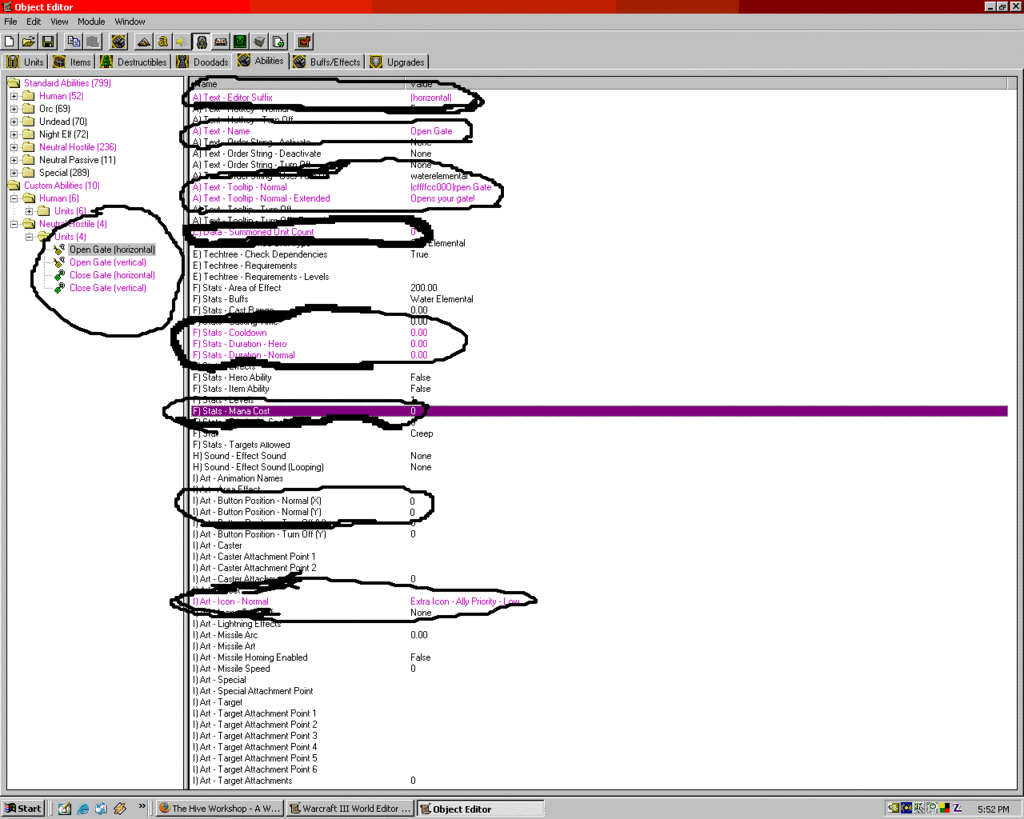
Okay, time to get started! Open the Object Editor by pressing F6, and switch over to the "Abilities" tab. Here, you are going to make two sets of Open and Close abilities that your gates will utilize.
- Under the "Neutral Hostile - Units" list, right-click the "Summon Sea Elemental" spell and select "New Custom Ability." Name this new ability as "Open Gate" and hit 'OK'. Then, copy the newly created "Open Gate" spell and paste it 3 more times so you have a total of 4 custom abilities.
- Edit their names so that you have 2 "Open Gate" abilities and two "Close Gate" abilities - one of each for vertical and horizontal gates. Also change the "Editor Suffix" property to show (vertical) and (horizontal) so that you can distinguish between the two types.
- Change the "Data - number of units summoned" to 0 for all of the abilities, edit the Tooltips and Icons to display something appropriate for a gate opening/closing ability. You may want to set the duration, cooldown, and mana cost to 0, and the Button Position (X,Y) to 0 also.
- You should now have 4 properly labeled abilities that have no effect.
Part 2: The Gates
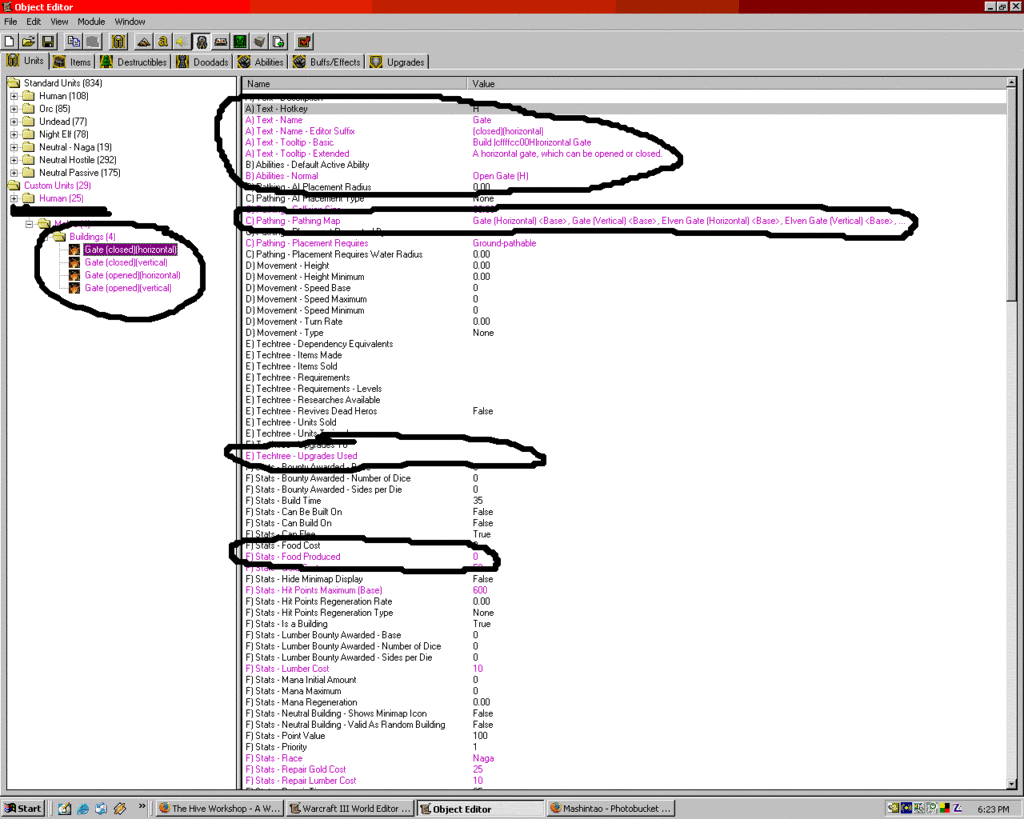
Now you can create the gates themselves! With the Object Editor still open, switch over to the Units tab. You will need to select a starter building to base your gate off of. Let's use a Human Farm to make things easier.
- Right-click on Farm (located in Human -> Melee -> Buildings) and select "New custom Unit," name it as "Gate" and hit "OK."
- Again copy the newly created Gate unit and paste it 3 more times so you have 4 Gates total.
- Edit the Editor Suffix properties to say (open)(horizontal), (open)(vertical), (closed)(horizontal), and (closed)(vertical) so you can distinguish between the 4 gates.
- For each gate, change the "Abilities - Normal" property to its corresponding Open/Close abilities. You should give the following gates these abilities:
Gate(open)(horizontal) = Close Gate(horizontal)
Gate(closed)(horizontal) = Open Gate(horizontal)
Gate(open)(vertical) = Close Gate(vertical)
Gate(closed)(vertical) = Open Gate(vertical) - Now you need to change the statistics to be more Gate appropriate. For all 4 Gates, make the following changes: Model File = Doodads\LordaeronSummer\Terrain\Gate\Gate.mdl ; Unit Soundset = NONE ; Food Produced = 0 ; Techtree - Upgrades Used = NONE ; Ground Texture = NONE
- For your vertical gates only: Art - Shadow Texture = ShadowGate3 ; Pathing Map = PathTextures\RoundDoor1Path.tga ; Button Position (X) = 1.
- For your horizontal gates only: Art - Shadow Texture = ShadowGate1 ; Pathing Map = PathTextures\Gate1Path.tga ; Button Postion (X) = 0.
- Lastly, change the tooltips to say something relative to which gate type they are, and change the Collision Size of the (open) Gates to 0 and the Pathing Map to NONE.
Part 3: The Triggers
These are the triggers which make your gates function properly. Also, there is a bug that these triggers fix, where if a unit is inside of a gate while it is being closed the gate would hop to a new location. These triggers will instead move the unit out of the way so that the gate can close properly. A separate trigger is necessary to rotate the vertical gates due to the fact that there is no model for them. So here are the triggers you need to make in the trigger editor. I trust you will be able to duplicate them properly? (note that I used "H" and "V" to abbreviate horizontal and vertical.)
- Before you begin making the triggers, you need to create 6 rects (also known as region) and 5 point variables with the following names and dimensions (the dimensions don't have to be exact, just close):
HoriDetect : 1000 x 200
HoriTop : 500 x 200
HoriBottom : 500 x 200
HoriTP : (point Variable)
HoriBP : (point Variable)
VertDetect : 200 x 1000
VertLeft : 200 x 500
VertRight : 200 x 500
VertLP : (point Variable)
VertRP : (point Variable)
VertLocation : (point Variable)
(points variables are created in the Variable Editor, which can be accessed by pressing Ctrl + B from the trigger editor)
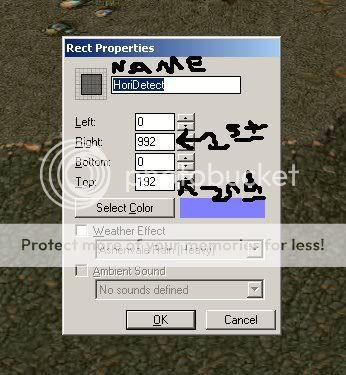
If you are wondering about how to make the Rect (region) variables have the right dimensions, just create your regions anywhere on the map and edit the "right" and "top" fields to the proper dimensions. Set the "left" and "bottom" fields to 0. The "right" field needs to have the first dimension value and the "top" field needs to have the second value. Here is how it should look:
- Trigger for opening Horizontal Gates:
-
 H Gate Open
-

 Events
-


 Unit - A unit Begins casting an ability
-
-
 Conditions
-
 (Ability being cast) Equal to Open Gate (H)
-
-

 Actions
-

 Unit - Replace (Casting unit) with a Gate (opened)(horizontal) using The old unit's relative life and mana
-
 Animation - Play (Last replaced unit)'s Death Alternate animation
-
-
-
- Trigger for closing Horizontal Gates:
-
H Gate Close
-
Events
-
Unit - A unit Begins casting an ability
-
-
Conditions
-
(Ability being cast) Equal to Close Gate (H)
-
-
Actions
-
Rect - Center HoriDetect <gen> on (Position of (Casting unit))
-
Rect - Center HoriTop <gen> on ((Position of (Casting unit)) offset by (0.00, 100.00))
-
Rect - Center HoriBottom <gen> on ((Position of (Casting unit)) offset by (0.00, -100.00))
-
 Set HoriBP = ((Position of (Casting unit)) offset by (-200.00, -300.00))
-
Set HoriTP = ((Position of (Casting unit)) offset by (200.00, 300.00))
-
 Wait 0.02 seconds
-
 Custom script: set bj_wantDestroyGroup = true
-
 Unit Group - Pick every unit in (Units in HoriDetect <gen>((((Matching unit) is A structure) Equal to False) and (((Matching unit) is A ground unit) Equal to True))) and do (Actions)
-
Loop - Actions
-
If ((HoriTop <gen> contains (Picked unit)) Equal to True) then do (Unit - Move (Picked unit) instantly to HoriTP) else do (Do nothing)
-
If ((HoriBottom <gen> contains (Picked unit)) Equal to True) then do (Unit - Move (Picked unit) instantly to HoriBP) else do (Do nothing)
-
-
-
Wait 0.02 seconds
-
Custom script: call RemoveLocation(udg_HoriTP)
-
Custom script: call RemoveLocation(udg_HoriBP)
-
Unit - Replace (Casting unit) with a Gate (closed)(horizontal) using The old unit's relative life and mana
-
Animation - Play (Last replaced unit)'s stand animation
-
-
-
- Trigger for making Vertical Gates actually be Vertical:
-
V Gate Rotate
-
Events
-
Unit - A unit Finishes construction
-
-
Conditions
-
(Unit-type of (Constructed structure)) Equal to Gate (closed)(vertical)
-
-
Actions
-
Set VertLocation = (Position of (Constructed structure))
-
Unit - Remove (Constructed structure) from the game
-
Unit - Create 1 Gate (closed)(vertical) for (Owner of (Constructed structure)) at VertLocation facing 0.00 degrees
-
Custom script: call RemoveLocation(udg_VertLocation)
-
-
-
- Trigger for opening Vertical Gates:
-
V Gate Open
-
Events
-
Unit - A unit Begins casting an ability
-
-
Conditions
-
(Ability being cast) Equal to Open Gate (V)
-
-
Actions
-
Unit - Replace (Casting unit) with a Gate (opened)(vertical) using The old unit's relative life and mana
-
Animation - Play (Last replaced unit)'s Death Alternate animation
-
-
-
- Trigger for closing Vertical Gates:
-
V Gate Close
-
Events
-
Unit - A unit Begins casting an ability
-
-
Conditions
-
(Ability being cast) Equal to Close Gate (V)
-
-
Actions
-
Rect - Center VertDetect <gen> on (Position of (Casting unit))
-
Rect - Center VertLeft <gen> on ((Position of (Casting unit)) offset by (-100.00, 0.00))
-
Rect - Center VertRight <gen> on ((Position of (Casting unit)) offset by (100.00, 0.00))
-
Set VertLP = ((Position of (Casting unit)) offset by (-300.00, -200.00))
-
Set VertRP = ((Position of (Casting unit)) offset by (300.00, 200.00))
-
Wait 0.02 seconds
-
Custom script: set bj_wantDestroyGroup = true
-
Unit Group - Pick every unit in (Units in VertDetect <gen>((((Matching unit) is A structure) Equal to False) and (((Matching unit) is A ground unit) Equal to True))) and do (Actions)
-
Loop - Actions
-
If ((VertLeft <gen> contains (Picked unit)) Equal to True) then do (Unit - Move (Picked unit) instantly to VertLP) else do (Do nothing)
-
If ((VertRight <gen> contains (Picked unit)) Equal to True) then do (Unit - Move (Picked unit) instantly to VertRP) else do (Do nothing)
-
-
-
Wait 0.02 seconds
-
Custom script: call RemoveLocation(udg_VertRP)
-
Custom script: call RemoveLocation(udg_VertLP)
-
Unit - Replace (Casting unit) with a Gate (closed)(vertical) using The old unit's relative life and mana
-
Animation - Play (Last replaced unit)'s stand animation
-
-
-
- I apologize for the length of these, but it is necessary for determining which side of the gate to move blocking units to.
Part 4: The Builder
I have saved the most difficult part for last!
- Copy a builder of your choice! (peon, peasant, etc) And then Paste a new one entitled "Gate Builder!"
- Edit his Techtree - Structures Built to "Gate (closed)(horizontal)" and "Gate (closed)(vertical)"!
- Wow, that was rough wasn't it?! Of course, you could simply just edit the structures built of the original builder unit instead of making a whole new one. But that wouldn't be quite as original now, would it?
Additional Information
There are other methods of making gates work, but this is a simple version that should suit most purposes just fine. If you are capable of making or acquiring a custom Vertical Gate model yourself, then that would cut out the need for the rotation trigger.
A few side notes:
- This tutorial was designed for use with World Editor Unlimited 1.20. I see no reason that you might encounter any problems with other editors, but just FYI...
- If you decide to change the size of your gates, be sure that you scale the size of all the rects to match the size of your gate. The triggers will also have to be altered to properly place the rects on each side of the gate to ensure that blocking units are detected and moved properly.
- If you prefer to use to chat input or unit proximity to open your gates instead of using abilities, this is also possible, but the method to do so is not included in this tutorial.
- I hope this helped you some!
Last edited:


 ruid uses ability:Tree of Life (Part of WoW's spells from druid class)


 hehe..


 I figured It out


