• Listen to a special audio message from Bill Roper to the Hive Workshop community (Bill is a former Vice President of Blizzard Entertainment, Producer, Designer, Musician, Voice Actor) 🔗Click here to hear his message!
  • Read Evilhog's interview with Gregory Alper, the original composer of the music for WarCraft: Orcs & Humans 🔗Click here to read the full interview.
  • The Hive's 22nd Icon Contest: Creep Abilities is now concluded, time to vote for your favourite set of icons! Click here to vote!
  • ✅ The POLL for Hive's Texturing Contest #34 is OPEN! Vote for the TOP 3 SKINS! 🔗Click here to cast your vote!
  • ✅ The POLL for Hive's Techtree Contest #20 is OPEN! Vote for the TOP 3 FACTIONS! 🔗Click here to cast your vote!

Fatal error and copying units

Status
Not open for further replies.
Level 8
Joined
Dec 28, 2009
Messages
257
yo. i finnaly made my map in wc3, but when i tested it, this showed up and Warcraft shuted down.
fatalerror.gif
[/URL]
anybody know what that means?

and about copying. is there any other way to copy units from map to other map then copy-paste? i got about 100spells and 20units and that will be about 3hours of copying...
 
Seas =)

1) Would be nice if you can say us WHEN this errors comes up. When you click the Test Button in the Editor? When the map is loading? After the map is loaded?

2) You can do this with the WEU Enhancer. But this will overwrite files. So if you got on both map custom units already -> you export the full custom unit file of one map -> and import this into the other map -> you only got this imported units.

Somehow there is a way with JGNP but I don't get this -_- I try it for myself but nothing happen. ( Extensions > Import or Export )

If you don't get both you need it to do by hand ( deactivate the "Brush List" in the editor - so it will be faster with importing by hand )
 
open object editor and on top left corner press 'File' and then select Export all object data.
Then go to your second map and the same way select Import all object data.
Map 2 will have all unit, spells just like in map 1. Keep in mind map 2 had some custom units before importing data it will disappear and you need to make them again.
 
Seas =)

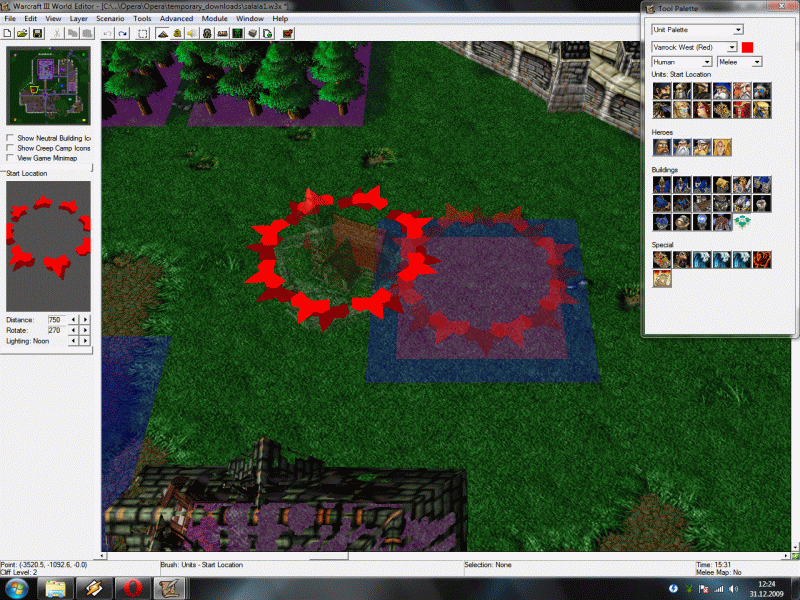
And about this error: You need to place the "Player 1 (Red)" start location to a different point:

bffarylhw0qo6x0wv.gif


After I did this, I tested the map 10 times <-- no crash.

Edit: Forget it - now I test it again ( just for a joke ) and again crush <-- I keep searching ^^

Edit 2: But somehow the start location are the problem: Deactivate "Melee Game - Create starting units (for all players)
" and the crash is gone. =S


Edit: 3 I replace every start location new. Make sure that you got enough space between the start position and the goldmines, the trees what ever. Also I don't know if it is a good idea, to put the start location (Purple and Grey) out of the maps because they gain a start base to. Put them on a place with enough space and then you can destroy it via trigger. Now everything must work ^^
 
Last edited:
oh, thanks!
and, what do you think about that map?
the outside of city is... bad, because i was making it for 10hours and my pc lagged so i just added trees, mines and its done.

my favorite place is the palace, and museum! and i hope ther eisnt too much markets and else.
and players 5 and 9 arent suposed to have starting location, 9 is only walls and 5 is city (units etc)
 
Seas =)

1) I don't know why this was the error. I know that you use gray only for walls but anyway as long you use the trigger "Melee Game - Create starting units (for all players)" ALL existing player gains there start position + start units.

2) What I think about this map... I will post this into a private massage to you, because this doesn't belong to your topic.

3) If your error problem is solved, give some +rep. This nothing against you, but you aren't the first one who didn't give +rep ( if someone was helping you ) and this really sux.
 
Status
Not open for further replies.
Back
Top