|
|
|
|
 |
|
|
The Hive Workshop Tools:
Warcraft III AutoRefresh
|
|
|
|
Tool
|
|
|
| Details |
| Uploaded: | 06:04, 20th Apr 2007 |
| Last Updated: | 16:09, 15th Mar 2008 |
| Keywords: | None |
| Operating System: | Windows XP, Windows Vista, MacOS X Tiger, Linux, Windows 2000, Windows ME |
| Category: | Gaming |
| Website: | |
What is Warcraft III AutoRefresh?
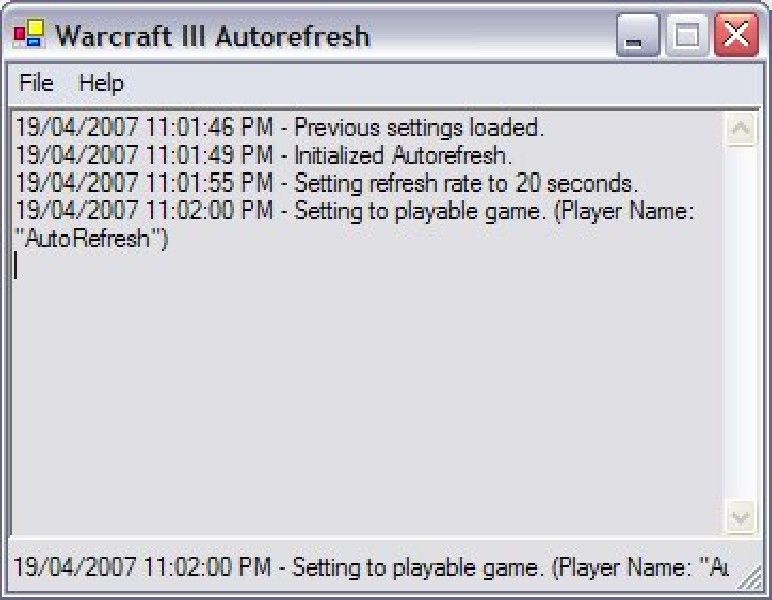
This is an application designed to automatically refresh the game you are currently hosting. Normally when you host a game, you would close all slots and open them to force your game to appear at the top of Battle.net's list of custom games. With this application, that process is done automatically.
Features
- Cross-platform, usable on Windows, Linux, and Mac.
- Automatically refresh your game.
- Set the rate at which your game is refreshed.
- Helps distribution of a map by assisting players in recognizing "Download Only" games.
- Customize the names and colors of the Autorefresh appearing in pre-game lobbies.
- Almost no CPU utilization, allowing you to keep your framerates up.
Requirements
Microsoft Windows 98/ME/2000/XP/Vista
Microsoft .NET Framework 1.1
--OR--
Linux (Any Distro)/MAC OS X
Mono Framework
Package Contents
- Warcraft III Autorefresh program
- C# Source Code
- General Public License (GPL) txt file
- readme.txt file

|
| Rating - 4.48 (42 votes) |
|
|
| Moderator Comments |
|
Not Rated
Ralle:
|
|
This tool is approved and works properly.
Click here to download WarcraftIIIAutoRefresh.zip (72.69 KB, 43947 Downloads)
|
04-22-2007, 05:49 PM
|
#2 (permalink)
|
|
aka. Moose
Join Date: Oct 2004
Posts: 6,467
|
This tool really helps people distributing their maps and makes the life easier for people with elbow problems, :P
|
|
|
05-29-2007, 11:35 PM
|
#3 (permalink)
|
|
Wc3 Helper
Join Date: Apr 2006
Posts: 151
|
SentryIII, I just wanted to let you know that I tried exactly 4 autorefresh programs from other sites and the only one that worked and refreshed my games was the one you made, this one.
I thank you, and good job!
|
|
|
05-30-2007, 08:58 PM
|
#4 (permalink)
|
|
User
Join Date: May 2007
Posts: 1
|
How do you install it?
|
|
|
06-02-2007, 02:26 PM
|
#5 (permalink)
|
|
User
Join Date: Feb 2006
Posts: 3
|
I don't thinks Warcraft III works in linux system
|
|
|
06-07-2007, 09:19 AM
|
#6 (permalink)
|
|
User
Join Date: Oct 2004
Posts: 53
|
Just a small update everyone: I've been trying to get it to work under Linux using the Mono Framework. Unfortunately as it is right now, the program requires a Windows-specific dll file (kernel32.dll) to work. In other words, those of you running WC3 under Linux or Mac OS X won't be able to use this program until I can fix it.
Also, I've heard reports that this will not work either under Windows Vista, and I don't plan on getting that anytime soon.
|
|
|
06-15-2007, 07:06 AM
|
#7 (permalink)
|
|
User
Join Date: Apr 2004
Posts: 23
|
Works perfectly on Vista for me. Awsome tool.
|
|
|
06-25-2007, 02:28 PM
|
#8 (permalink)
|
|
User
Join Date: Feb 2007
Posts: 2,154
|
Bobdole454, whats the problem with it?
1- First restart youre computer.
2- get into auto refresh
3- Log on to b-net and host a game.
If that dosent work I cant help you im afraid
|
|
|
07-01-2007, 07:29 PM
|
#9 (permalink)
|
|
User
Join Date: Jul 2007
Posts: 1
|
Like Bobdole454, I can't use it because it says failed to initialize[...]. It says the same when you try to run a setup in a wrong file directory ( or something like that) can someone help me i really need to get it working!
|
|
|
07-04-2007, 02:49 PM
|
#10 (permalink)
|
|
User
Join Date: Oct 2004
Posts: 53
|
Failed to Initialize (0xc000135)
This is because you don't have the .NET Framework 1.1 installed. I believe I listed that in the "Requirements". A google search would tell you that. Come on people... part of life is being able to help yourselves. You're smart enough to know how to register so I'm sure you know how to use a search engine.
|
|
|
07-14-2007, 05:15 AM
|
#11 (permalink)
|
|
User
Join Date: Apr 2007
Posts: 112
|
i have the .net framework 1.1 installed but it still wont refresh for me
|
|
|
08-01-2007, 12:03 AM
|
#12 (permalink)
|
|
User
Join Date: Jul 2007
Posts: 2
|
I was just wandering if I should open the program first and then host a game. Or should I host a game first and then open autorefresher program?
|
|
|
08-12-2007, 11:03 AM
|
#13 (permalink)
|
|
User
Join Date: Oct 2004
Posts: 53
|
Uploaded a new version. It should improve usability, especially with Mac and Linux users. I've also added a feature that allows you to customize the names and colors of what the autorefresh says in the pre-game lobby. Check it out!
|
|
|
08-13-2007, 02:09 AM
|
#14 (permalink)
|
|
User
Join Date: Apr 2007
Posts: 3
|
how do i run it on mac... there is only a .exe file which mac cant run
|
|
|
08-13-2007, 08:10 AM
|
#15 (permalink)
|
|
User
Join Date: Aug 2007
Posts: 38
|
it works man !!
|
|
|
Posting Rules
|
You may not post new threads
You may not post replies
You may not post attachments
You may not edit your posts
HTML code is Off
|
|
|
|
|
|
|
|
|
|
|
|