
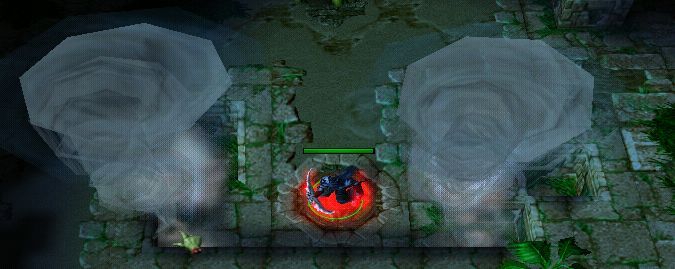
For those who want to use an easy format for making your spells MUI, this might be a
good resource for you.
How to use
Copy the following triggers into your map:
Unit Indexer
Cast Spell
Loop Spell
Preload Spells
For all spells you make, add the spell to the "Preload Spells" trigger
Modify the Cast Spell and Loop Spell triggers to what you need your spells to be like
Follow the advice left in the spells as comments - this will help you develop and customize your spell.
Anything you don't understand, please ask questions. This is after all a tutorial
Triggers
Cast Spell
Events
Unit - A unit Starts the effect of an ability
Conditions
(Ability being cast) Equal to TesterSpell
Actions
-------- -------- -------- Create a dummy unit to represent this spell -------- -------- -------- Set TargetPoint = (Target point of ability being cast) Unit - Create 1 Dummy (Vexorian, Anitarf, Infrane) for (Triggering player) at TargetPoint facing 0.00 degrees -------- -------- -------- The variable ID represents this individual cast of the spell -------- -------- -------- Set TempUnit = (Last created unit) Set ID = (Custom value of TempUnit) -------- -------- -------- Use the ID variable with arrays to store exclusive data -------- -------- -------- -------- These next variables are just to show how to use it, you can delete them -------- -------- -------- Set TesterSpell_Caster[ID] = (Triggering unit) Special Effect - Create a special effect at TargetPoint using Abilities\Spells\Other\Tornado\TornadoElemental.mdl Set TesterSpell_Effect[ID] = (Last created special effect) Set TempReal = (Real((Level of (Ability being cast) for TesterSpell_Caster[ID]))) Set TesterSpell_Damage[ID] = TempReal Set TesterSpell_Radius[ID] = (200.00 + (50.00 x TempReal)) -------- -------- -------- You can change the value of 'duration' to whatever you want -------- -------- -------- Set TesterSpell_Duration[ID] = (5.00 x TempReal) If (All Conditions are True) then do (Then Actions) else do (Else Actions)
If - Conditions
(TesterSpell_Group is empty) Equal to True
Then - Actions
-------- -------- -------- Turn on the loop trigger as it's currently off -------- -------- -------- Trigger - Turn on Loop Spell <gen>
Else - Actions
-------- -------- -------- Add the dummy to this spell's group so that it can be referenced over time -------- -------- -------- Unit Group - Add TempUnit to TesterSpell_Group -------- -------- -------- Clean leaks of course -------- -------- -------- Custom script: call RemoveLocation(udg_TargetPoint)
Loop Spell
Events
Time - Every 0.03 seconds of game time
Conditions Actions
Unit Group - Pick every unit in TesterSpell_Group and do (Actions)
Loop - Actions
Set TempUnit = (Picked unit) Set ID = (Custom value of TempUnit) -------- -------- -------- This next chunk of code is just for the demo - change it to what you want your spell to be like -------- -------- -------- Set TempPlayer = (Owner of TempUnit) Set CenterPoint = (Position of TempUnit) Custom script: set bj_wantDestroyGroup = true Unit Group - Pick every unit in (Units within TesterSpell_Radius[ID] of CenterPoint) and do (Actions)
Loop - Actions
Set TargetUnit = (Picked unit) If (All Conditions are True) then do (Then Actions) else do (Else Actions)
If - Conditions
(TargetUnit belongs to an enemy of TempPlayer) Equal to True
Then - Actions
-------- -------- -------- I let the dummy unit deal the damage in case the caster is dead/removed -------- -------- -------- Unit - Cause TempUnit to damage TargetUnit, dealing TesterSpell_Damage[ID] damage of attack type Spells and damage type Unknown
Else - Actions
Custom script: call RemoveLocation(udg_CenterPoint) -------- -------- -------- When the duration reaches 0 it means the spell is done -------- -------- -------- Set TesterSpell_Duration[ID] = (TesterSpell_Duration[ID] - 0.03) If (All Conditions are True) then do (Then Actions) else do (Else Actions)
If - Conditions
TesterSpell_Duration[ID] Less than or equal to 0.00
Then - Actions
-------- -------- -------- Clean up any data attached to this spell -------- -------- -------- Special Effect - Destroy TesterSpell_Effect[ID] -------- -------- -------- Remove the dummy from the group and from the game -------- -------- -------- Unit Group - Remove TempUnit from TesterSpell_Group Unit - Remove TempUnit from the game If (All Conditions are True) then do (Then Actions) else do (Else Actions)
If - Conditions
(TesterSpell_Group is empty) Equal to True
Then - Actions
-------- -------- -------- Turn off this trigger as it's currently doing nothing -------- -------- -------- Trigger - Turn off Loop Spell <gen>
Else - Actions
Else - Actions
Preload Spells
Events
Game - UnitIndexEvent becomes Equal to 3.00
Conditions Actions
Set UnitIndexerEnabled = False Set CenterPoint = (Center of (Playable map area)) Unit - Create 1 Dummy (Vexorian, Anitarf, Infrane) for Neutral Passive at CenterPoint facing 0.00 degrees Set TempUnit = (Last created unit) -------- -------- -------- To preload abilities and/or buffs, just add them to TempUnit -------- -------- -------- Unit - Add TesterSpell to TempUnit -------- -------- -------- The dummy unit's task is now done, it can be removed from the game -------- -------- -------- Unit - Remove TempUnit from the game Custom script: call RemoveLocation(udg_CenterPoint) Set UnitIndexerEnabled = True
Unit Indexer
Events
Map initialization
Conditions Actions
Custom script: call ExecuteFunc("InitializeUnitIndexer") Custom script: endfunction -------- -------- -------- This is the most important function - it provides an index for units as they enter the map -------- -------- -------- Custom script: function IndexUnit takes nothing returns boolean Custom script: local integer pdex = udg_UDex -------- -------- -------- You can use the boolean UnitIndexerEnabled to protect some of your undesirable units from being indexed -------- -------- - Example: -------- -------- -- Set UnitIndexerEnabled = False -------- -------- -- Unit - Create 1 Dummy for (Triggering player) at TempLoc facing 0.00 degrees -------- -------- -- Set UnitIndexerEnabled = True -------- -------- -------- -------- You can also customize the following block - if conditions are false the (Matching unit) won't be indexed. -------- -------- -------- If (All Conditions are True) then do (Then Actions) else do (Else Actions)
If - Conditions
UnitIndexerEnabled Equal to True
Then - Actions
-------- -------- -------- Generate a unique integer index for this unit -------- -------- -------- If (All Conditions are True) then do (Then Actions) else do (Else Actions)
If - Conditions
UDexRecycle Equal to 0
Then - Actions
Set UDex = (UDexGen + 1) Set UDexGen = UDex
Else - Actions
Set UDex = UDexRecycle Set UDexRecycle = UDexNext[UDex]
-------- -------- -------- Link index to unit, unit to index -------- -------- -------- Set UDexUnits[UDex] = (Matching unit) Unit - Set the custom value of UDexUnits[UDex] to UDex -------- -------- -------- Use a doubly-linked list to store all active indexes -------- -------- -------- Set UDexPrev[UDexNext[0]] = UDex Set UDexNext[UDex] = UDexNext[0] Set UDexNext[0] = UDex -------- -------- -------- Fire index event for UDex -------- -------- -------- Set UnitIndexEvent = 0.00 Set UnitIndexEvent = 1.00 Set UnitIndexEvent = 0.00 Custom script: set udg_UDex = pdex
Else - Actions
Custom script: return false Custom script: endfunction -------- -------- -------- The next function is called each time a unit enters the map -------- -------- -------- Custom script: function IndexNewUnit takes nothing returns boolean Custom script: local integer pdex = udg_UDex Custom script: local integer ndex -------- -------- -------- Recycle indices of units no longer in-play every (15) units created -------- -------- -------- Set UDexWasted = (UDexWasted + 1) If (All Conditions are True) then do (Then Actions) else do (Else Actions)
If - Conditions
UDexWasted Equal to 15
Then - Actions
Set UDexWasted = 0 Set UDex = UDexNext[0] Custom script: loop Custom script: exitwhen udg_UDex == 0 If (All Conditions are True) then do (Then Actions) else do (Else Actions)
If - Conditions
(Custom value of UDexUnits[UDex]) Equal to 0
Then - Actions
-------- -------- -------- Remove index from linked list -------- -------- -------- Custom script: set ndex = udg_UDexNext[udg_UDex] Custom script: set udg_UDexNext[udg_UDexPrev[udg_UDex]] = ndex Custom script: set udg_UDexPrev[ndex] = udg_UDexPrev[udg_UDex] Set UDexPrev[UDex] = 0 -------- -------- -------- Fire deindex event for UDex -------- -------- -------- Set UnitIndexEvent = 2.00 Set UnitIndexEvent = 0.00 -------- -------- -------- Recycle the index for later use -------- -------- -------- Set UDexUnits[UDex] = No unit Set UDexNext[UDex] = UDexRecycle Set UDexRecycle = UDex Custom script: set udg_UDex = ndex
Else - Actions
Set UDex = UDexNext[UDex]
Custom script: endloop Custom script: set udg_UDex = pdex
Else - Actions
-------- -------- -------- Handle the entering unit (Matching unit) -------- -------- -------- If (All Conditions are True) then do (Then Actions) else do (Else Actions)
If - Conditions
(Custom value of (Matching unit)) Equal to 0
Then - Actions
Custom script: call IndexUnit()
Else - Actions
Custom script: return false Custom script: endfunction -------- -------- -------- The next function initializes the core of the system -------- -------- -------- Custom script: function InitializeUnitIndexer takes nothing returns nothing Custom script: local integer i = 0 Custom script: local region re = CreateRegion() Custom script: local rect r = GetWorldBounds() Set UnitIndexerEnabled = True Custom script: call RegionAddRect(re, r) Custom script: call TriggerRegisterEnterRegion(CreateTrigger(), re, Filter(function IndexNewUnit)) Custom script: call RemoveRect(r) Custom script: set re = null Custom script: set r = null Custom script: loop Custom script: call GroupEnumUnitsOfPlayer(bj_lastCreatedGroup, Player(i), Filter(function IndexUnit)) Custom script: set i = i + 1 Custom script: exitwhen i == 16 Custom script: endloop -------- -------- -------- This is the "Unit Indexer Initialized" event, use it instead of "Map Initialization" for best results -------- -------- -------- Set UnitIndexEvent = 3.00 Set UnitIndexEvent = 0.00
Preloading the spell prevents lag on the first cast if the spell wasn't already on an
existing here when the map was first loaded. Quite important with the spell is to also
also preload dummy units and the special effects. Now if you do this right the dummy
unit in the map is the last dummy unit you ever need, for anything. The demo map does
not preload the special effect because I wanted to keep things as simple as possible for
users, but any real spell I highly recommend it because it keeps things seamless all
throughout the game.
__________________
How to post your triggers on the Hive Workshop. JPAG - Bettering the cause of readable source code.
Preloading the spell prevents lag on the first cast if the spell wasn't already on an
existing here when the map was first loaded. Quite important with the spell is to also
also preload dummy units and the special effects. Now if you do this right the dummy
unit in the map is the last dummy unit you ever need, for anything. The demo map does
not preload the special effect because I wanted to keep things as simple as possible for
users, but any real spell I highly recommend it because it keeps things seamless all
throughout the game.
Ohh right; see that makes more sense now,
Cheers for explaining that; when i get chance shall add preload to my Cloud Spiral then,
so its easier for people who are you using your System, to get a better idea of spells.
It's usually not the hero spell itself that needs to be preloaded but dummy spells that the triggered spell uses as they might be "added" to the hero. This will 'cause a heavy "first cast lagg" when a dummy ability is added to a unit for the first time and thus added to a dummy unit at first will make it preloaded and safe to use for the next add which might be your hero unit.
EDIT:
I think it's worth to mention that Playable map area in this line will not leak as it's a predefined region. Else way I think this is good enough.
Set CenterPoint = (Center of (Playable map area))
PS to Mag -> Ever tried fixing AIDS? I think I've done it once or twice for my maps although I cannot find it now when I speak about it :) (And use Nest's UnitIndexer!)
EDIT2:
Are we allowed to upload resources that uses your UnitIndexer Bribe? Maybe I can code GUI again then hehe.
I know the region itself doesn't leak, why would I bother to mention it though?
The map is now attached to that post, I don't have any idea why it is crashing when
I try to load the game. Maybe it has something to do with the preloading I'm doing but
I can't see why.
__________________
How to post your triggers on the Hive Workshop. JPAG - Bettering the cause of readable source code.
Unit - Cause TempUnit to damage TargetUnit, dealing TesterSpell_Damage[ID] damage of attack type Spells and damage type Unknown
Sometimes it is not a good idea to use the tempunit, Lets say the unit is not in sight of the unit; So in the Fog Of War area; sometimes you wont get the exp;
Also; you want the unit to charge to the caster; not away from the dummy unit;
so i would recommend changing it to;
Unit - Cause TesterSpell_Caster[ID] to damage TargetUnit, dealing TesterSpell_Damage[ID] damage of attack type Spells and damage type Unknown
Also use a different variable in the loop trigger;
Maybe
PS to Mag -> Ever tried fixing AIDS? I think I've done it once or twice for my maps although I cannot find it now when I speak about it :) (And use Nest's UnitIndexer!)
Actually, I'm using Bribe's UnitIndexer converted to vJASS xD
Nestharus' has LUA scripts (I'm never ever going to use them because once, they made a map of mine unplayable :S)