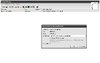
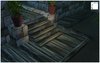
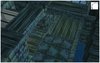
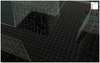
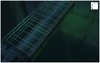
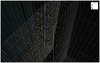
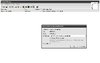
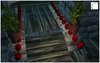
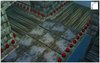
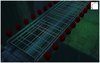
There will be no 'test-map', mate. I've just took some shots of my current projects. As a conlusion, it isn't even necessary cause the alpha-tile is a tool for your work-flow.
er.
what are you saying, that the tile can be used as some kind of.. layer beneath doodads?
it's most definitely not a tutorial currently. it explains how to import an alpha tile - it doesn't explain any of the parts that you've done there, i took a wild stab in the dark, which i think is right.
plus wouldn't the walkable box in destructibles make this a lot simpler - apart from the snap-to-grid stuff.
tutorials are meant to actually teach people how to do stuff, not just.. introduce an idea. especially in such vague terms. i doubt most people would understand this very much.
This is a tool, dude. I can't teach/show people how to find their own artistic style.
Quote:
what are you saying, that the tile can be used as some kind of.. layer beneath doodads?
As pathing for units/any physic engine.
Quote:
it doesn't explain any of the parts that you've done there, i took a wild stab in the dark, which i think is right.
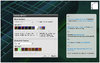
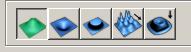
Mh? I can't see any difficulty using the terrain-palette. Once the tile is imported and applied - you can start working with it.
This is no tutorial for importing senseless stuff into your map. As I already mentioned in my final conclusion, it's a technique and method to boost and improve your work-flow and final achievements.
Let's take a look on the following example:
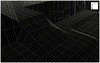
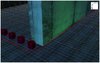
I've created a stair, using different doodads. On the other screenshot you can see the pathing/mesh of the editor.
In order to use this - according to the rules - you have to place some pathing blockers (on the left/right side), of course.
.. but sure, that's right. This technique requires some basic knowledge with the WE.
Edit: I've attached the screenshots. Give me some time, I'll add some comments. (;
This is a tool, dude. I can't teach/show people how to find their own artistic style.
excuse me? the world editor is a tool. the model editing tools are tools. photoshop and the art programs are TOOLS. this section is for tutorials on tools (mainly).
Quote:
Originally Posted by De.Facto
Mh? I can't see any difficulty using the terrain-palette. Once the tile is imported and applied - you can start working with it.
This is no tutorial for importing senseless stuff into your map. As I already mentioned in my final conclusion, it's a technique and method to boost and improve your work-flow and final achievements.
I know that, and so do some people, but not everyone does. the whole thing is kind of ridiculous because all you're doing is promoting a texture and vaguely showing how to use it for things.
Quote:
Originally Posted by De.Facto
I've created a stair, using different doodads. On the other screenshot you can see the pathing/mesh of the editor.
In order to use this - according to the rules - you have to place some pathing blockers (on the left/right side), of course.
.. but sure, that's right. This technique requires some basic knowledge with the WE.
again, I know that, but a lot of people do not. a lot of people wouldn't know what you're trying to show with the mesh, and lots wouldn't know that you have to place pathing blockers.
you're not making a 'tutorial' so that it shows how much YOU know, it's meant to educate people on things, they go into the tutorial and go out knowing how to do something (at least in most cases). at least say that it require quite a bit of editor knowledge, because it really does.
Ok, thanks for the feedback. I've improved the tutorial.
E: yeah sorry, I know. :> Would've done this with an english version of the editor.. but I thought it wasn't 'that' necessary since the explanation-text is in english.
This is very well done, Just that your editor is in german :/ I live in sweden, and I use english editor >.<
Anyway, this is good for all kind of maps, I approve.
The tutorial looks cool, but I have no idea what you are trying to explain. This... Alpha tile. It's an invisible tile, right? So you have to use it to... Well, what do you use it for? I have no idea what you're trying to explain. :/
If I understood right, it's mainly to put doodads on top of it, and keep it walkable\playable, right? But this can be done with other stuff, like invisible platforms and custom pathing maps. But I suppose this is good for doodads that have holes in them, so they're "see-through", like that metal bridge\floor from Chernobyl: Lost Riddles.
The tutorial looks cool, but I have no idea what you are trying to explain. This... Alpha tile. It's an invisible tile, right? So you have to use it to... Well, what do you use it for? I have no idea what you're trying to explain. :/
100% Transparency Terrain Tile!
In other words it will remove tile from ground but height will remain there, units can go there, build building do whatever they want, just like using large invisible platform that can be lowered on some point, and so on!
But this can be done with other stuff, like invisible platforms and custom pathing maps.
That's probably, well.. that's the point. Platforms absorb performance. Try to use 10, 20, 50 .. no problem. Try to use more than 4000-5000 like we did in Chernobyl - Lost Riddles, unplayable. The alpha-tile absorbs nothing. Zero. We got stable fps and I'm doing good with it. Just take a look on Arcadia, or Rise or Rapture. This is very useful for large projects which depends on a good performance. Using invisible platforms has shown, that you'll loose performance - far beyond unplayability. Furthermore you have to put more and more WORK into creating such pathing-maps. The alpha-tile is easy to handle, absorbs no performance and can be used by everyone.
But, one thing: The grid is your god. The doodads around your mesh are 'just' eyecandy.
Quote:
Originally Posted by Debode
So you have to use it to... Well, what do you use it for? I have no idea what you're trying to explain. :/
Should I create more examples? I mean, what is your point of view? This is just a technique, I can't give you tips for a specific idea.
I'll probably create a second tutorial .. something like 'Tips for better ideas'. When you forgot to read the tutorial-comments, do it.
Quote:
Originally Posted by -Kobas-
100% Transparency Terrain Tile!
In other words it will remove tile from ground but height will remain there, units can go there, build building do whatever they want, just like using large invisible platform that can be lowered on some point, and so on!
Hey that's good, too. I'll create another layer for the tutorial. May I assimilate your comment? I think it would be great to have several voices in the conclusion.
E: I'll create a simple test-map for a better imagination.
the pictures are still about as helpful as a bottomless bucket, you might want to describe things in them, what they are, what they do, all that kind of stuff